Stellar Photo Recovery Software Alternative
When you need some alternatives to Stellar Photo Recovery, you can choose DoYourData, Magoshare, Disk Drill, PhotoRec, Remo, or R-Studio. You can use the software to recover photos, videos, or other media files.
 Updated by Justin Kenny on April 03, 2026
Quick Navigation:
- Why Users Seek Alternatives to Stellar Photo Recovery
- Key Features to Look for in a Photo Recovery Alternative
- Top Stellar Photo Recovery Alternatives
- Tips for Successful Photo Recovery
- Conclusion
Losing precious photos, videos, or audio files can be frustrating, whether due to accidental deletion, formatted drives, or system crashes. For years, Stellar Photo Recovery has been a popular choice for users seeking reliable media recovery. It supports various file types, storage devices, and offers both Windows and Mac versions. However, despite its popularity, many users search for alternatives due to pricing, limited features, or platform restrictions.
This article explores the best alternatives to Stellar Photo Recovery, what to consider before choosing a recovery tool, and tips for ensuring successful file recovery.

Why Users Seek Alternatives to Stellar Photo Recovery
While Stellar Photo Recovery is powerful, there are several reasons why users look for alternatives:
- High Cost: Stellar's premium plans can be expensive, especially for occasional use. Users often want more cost-effective solutions or freemium options.
- Performance Issues: Some users experience slow scanning speeds or limited recovery success rates, especially with deep scans or severely corrupted drives.
- Platform Limitations: While available for Windows and Mac, Stellar lacks mobile device recovery options. Users often require cross-platform compatibility.
- Specific Needs: Users may need advanced scanning features, cloud backups, or a simpler interface. Some alternatives offer unique features not found in Stellar.
Understanding these limitations is important to make an informed decision when selecting a recovery tool.
Key Features to Look for in a Photo Recovery Alternative
Choosing a recovery tool requires careful consideration. Here are essential features to evaluate:
- File Format Support: The software should recover common and specialized formats like JPEG, PNG, GIF, RAW, MP4, AVI, MP3, and WAV.
- Storage Compatibility: Support for HDDs, SSDs, USB drives, SD cards, memory cards, and external drives ensures flexibility.
- Scan Options: Quick scan for recently deleted files and deep scan for more thorough recovery are essential. Preview options before recovery are also valuable.
- User-Friendly Interface: A simple, intuitive interface saves time and reduces user frustration.
- Safety & Security: Read-only scanning prevents data overwrite, and software must be malware-free.
- Price & Licensing: Free trials, one-time payments, or subscription options allow users to choose based on budget.
Evaluating these features helps users select a tool that fits their recovery needs.
Top Stellar Photo Recovery Alternatives
Here's a detailed look at the top alternatives to Stellar Photo Recovery, with their pros and cons:
1) Do Your Data Recovery – Best Overall Photo/Media Recovery Tool
Do Your Data Recovery consistently ranks among the top alternatives to Stellar Photo Recovery. It's designed to recover deleted, formatted, lost, or inaccessible photos, videos, audio files, documents, and more from a wide range of storage media.
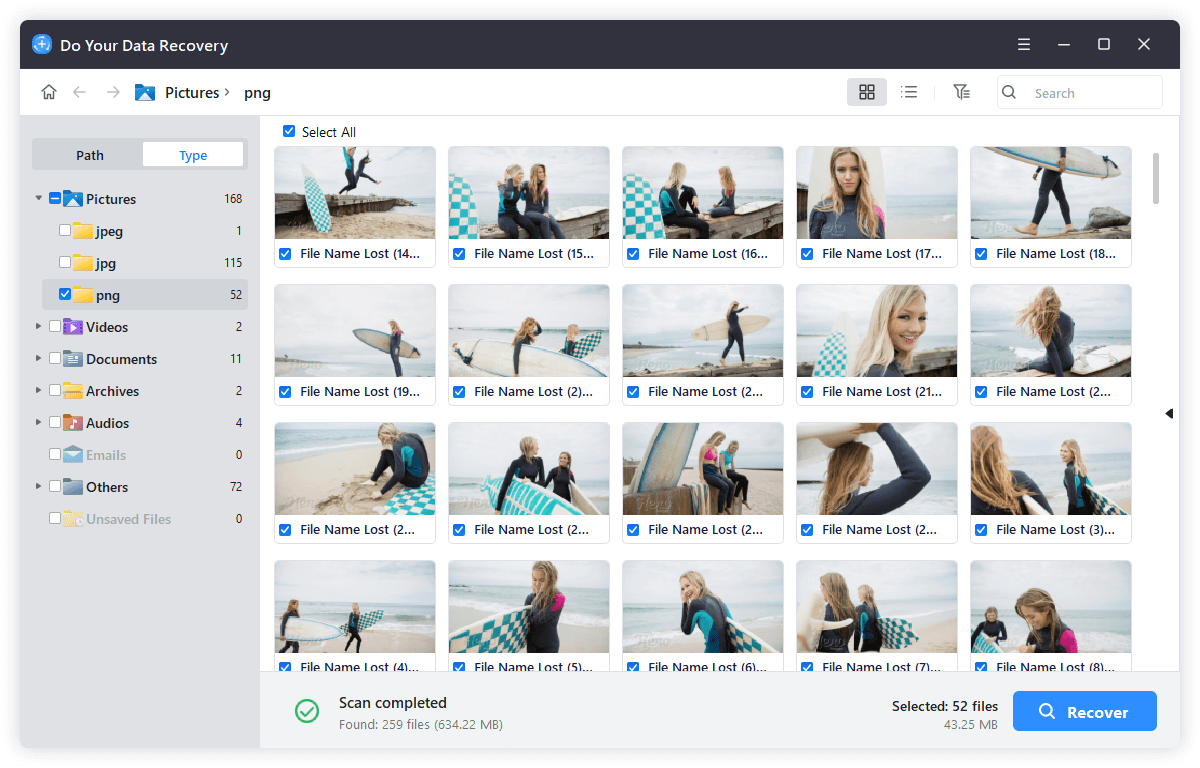
Key Features:
- ✔ Supports over 1,000 file formats, including JPG, PNG, TIFF, RAW camera formats, MP4, MOV, AVI, MP3, WAV, etc.
- ✔ Recovers from hard drives, SSDs, USB drives, SD cards, memory cards, digital cameras, and more.
- ✔ Both quick scan and deep scan modes for different recovery scenarios.
- ✔ Preview before recovery — view files before deciding which to restore.
- ✔ Windows & Mac versions available with consistent UX.
Do Your Data Recovery
- The Top 1 alternative to Stellar Photo Recovery.
- Data recovery for photos, videos, documents, etc.
- Quick and easy to get back any lost data.
Why It's a Great Alternative:
- – High recovery success rate: Do Your Data Recovery's scanning algorithms are very thorough, making it effective even if files have been deleted a while ago.
- – User friendly: The clean interface is easy for beginners without sacrificing advanced features.
- – Versatile file support: Because it handles hundreds of formats, it's useful for photographers, videographers, and general users alike.
Drawbacks:
- Deep scans can be time consuming on very large drives.
- Full functionality requires a paid license.
Best For: Users who want a reliable, feature rich recovery tool with a gentle learning curve.
2) Magoshare Data Recovery – Best for Simple & Fast Recovery
Magoshare Data Recovery is a trusted name in data recovery. Its focus is on simplicity and speed, making it ideal if your priority is a straightforward recovery process rather than advanced customization.
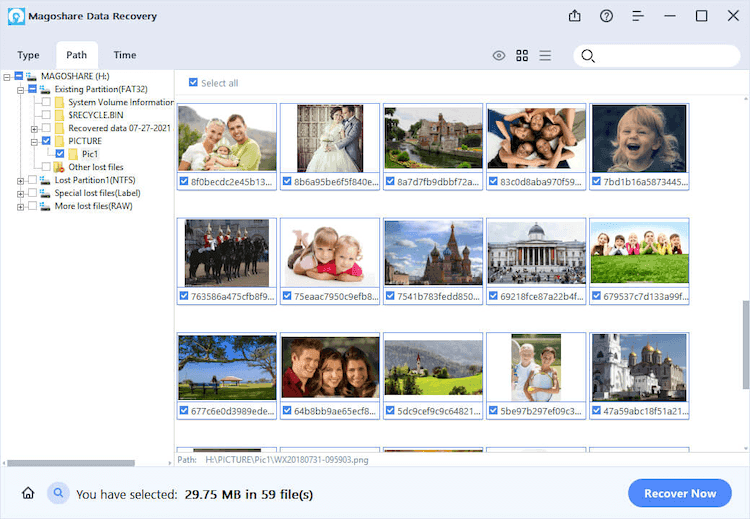
Key Features:
- ✔ Recovers deleted and lost photos, videos, documents, emails, and more.
- ✔ Supports Windows & Mac, as well as external storage devices.
- ✔ Preview feature to inspect files before recovery.
- ✔ “Filter & Search” options to locate specific file types quicker.
Pros:
- Clean and intuitive UI — perfect for non technical users.
- Fast scanning and recovery for recently deleted files.
Cons:
- Limited advanced features compared to specialized tools.
- Large data recovery requires a paid upgrade.
Best For: Users who want quick, simple recovery without dealing with too many advanced options.
3) Disk Drill – Best Photo Recovery + Disk Management Tools
Disk Drill combines traditional data recovery with additional disk health and management tools, making it a great choice if you want more than just file recovery.
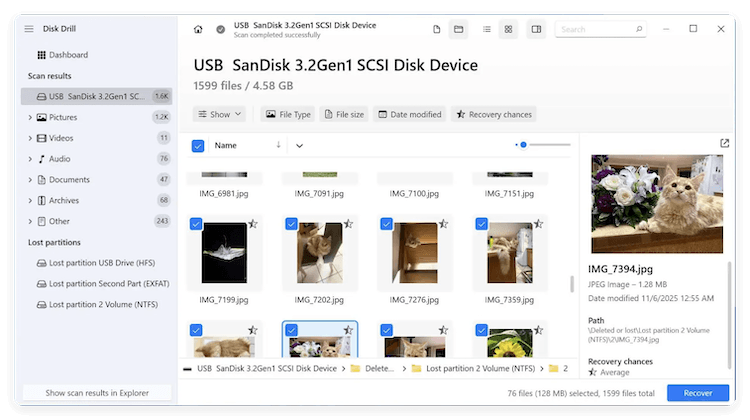
Key Features:
- ✔ Recovers deleted and lost files from internal and external drives, memory cards, and more.
- ✔ Includes bonus tools like disk health monitoring, duplicate finder, and backup tools.
- ✔ Supports hundreds of file formats.
- ✔ Filter options based on type, size, and time.
Why It's Worth Considering:
- – The free version lets you recover up to 500MB of data on Windows.
- – Includes additional utilities that help keep your drives healthy and organized, preventing future loss.
- – Simple and visually intuitive interface.
Drawbacks:
- Some advanced recovery options are restricted to premium versions.
- Not as fast as some competitors during deep scans.
Best For: Users who want a hybrid tool that helps with recovery and ongoing disk care.
4) PhotoRec – Best Free & Open Source Option
PhotoRec is an open source recovery program that's completely free and extremely powerful under the hood — though it lacks a modern graphical interface.
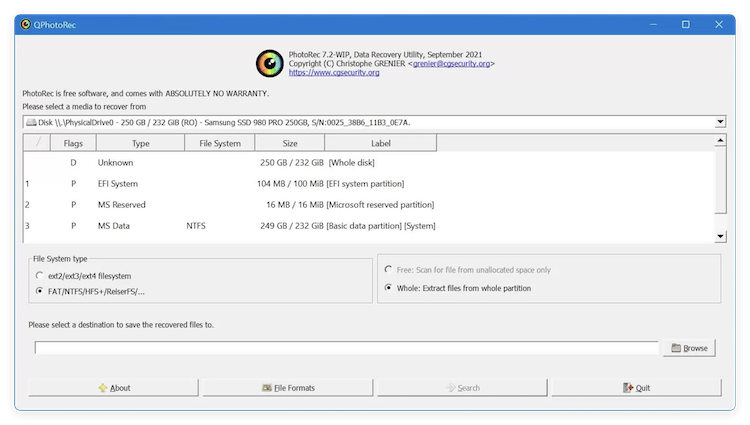
Key Features:
- ✔ Supports hundreds of different file formats.
- ✔ Works on Windows, Mac, Linux, and even older systems.
- ✔ Recovers files from hard drives, USBs, memory cards, CD/DVD, and more.
Why It's Powerful:
- – Because it works at a low level, PhotoRec can recover files even when the filesystem is severely damaged or formatted.
- – The fact that it's free makes it extremely attractive for users on a budget.
Cons:
- No graphical user interface — it runs in a text based command prompt.
- Not ideal for beginners who aren't comfortable with non visual tools.
Best For: Tech savvy users or those comfortable with command line interfaces and who don't want to pay for recovery.
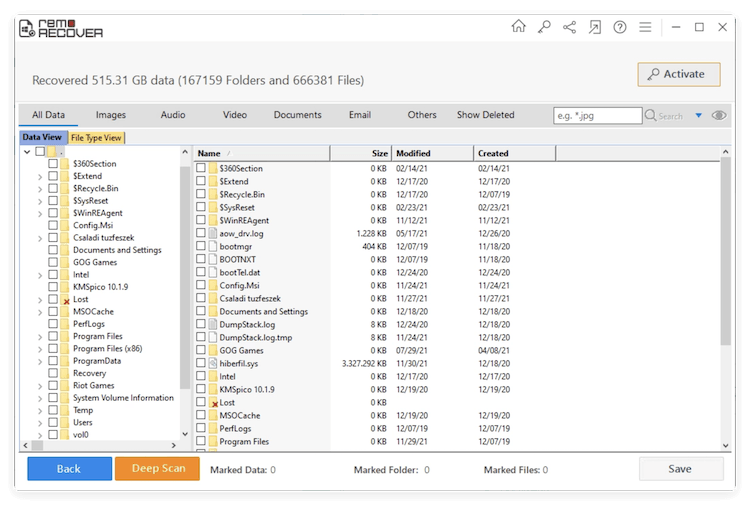
5) Remo Recover – Best for Targeted Photo & Media Recovery
Remo Recover is a focused media recovery solution that zeroes in on images, videos, and music files. Its interface steers users step by step, making it a strong choice if your priority is photo centric recovery.
Key Features:
- ✔ Designed to recover photos and media lost due to deletion, formatting, or corruption.
- ✔ Supports a wide range of photo formats and cameras.
- ✔ Simple step by step recovery process.
- ✔ Compatible with Windows & Mac.
Pros:
- Well structured guided workflows for easy recovery.
- Good support for camera RAW and proprietary photo formats.
- Helpful for photographers and hobbyists.
Cons:
- Can be slower on large volume scans.
- Paid license needed for full recovery.
Best For: Users who primarily want media and photo recovery — not general file recovery.
6) R-Studio – Best for Professional & Advanced Users
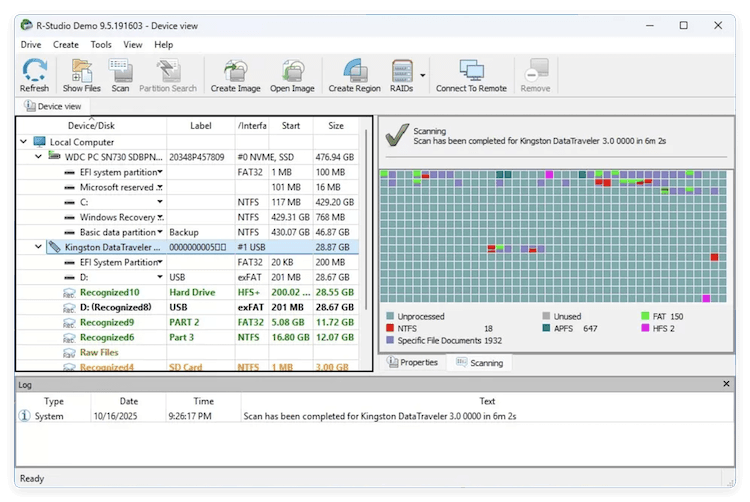
R-Studio isn't just another recovery tool — it's essentially professional grade data recovery software. It's more complex than most alternatives, but extremely powerful in the right hands.
Key Features:
- ✔ Supports extensive file systems (NTFS, FAT, exFAT, HFS+, Ext).
- ✔ Advanced disk imaging and cloning tools.
- ✔ Hex viewer and detailed file reconstruction.
- ✔ Network recovery capabilities.
Why It's Unique:
- – Designed for data recovery professionals and IT technicians.
- – Deep scanning is extremely thorough — capable of recovering files after severe corruption.
- – Handles complex scenarios like RAID recovery.
Cons:
- Steep learning curve for beginners or casual users.
- More expensive than most consumer options.
Best For: Users with advanced recovery needs or IT professionals handling complex loss scenarios.
How These Alternatives Compare to Stellar Photo Recovery
Tool |
Ease of Use |
Free Version |
Cross Platform |
Best For |
|---|---|---|---|---|
Stellar Photo Recovery |
⭐⭐⭐ |
Limited |
Windows & Mac |
General consumers |
Do Your Data |
⭐⭐⭐ |
✔ (1GB) |
Windows & Mac |
Most users needing balanced power & simplicity |
Magoshare Data Recovery |
⭐⭐⭐ |
✔ (200MB) |
Windows & Mac |
Beginner focused recovery |
Disk Drill |
⭐⭐⭐ |
✔ (500MB) |
Windows & Mac |
Recovery + disk utilities |
PhotoRec |
⭐ |
✔ (unlimited) |
Windows, Mac, Linux |
Free & advanced users |
Remo Recover |
⭐⭐ |
Limited |
Windows & Mac |
Photo & media recovery |
R-Studio |
⭐⭐ |
No |
Windows, Mac, Linux |
Pro/advanced recovery |
Tips for Successful Photo Recovery
Even the best software can fail if the proper steps aren't taken. Here are tips to maximize recovery success:
- Stop Using the Device Immediately: Prevents overwriting lost files.
- Avoid Installing Recovery Software on the Affected Drive: Use a separate storage device for software installation.
- Use Preview Features: Ensures you are recovering the correct files before saving.
- Consider Cloud Backups: Prevent future losses by regularly backing up important media.
- Deep Scan When Needed: For formatted or severely corrupted drives, deep scan improves recovery chances.
Following these guidelines increases the probability of successful recovery.
Conclusion
While Stellar Photo Recovery is a powerful tool, alternatives like Do Your Data Recovery, Magoshare Data Recovery, Disk Drill, PhotoRec, and Remo Recover provide excellent options for users seeking affordability, cross-platform support, or specialized features.
When choosing a recovery tool, consider your needs:
- For ease-of-use and a polished interface, DoYourData and Magoshare are excellent.
- For disk management and recovery combined, Disk Drill offers added utility.
- For free, advanced recovery, PhotoRec is unmatched but requires technical skills.
- For focused media recovery, Remo Recover is simple and efficient.
No matter which software you choose, always follow best practices to avoid data loss and increase recovery success. Testing free trials before committing to a paid plan is also recommended.
Recovering lost photos and media has never been easier with the right tool, ensuring your memories are preserved safely and effectively.
Do Your Data Recovery
The safe, powerful and easy-to-use data recovery program to help you recover deleted, formatted or lost data, recover lost data from damaged hard drive, from HDD, SSD, USB flash drive, memory card, digital camera, etc, fix damaged drive and external devices.
Written & Updated by Justin Kenny
Justin Kenny is a writer & editor of DoYourData. He joined DoYourData in 2016 and focuses on writing articles about Windows data recovery, Mac data recovery, external device data recovery, hard drive clone, data erasure, Mac cleanup, computer issue fixes, etc. He is a super fan of Apple devices and is big on testing new digital device and system utility software.