Best Data Sanitization Software - DoYourData Super Eraser
DoYourData Super Eraser is the most reliable data sanitization software for Windows and Mac. It can securely wipe data and ensure all the wiped data is gone forever. There will be no way to get back the data wiped by the software.
 Updated by Shirly Chen on July 8, 2026
Quick Navigation:
- What is Data Sanitization and Why Do You Need It?
- The Best Data Sanitization Software: DoYourData Super Eraser
- How It Compares to Other Data Sanitization Software
- FAQs about DoYourData Super Eraser
- Conclusion
Have you ever wondered what happens to your personal files after you drag them to the Recycle Bin and click 'Empty'? Most people think those files are gone forever. Unfortunately, that is a common misconception.
When you delete a file or format a local drive, your computer does not actually destroy the data. Instead, it simply hides it, marking the space as available for new information. Until that space is overwritten by new data, anyone with simple data recovery software can bring your private data, including family photos, financial documents, or business contracts back to life in just a few clicks.
This creates a massive privacy risk, especially if you are planning to sell your old laptop, donate a hard drive, or return a corporate computer. To keep your information completely secure, you need a professional solution designed for total data destruction. That is where the best data sanitization software - DoYourData Super Eraser comes into play.
What is Data Sanitization and Why Do You Need It?
Data sanitization is a technical term for permanently cleaning a storage device. It goes far beyond standard file deletion. It ensures that data is completely overwritten using advanced mathematical patterns, leaving zero chance for any recovery tool to piece it back together.
Whether you use a traditional hard drive (HDD), a modern solid-state drive (SSD), a portable USB flash drive, or an SD card from your camera, data sanitization ensures that your digital footprint is entirely erased. It provides certified security that protects you from identity theft, corporate espionage, and data leaks.
The Best Data Sanitization Software: DoYourData Super Eraser
DoYourData Super Eraser is widely recognized as the best data sanitization software - DoYourData Super Eraser for both home users and businesses. It offers an easy-to-use, secure, and permanent data erasure experience that gives you peace of mind.
DoYourData Super Eraser
- Top-class data sanitization software for Windows and Mac.
- Permanently wipe data to avoid data recovery possibility.
- Support erasing HDD/SSD, USB flash drive and SD card.
The software uses military-grade wiping algorithms to overwrite your files multiple times. Once the program completes its task, the erased data is lost forever. No recovery software, laboratory tools, or forensic services can ever retrieve it.
Three Flexible Wiping Modes for Every Situation
Everyone has different privacy needs. DoYourData Super Eraser provides three distinct modes to handle any scenario safely and efficiently without wasting your time:
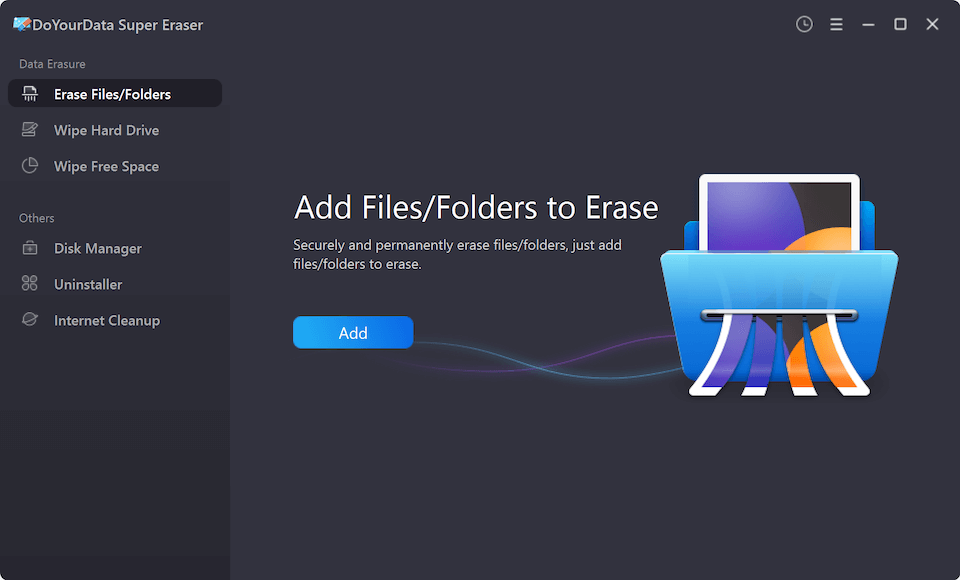
1. Erase Files and Folders
If you only want to destroy specific items, this mode is perfect. You do not need to wipe your entire drive. You simply select the specific files or folders you want to eliminate, click 'Erase Now,' and the software shreds them permanently. It is ideal for cleaning up old tax forms, private photos, or project files.
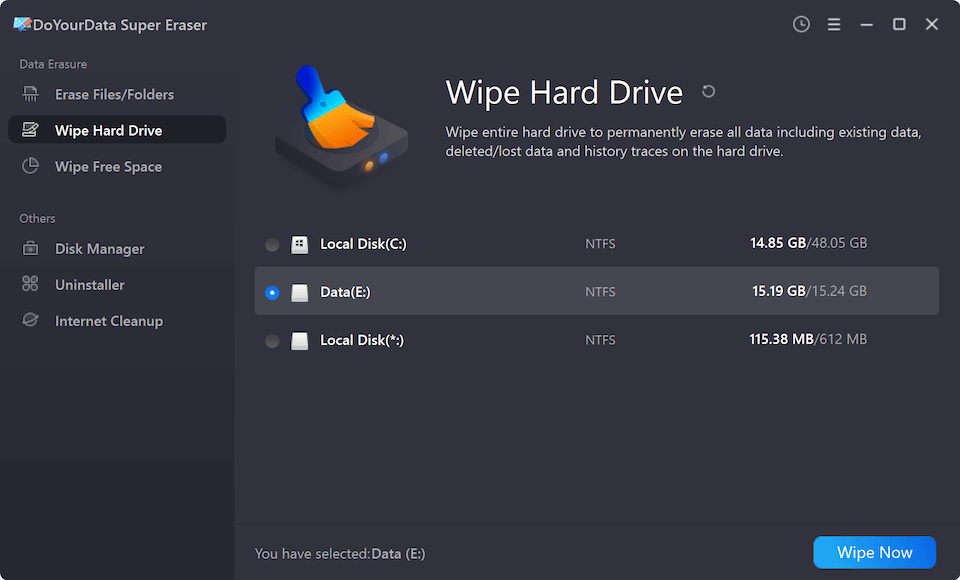
2. Wipe Hard Drive Partition
When you are getting ready to dispose of an external drive or clear a secondary partition on your PC, you can use this mode. It completely wipes the entire partition or storage device, destroying all existing and hidden data safely. It is the best choice before selling or giving away an external hard disk or USB drive.
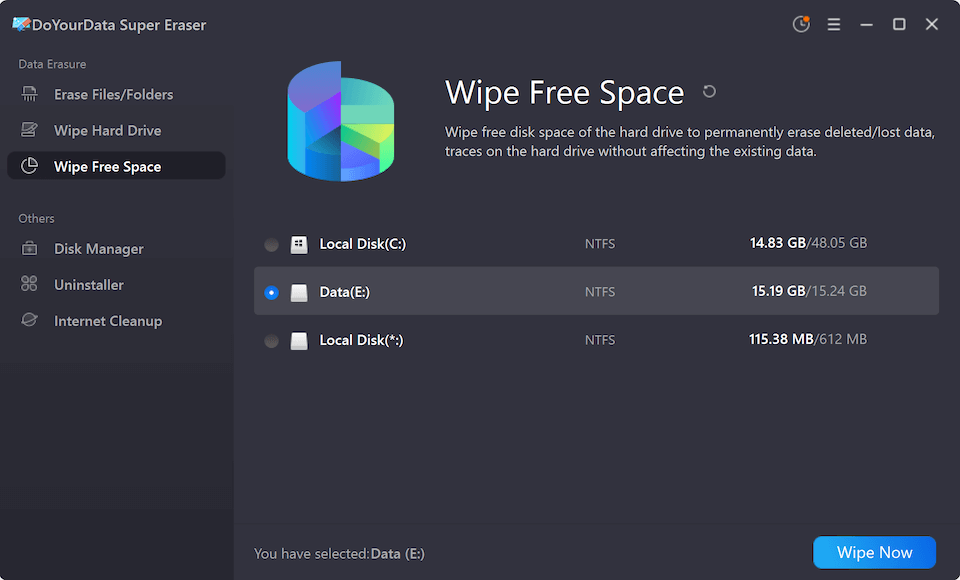
3. Wipe Unused Disk Space
What about the files you already deleted the old-fashioned way in the past? They are still sitting silently in your drive's free space. This mode targets only the 'unused' or free space on your drive. It wipes the hidden traces of previously deleted files without touching your current, active files. It keeps your existing system safe while cleaning up old digital ghosts.
Key Features that Make it the Best Choice
DoYourData Super Eraser stands out in the crowded data destruction market due to several key features designed for regular users:
- Certified Algorithms: It supports globally recognized data erasure standards, including U.S. DoD 5220.22-M and NIST 800-88, ensuring top-tier corporate security.
- Multi-Device Support: You can clean internal HDDs/SSDs, external hard drives, USB flash drives, memory cards, digital cameras, and other storage media.
- Cross-Platform Compatibility: Fully supports Windows 11, 10, 8, 7, Vista, XP, and Windows Server, as well as macOS versions up to the latest macOS(including Apple Silicon M1/M2/M3/M4/M5 chips).
- Bonus Toolkits: Includes a built-in uninstaller to completely remove unwanted apps, an internet privacy cleaner to clear browser tracking data, and a disk repair tool to fix minor drive errors.
- Clean and Friendly Interface: The layout is clean, minimalist, and easy to navigate. No steep learning curves or complicated tech settings required.
How It Compares to Other Data Sanitization Software
While enterprise tools like Blancco and WipeDrive focus heavily on complex IT workflows, and older tools like DBAN require booting from a USB drive before your computer starts, DoYourData Super Eraser balances high-security standards with unmatched simplicity.
It runs smoothly directly inside your active Windows or Mac operating system. It provides a lightweight, accessible experience for everyday consumers and growing businesses without charging astronomical corporate fees.
FAQs about DoYourData Super Eraser
Conclusion:
Your digital privacy is too valuable to leave to chance. Simply formatting a drive or emptying your computer trash bin leaves a massive back door open for data thieves and prying eyes.
By choosing the best data sanitization software - DoYourData Super Eraser, you choose certified, irreversible security. It is the easiest, most reliable way to wipe away your digital footprints before hand-off, resale, or recycling. Download DoYourData Super Eraser today and take control of your data security.

DoYourData Super Eraser
DoYourData Super Eraser, the award-winning data erasure software, offers certified data erasure standards including U.S. Army AR380-19, DoD 5220.22-M ECE to help you securely and permanently erase data from PC, Mac, HDD, SSD, USB drive, memory card or other device, make data be lost forever, unrecoverable!
Written & Updated by Shirly Chen
Shirly Chen has been writing data recovery, data erasure articles for DoYourData over 4 years. She has been working as a professional website content writer & editor for quite a long time. She also writes articles about disk clone, Mac optimization, disk backup, etc.