Best File Shredder Tool for Permanently Wiping Tax Documents
Before we start: Moving digital tax documents, W-2 forms, and financial PDFs to the Recycle Bin or Trash does NOT permanently remove them from your computer's hard drive. To protect your financial identity and guarantee 100% permanent removal, you need the best file shredder tool for permanently wiping tax documents: DoYourData Super Eraser. By using the software to shred specified tax documents, you ensure that shredded files will not be recovered in any way by anyone.
 Updated by Shirly Chen on October 15, 2026
Quick Navigation:
- Why Normal Deletion Fail for Tax Documents
- Why DoYourData Super Eraser Is the Best File Shredder Tool
- Best Practices for Managing Digital Tax Records Safely
- FAQs about Shredding Tax Documents Permanently
- Conclusion
Tax season comes and goes, but the digital footprint of your financial records often stays on your computer for years. Digital tax returns, W-2 forms, 1099 statements, and itemized deduction PDFs contain some of the most sensitive personal data you own.
From your Social Security numbers, home addresses, and bank routing numbers to employer details and investment summaries, tax files are a prime target for identity thieves and corporate data brokers. When retention periods expire, disposing of these documents properly is vital.

Many computer users assume that dragging tax PDFs into the Recycle Bin or Trash and emptying it completely destroys the files. Unfortunately, standard deletion leaves the underlying data fully recoverable. In this guide, we will explore why normal deletion fails and how to use the best file shredder tool for permanently wiping tax documents safely.
Why Normal Deletion Fail for Tax Documents
Understanding how your operating system handles file deletion reveals why simple tricks leave your financial data dangerously exposed.
1. File System Index Removal Only
When you delete a tax document on Windows or Mac, your operating system merely removes the file index reference pointing to that document. The actual binary data of your tax return remains intact on your storage drive sectors.
2. The Danger of Data Recovery Tools
Anyone with access to your computer, or who buys your old hard drive after an upgrade, can run standard data recovery software. Within minutes, these tools can scan your drive and recover your tax PDFs down to the last digit.
3. Temporary Caches and PDF Reader Footprints
PDF readers, tax software applications, and temporary system folders often create hidden cache copies, backup files, and autosave records while you prepare your taxes. Normal deletion completely misses these hidden remnants.
Why DoYourData Super Eraser Is the Best File Shredder Tool
When dealing with high-security financial data like tax documents, you need a certified data destruction program that goes beyond simple file deletion. DoYourData Super Eraser is widely recognized as the premier file shredder tool for permanently wiping tax documents on both Windows PC and Mac.
DoYourData Super Eraser
- Permanently shred tax documents and any other files.
- Certified data erasure software for Windows and macOS.
- Wipe hard drive data to prevent data recovery.
The software utilizes internationally recognized military and government data sanitization standards—such as DoD 5220.22-M and Peter Gutmann 35-pass algorithms—to overwrite storage sectors with random characters, guaranteeing absolute data destruction.
Step-by-Step Guide: How to Shred Tax Documents Permanently
Using DoYourData Super Eraser to destroy your sensitive tax returns and financial PDFs is straightforward and secure. Follow these steps:
Step 1: Select 'Erase Files/Folders' Mode
Download, install, and launch DoYourData Super Eraser on your computer. From the main application dashboard, choose the 'Erase Files/Folders' mode.
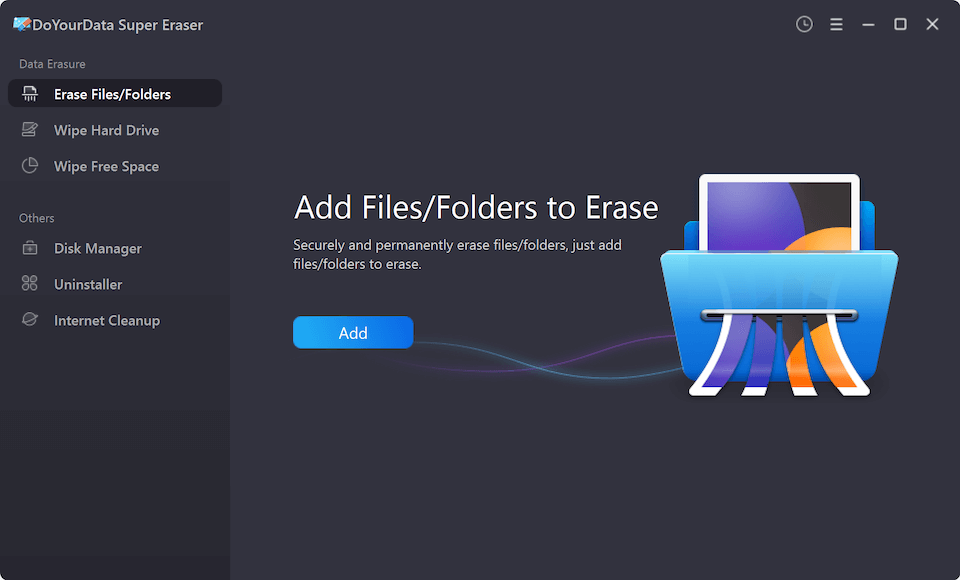
Step 2: Add Your Tax Documents
Click the 'Add' button to browse your local storage drive and select the specific tax PDF files, folders, or financial archives you want to shred.
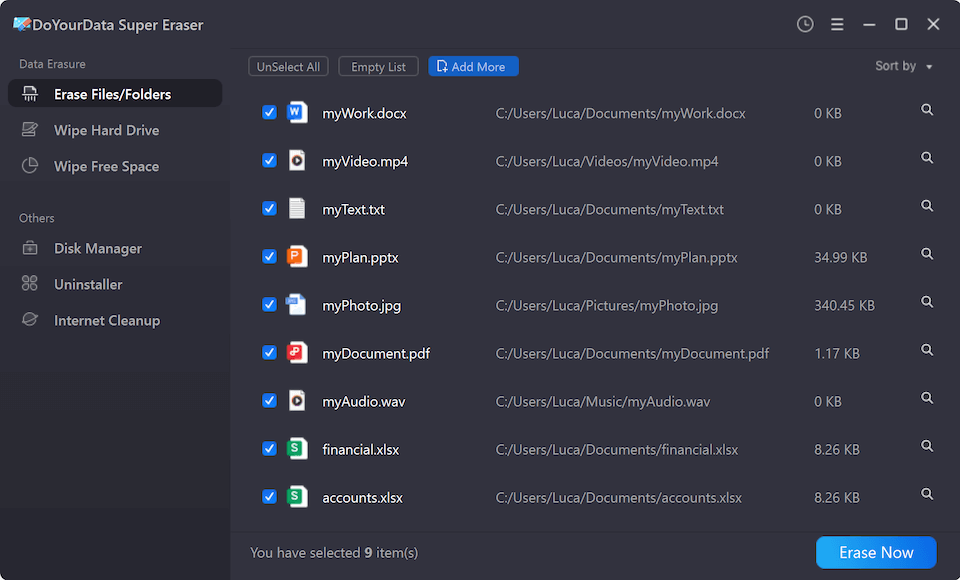
Step 3: Choose Wiping Standard and Execute
Click 'Erase Now', select your preferred military-grade data erasure standard, and click 'Continue' to start shredding the selected tax files.
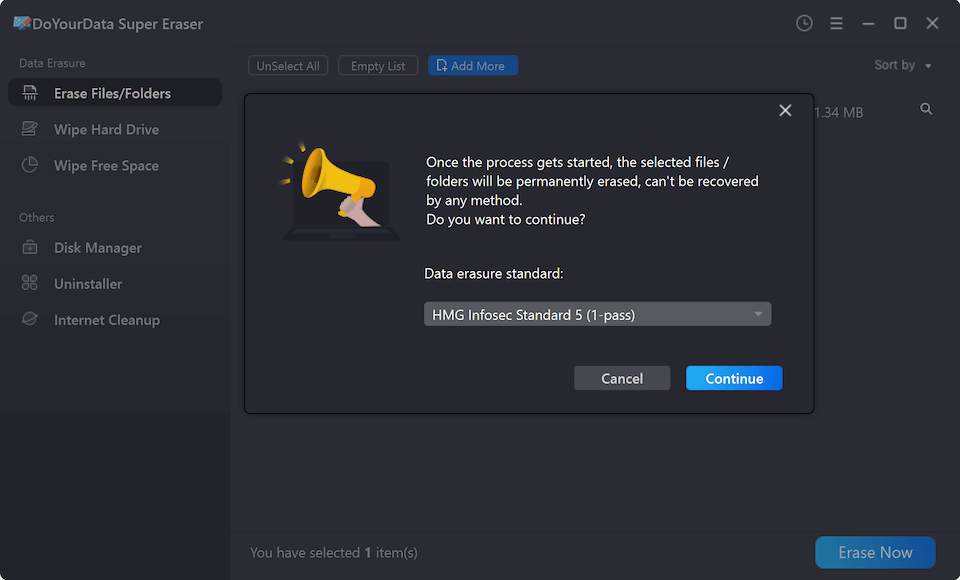
💡 Important Note: Once shredded, these tax files are no longer recoverable in any way. Always double-check and ensure you have selected the correct files before confirming.
Advanced Protection: Wiping Free Space on the Drive
If you previously deleted old tax returns using normal computer deletion methods before discovering professional shredding software, those old files are still lingering in your drive's unused free space.
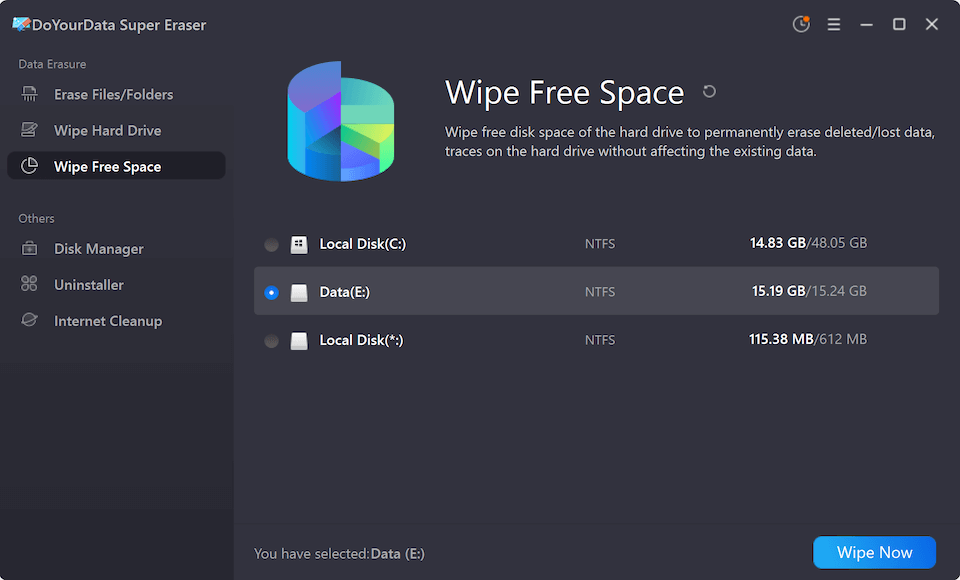
To guarantee absolute security and ensure no residual traces remain, you can use DoYourData Super Eraser to wipe the free space of your drive:
- Switch to Wipe Free Space: Switch your active mode in DoYourData Super Eraser from file shredding to 'Wipe Free Space'.
- Select the Drive: Select the drive where your tax data and browser caches were stored.
- Choose a Wiping Method: Click 'Erase Now' to choose a secure data wiping method (such as DoD 3-pass or 1-pass zero overwriting).
- Execute and Overwrite: Click the 'Continue' button and start wiping. The removed data on the drive will be permanently overwritten and destroyed beyond recovery.
Best Practices for Managing Digital Tax Records Safely
In addition to using professional file shredding software, these best practices help keep your financial paperwork secure:
- Encrypt Active Storage: Store active, necessary tax documents in encrypted folders or password-protected archives to prevent unauthorized local access.
- Verify Retention Rules: Follow IRS retention guidelines to determine when tax records can be safely destroyed (typically 3 to 7 years depending on your filing situation).
- Conduct Routine Audits: Regularly audit your computer for orphaned tax preparation exports, temporary financial downloads, and backup logs.
FAQs about Shredding Tax Documents Permanently
Conclusion
Protecting your financial identity requires taking complete control of your sensitive tax records. Leaving old tax returns and W-2 forms sitting in your Recycle Bin leaves your personal data vulnerable to discovery.
By using the best file shredder tool for permanently wiping tax documents—DoYourData Super Eraser—you can securely shred specific tax files and wipe your system drive free space. Take charge of your financial privacy today and destroy your tax records with absolute confidence.

DoYourData Super Eraser
DoYourData Super Eraser, the award-winning data erasure software, offers certified data erasure standards including U.S. Army AR380-19, DoD 5220.22-M ECE to help you securely and permanently erase data from PC, Mac, HDD, SSD, USB drive, memory card or other device, make data be lost forever, unrecoverable!
Written & Updated by Shirly Chen
Shirly Chen has been writing data recovery, data erasure articles for DoYourData over 4 years. She has been working as a professional website content writer & editor for quite a long time. She also writes articles about disk clone, Mac optimization, disk backup, etc.