Best Software to Sanitize Hard Drive Data Before Donation (Complete Guide)
Standard file deletion and 'Quick Format' leave raw personal data intact on storage sectors, making files easy to recover. Use certified data erasure software to overwrite storage sectors with binary patterns, destroying data permanently. DoYourData Super Eraser provides military-grade algorithms (DoD 5220.22-M, NIST 800-88, Gutmann) across Windows and Mac.
 Updated by Shirly Chen on October 14, 2026
Quick Navigation:
- Why You Must Sanitize Your Hard Drive Before Donating
- What Does It Mean to Sanitize a Hard Drive?
- DoYourData Super Eraser: Best Choice Before Donation
- Essential Checklist Before Donating Your Hard Drive
- FAQs about Wiping Hard Drive before Donating
- Conclusion
Donating your old computer, laptop, or external hard drive to a school, charity, family member, or local recycling center is a wonderful way to extend the life of tech hardware. However, passing on a computer without proper data sanitization poses a massive threat to your personal privacy.
When you drag files to the Recycle Bin or perform a basic format, your operating system only removes the table of contents pointer. The raw binary data sits untouched on physical storage sectors. Anyone equipped with free data recovery software can easily retrieve your deleted files in a few minutes.

To protect yourself from identity theft and privacy leaks, you need reliable software to sanitize hard drive data before donation. In this guide, we break down why standard formatting fails and show you how to wipe your drive permanently using DoYourData Super Eraser .
Why You Must Sanitize Your Hard Drive Before Donating
Over years of use, storage drives accumulate sensitive personal records—including saved web browser passwords, tax forms, bank statements, family photos, medical logs, and work credentials. Simply deleting your files or resetting Windows does not actually remove this information.
To understand why specialized software is necessary before donation, let's look at how storage devices handle file deletion.
Think of a hard drive or solid-state drive (SSD) like a library. The operating system maintains an index catalog (such as NTFS MFT or APFS file map) pointing to book locations (storage sectors).
When you press 'Delete' or run a 'Quick Format', the computer only erases the index entry. The actual books (your personal documents, photos, and browser history) remain sitting on the shelves. The computer simply considers those shelves available for future storage.
Commercial data recovery tools exploit this mechanism. They bypass the erased index table and scan raw magnetic platters or flash memory blocks directly. If those sectors have not been overwritten with new random data, the recovery software reconstructs your original files instantly.
What Does It Mean to Sanitize a Hard Drive?
Data sanitization is the process of permanently destroying all data stored on a storage device so that it cannot be recovered by any software or laboratory equipment.
Proper sanitization replaces every physical storage sector with new binary patterns—such as all zeros, all ones, or randomized characters. Once an overwrite pass is executed, the original electronic or magnetic state representing your file is destroyed forever.
Recognized international standards for data sanitization include:
- NIST SP 800-88: The modern gold standard for media sanitization across SSDs and HDDs.
- DoD 5220.22-M: The U.S. Department of Defense 3-pass overwrite standard.
- Peter Gutmann Method: A high-security 35-pass overwrite algorithm.
DoYourData Super Eraser: Best Choice Before Donation
When preparing a laptop, desktop, or external drive for donation, you need a solution that is powerful, verifiably safe, and simple to operate. DoYourData Super Eraser is designed specifically to solve this problem.
DoYourData Super Eraser
- Best software to wipe data permanently from drive.
- Erase data with certified data erasure algorithms.
- Shred files, wipe drive, erase deleted data completely.
Whether you are donating an old Windows 11/10 laptop, a Mac desktop, an external USB hard drive, or an SD card, DoYourData Super Eraser guarantees that your deleted data becomes 100% unrecoverable.
Key Features of DoYourData Super Eraser:
- Military-Grade Erasure Standards: Supports certified algorithms including NIST 800-88, DoD 5220.22-M, U.S. Army AR380-19, and Gutmann.
- Three Versatile Erasure Modes:
- Wipe Hard Drive: Erases an entire hard drive partition, SSD, or external USB drive completely before donation.
- Erase Files/Folders: Selectively shreds specific confidential files or tax folders.
- Wipe Free Space: Overwrites unused storage sectors to permanently destroy previously deleted files while leaving active operating system files intact.
- Cross-Platform Compatibility: Fully supports Windows 11, 10, 8, 7, and macOS Sonoma, Ventura, Monterey, and earlier.
- Safe for Storage Hardware: Overwrites sectors safely without causing physical harm or reducing drive lifespan.
Step-by-Step Guide: How to Sanitize a Hard Drive Before Donation
Wiping your hard drive with DoYourData Super Eraser is quick and requires no technical expertise. Follow these simple steps:
Step 1: Download and Install DoYourData Super Eraser
Download the official setup package from DoYourData.com and install the application on your computer. Connect the external drive or secondary disk you wish to sanitize.
Step 2: Select 'Wipe Hard Drive' Mode
Launch DoYourData Super Eraser. In the left sidebar, click on 'Wipe Hard Drive'. This mode completely sanitizes selected drives and partitions. Select the hard drive or partition you plan to donate from the list. Click the 'Wipe Now' button.
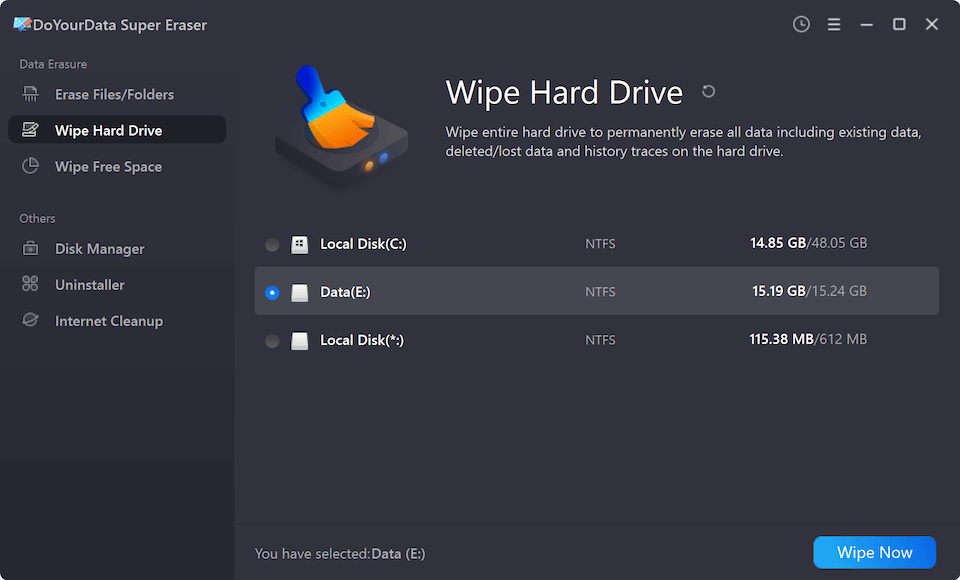
Step 3: Choose Wipe Method and Execute Sanitization
Select a data erasure standard from the list. Confirm the operation by clicking the 'Continue' button. The software will start to wipe data from the selected drive by using the selected data wiping algorithm.
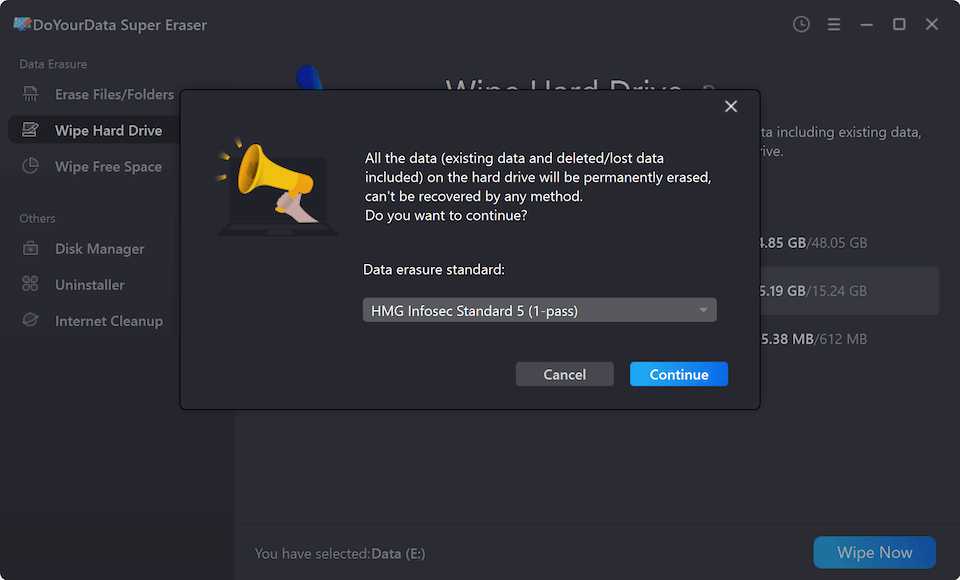
DoYourData Super Eraser will run a deep, sector-by-sector overwrite pass across the drive. Once finished, all photos, bank records, and private documents will be destroyed permanently, making recovery impossible.
Essential Checklist Before Donating Your Hard Drive
Before wiping and donating your computer or drive, complete these quick pre-donation steps:
- Create a Full Backup: Copy all important documents, photos, and media to an external drive or cloud account. Or you can clone the drive to another one along with all data.
- Check the Disk Status: Check and ensure the disk is still usable and health before giving it to anyone.
- Clean Exterior Labels: Peel off any asset tags, business stickers, or physical labels containing your name, company info, or serial numbers.
- Sanitize the Drive: Run DoYourData Super Eraser to wipe all data permanently.
FAQs about Wiping Hard Drive before Donating
Conclusion
Donating your old computer or storage drive is a great charitable act, but leaving your personal records exposed to data recovery is a risk you should never take.
By using DoYourData Super Eraser, you get reliable software to sanitize hard drive data before donation that guarantees complete peace of mind. Download DoYourData Super Eraser today, sanitize your hard drive safely, and donate your tech hardware with confidence!

DoYourData Super Eraser
DoYourData Super Eraser, the award-winning data erasure software, offers certified data erasure standards including U.S. Army AR380-19, DoD 5220.22-M ECE to help you securely and permanently erase data from PC, Mac, HDD, SSD, USB drive, memory card or other device, make data be lost forever, unrecoverable!
Written & Updated by Shirly Chen
Shirly Chen has been writing data recovery, data erasure articles for DoYourData over 4 years. She has been working as a professional website content writer & editor for quite a long time. She also writes articles about disk clone, Mac optimization, disk backup, etc.