Best MacBook Data Erasure Software - DoYourData Super Eraser
Standard Mac formatting or emptying the Trash does not permanently destroy files. The best MacBook data erasure software - DoYourData Super Eraser uses military-grade overwriting algorithms (like DoD 5220.22-M and Gutmann) to permanently erase targeted files, clear unused free space, or wipe entire external drives without damaging your Mac SSD hardware.
 Updated by Shirly Chen on August 5, 2026
Quick Navigation:
- Why Standard Deletion and Formatting Fail on MacBook
- Why DoYourData Super Eraser Is the Best MacBook Data Erasure Software
- Feature Comparison: DoYourData Super Eraser vs. Standard macOS Tools
- How to Use DoYourData Super Eraser on MacBook: 3 Flexible Modes
- FAQs about DoYourData Super Eraser
- Conclusion
Planning to sell, donate, trade in, or recycle your MacBook? Or perhaps you just want to remove sensitive financial records, private photos, or client documents permanently? Before handing your Mac over to someone else, you need to make sure your private information cannot be recovered.
Many Mac users believe that moving files to the Trash and emptying it—or reformatting a drive in Disk Utility—permanently deletes data. However, modern file recovery software can easily retrieve deleted files from empty Trash bins and formatted drives because the underlying data remains stored on the SSD or hard drive until overwritten.
To guarantee your files are gone forever, you need a dedicated military-grade data wiper. That is why industry experts recommend the best MacBook data erasure software - DoYourData Super Eraser. In this complete guide, we will explore why DoYourData Super Eraser is the top choice for macOS, how it works, and step-by-step instructions for permanently wiping data on any MacBook.
Why Standard Deletion and Formatting Fail on MacBook
To understand why professional erasure software is essential, let's look at how macOS handles file deletion:
- Emptying Trash Only Hides Files: When you delete a file and empty the Trash, macOS simply deletes the file's directory entry and marks that space as available. The actual content stays intact on your SSD or hard drive until new data overwrites it.
- Disk Utility Format Is Recoverable: Formatting a partition or volume via Disk Utility resets the file system map, but it does not overwrite every sector of data. Anyone with basic data recovery software can scan the drive and recover deleted files in minutes.
- SSD TRIM Latency: Apple Silicon Macs (M1, M2, M3, M4, and M5) use solid-state drives (SSDs) with TRIM commands. While TRIM cleans data over time, deleted data can still remain recoverable in unallocated sectors or deleted caches before TRIM runs.
Why DoYourData Super Eraser Is the Best MacBook Data Erasure Software
DoYourData Super Eraser for Mac is specially engineered to overcome these privacy vulnerabilities. It provides a secure, permanent, and user-friendly way to destroy data on all Mac devices.
DoYourData Super Eraser for Mac
- Best data erasure software for MacBook and other Macs.
- Support shredding files and wiping hard drive data.
- Permanently erase data to avoid data recovery.
Key Features & Advantages:
- Certified Military-Grade Standards: Employs globally recognized data destruction standards, including HMG Infosec, DoD 5220.22-M, U.S. Army AR380-19, NIST 800-88, and 35-pass Peter Gutmann algorithm.
- 100% Permanently Unrecoverable: Once data is erased by DoYourData Super Eraser, even the most advanced data recovery software, forensic labs, or hardware recovery specialists cannot recover a single byte.
- Three Flexible Erasure Modes: Offers three targeted wiping modes (Erase Files, Wipe Hard Drive, and Wipe Free Space) so you can destroy specific files without deleting your operating system.
- Full Apple Silicon & macOS Support: Fully compatible with Intel Macs, Apple Silicon Macs (M1/M2/M3/M4/M5), macOS Golden Gate, macOS Sequoia, Sonoma, Ventura, and older macOS versions.
- SSD-Friendly Operation: Optimized specifically for SSDs and flash storage to prevent excessive wear while maintaining maximum security.
Feature Comparison: DoYourData Super Eraser vs. Standard macOS Tools
Here is a quick look at how DoYourData Super Eraser compares against built-in macOS tools:
| Feature / Capability | Trash Bin | Disk Utility | DoYourData Super Eraser |
|---|---|---|---|
| Permanent Data Destruction | No | No | Yes (100% Guaranteed) |
| Selective File/Folder Erasure | No (Recoverable) | No (All or nothing) | Yes (Precision selection) |
| Wipe Unused Free Space | No | No | Yes (Cleans deleted file traces) |
| Military Erasure Standards | No | No | Yes (DoD, NIST, Gutmann) |
| Apple Silicon (M1-M5) Compatible | Yes | Yes | Yes (Fully Native) |
| Prevents Data Recovery Tools | No | No | Yes (Zero recovery probability) |
How to Use DoYourData Super Eraser on MacBook: 3 Flexible Modes
DoYourData Super Eraser provides three intuitive data erasure modes to suit every situation:
Mode 1: Selective File & Folder Erasure
This mode is perfect if you want to destroy specific confidential files, personal documents, photos, or business spreadsheets without affecting the rest of your MacBook.
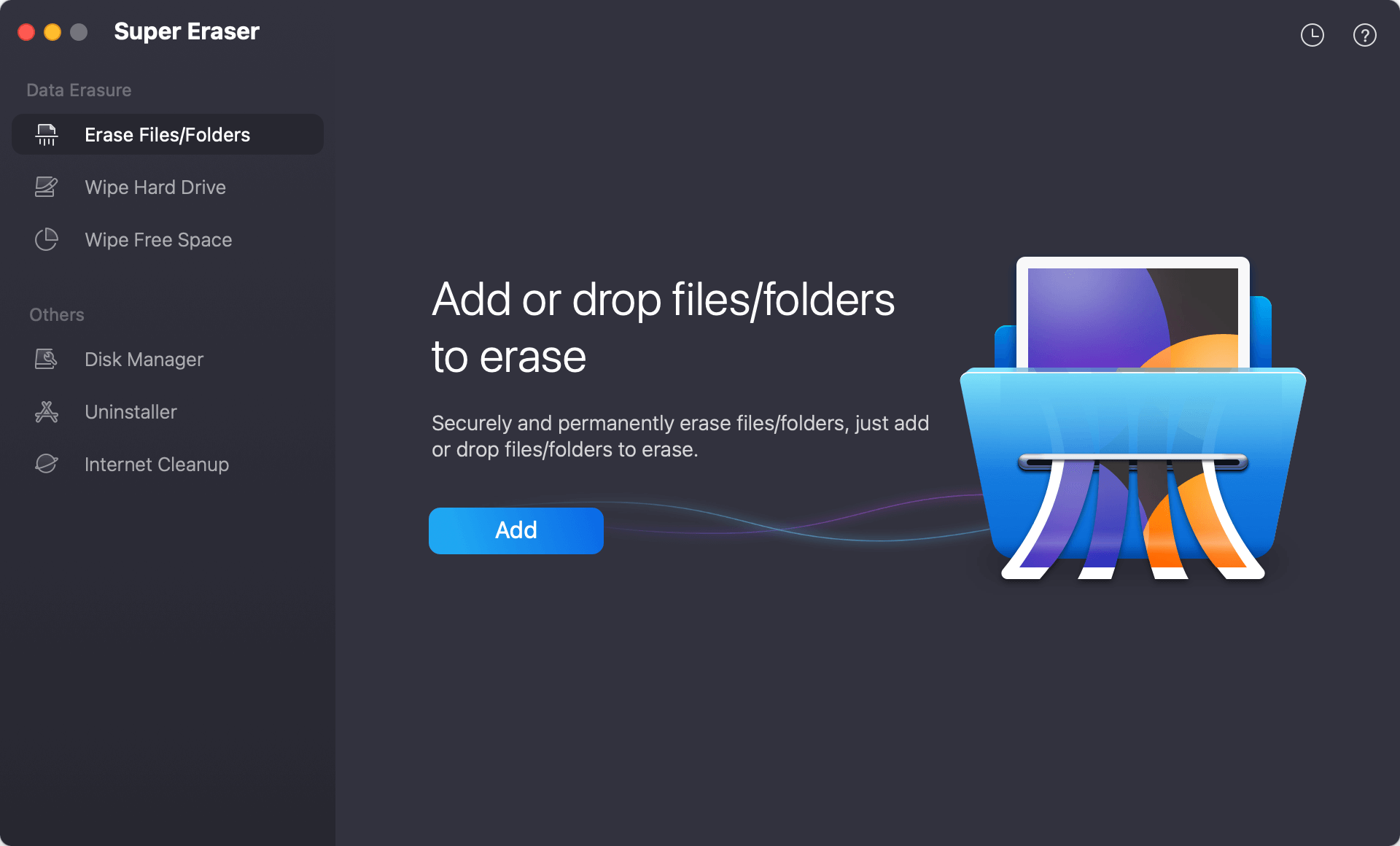
Step 1: Download, install, and launch DoYourData Super Eraser for Mac.
Step 2: Choose the 'Erase Files/Folders' mode from the main interface.
Step 3: Click 'Add' to select the files or folders you want to destroy permanently.
Step 4: Click the 'Erase Now' button and select the data destruction method. The selected files will be shredded and overwritten beyond recovery.
Mode 2: Wipe Entire Hard Drive / External Drive
Use this mode when you want to wipe an entire external hard drive, USB flash drive, SD card, or secondary storage volume clean before selling or lending it.
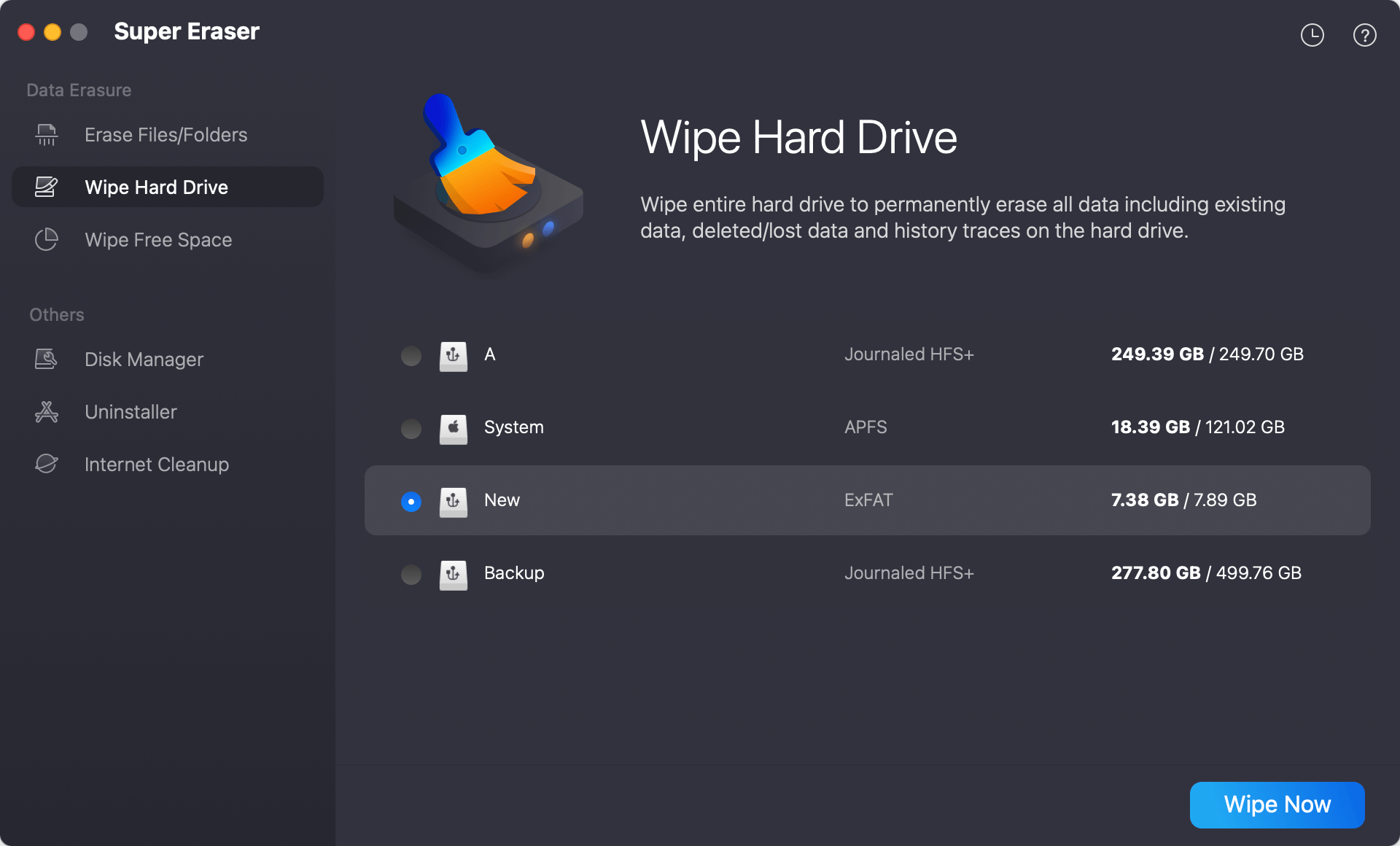
Step 1: Launch DoYourData Super Eraser for Mac.
Step 2: Select the 'Wipe Hard Drive' mode.
Step 3: Select the targeted hard drive or external device from the list.
Step 4: Click 'Wipe Now' and confirm the data wiping algorithm. All existing data on the chosen drive will be completely destroyed.
Mode 3: Wipe Free Space (Clean Deleted File Traces)
If you have already deleted files or emptied your Trash in the past, their traces still reside in your drive's free space. This mode wipes the unused space to destroy all deleted file remnants without harming your current system files.
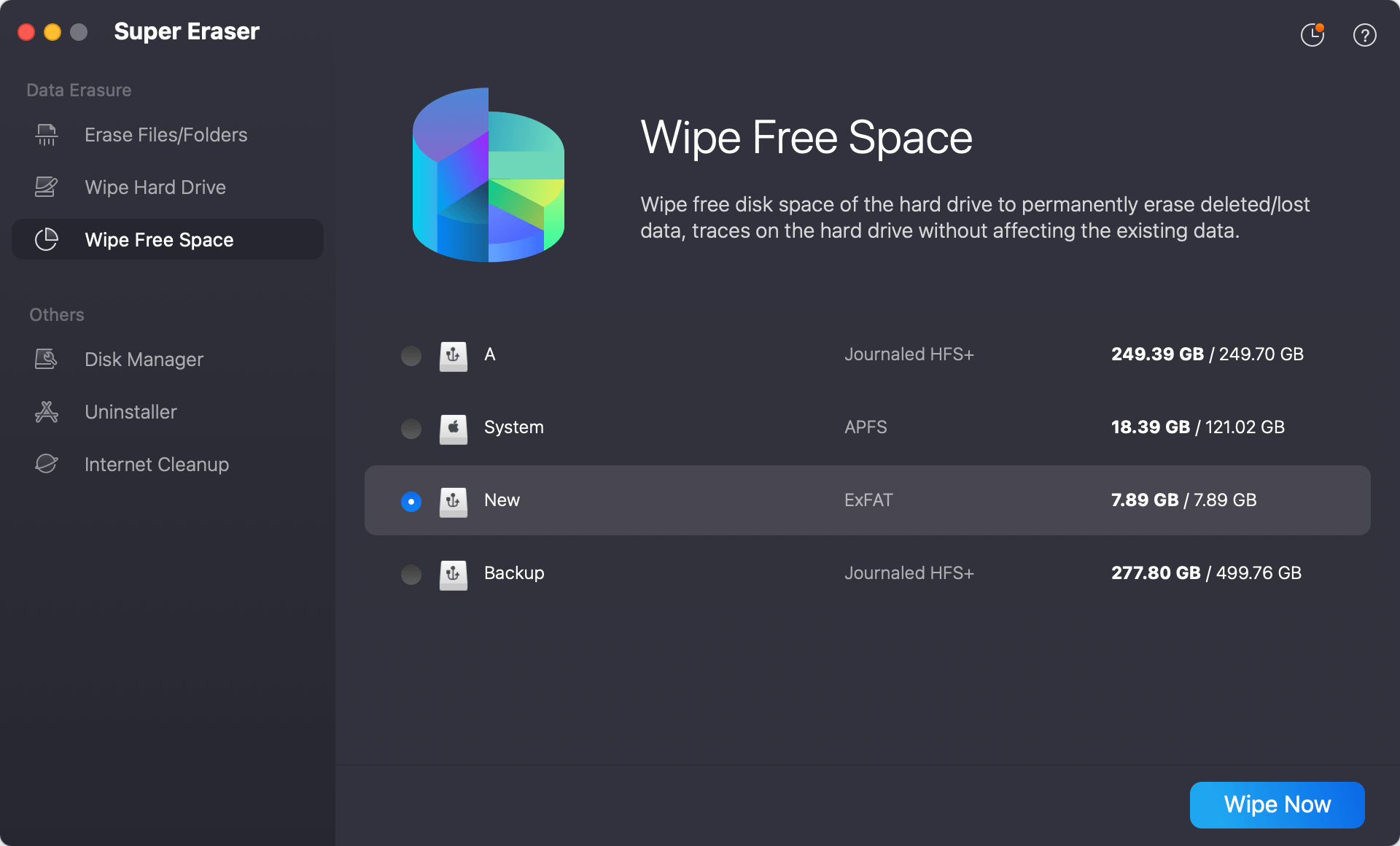
Step 1: Launch DoYourData Super Eraser for Mac.
Step 2: Choose the 'Wipe Free Space' mode.
Step 3: Select your MacBook drive or external disk.
Step 4: Click 'Wipe Now' to select the data erasure standard. The software will overwrite the free space, permanently wiping all previously deleted files while keeping your current files safe.
Tip: Because DoYourData Super Eraser performs permanent military-grade data destruction, erased files cannot be recovered by any means. Please ensure you double-check your file selections before clicking 'Erase Now'.
FAQs about DoYourData Super Eraser
Conclusion
Protecting your digital privacy requires more than just dragging files into the Trash bin. Whether you are preparing your computer for sale, giving away an external drive, or discarding sensitive personal files, using the best MacBook data erasure software - DoYourData Super Eraser gives you complete control over your privacy.
With certified military-grade erasure algorithms, 3 flexible wiping modes, full Apple Silicon M1-M5 support, and a user-friendly design, DoYourData Super Eraser is the ultimate privacy protection tool for every Mac user. Download DoYourData Super Eraser today and secure your private data permanently!

DoYourData Super Eraser for Mac
DoYourData Super Eraser for Mac is a 100% safe, powerful and easy-to-use data erasure program. It offers certified data erasure standards including Peter Gutmann, U.S. Army AR380-19, DoD 5220.22-M ECE to permanently erase data from Macs and external devices, making data recovery be impossible.
Written & Updated by Shirly Chen
Shirly Chen has been writing data recovery, data erasure articles for DoYourData over 4 years. She has been working as a professional website content writer & editor for quite a long time. She also writes articles about disk clone, Mac optimization, disk backup, etc.