How to Shred Private Folder Using DoD 5220.22-M Algorithm: Step-by-Step Guide
When you delete a private folder containing personal tax documents, banking details, confidential work photos, or sensitive client files on Windows or Mac, you might think it is gone forever. Unfortunately, it's wrong. If you want to permanently shred files or folders, use the professional tool DoYourData Super Eraser.
 Updated by Shirly Chen on July 29, 2026
Quick Navigation:
- What Is the DoD 5220.22-M Data Erasure Algorithm?
- Why Use DoD 5220.22-M to Shred Your Private Folders?
- How to Shred Private Folder Using DoD 5220.22-M Algorithm
- FAQs about Shredding Files with DoD 5220.22-M
- Conclusion
When you right-click, select 'Delete' or move the folder to the Recycle Bin or Trash, and click 'Empty.' Here is the alarming truth: standard deletion does not erase your data. Instead, your operating system simply deletes the file pointer and marks that storage space as available for future use. Until new data happens to overwrite those exact sectors on your hard drive or SSD, data recovery software can easily scan the disk and recover your entire private folder intact.
If you are trying to protect sensitive personal records, normal deletion leaves you vulnerable to identity theft and privacy leaks. To completely wipe sensitive files so they can never be recovered, you need a professional data destruction standard. This is where the DoD 5220.22-M algorithm comes into play.
In this guide, we will show you the information about the DoD 5220.22-M algorithms and how to shred private folder using DoD 5220.22-M algorithm. By shredding files with the professional data erasure standard, the files are gone forever and won't be recovered in any way.
What Is the DoD 5220.22-M Data Erasure Algorithm?
The DoD 5220.22-M algorithm is a military-grade data sanitization standard originally defined by the United States Department of Defense in the National Industrial Security Program Operating Manual (NISPOM).
Unlike basic deletion which leaves raw data written on magnetic or solid-state memory, DoD 5220.22-M overwrites existing data in multiple passes. By default, the standard DoD 5220.22-M (E) process executes three distinct overwriting passes across every sector of the targeted file or folder:
- Pass 1: Overwrites all binary storage locations with a fixed character (such as zeros).
- Pass 2: Overwrites all storage locations with the complement character (such as ones).
- Pass 3: Overwrites all storage locations with pseudo-random characters and verifies the overwriting process.
By completing these three continuous passes, DoD 5220.22-M neutralizes any residual magnetic traces or underlying block data, rendering modern data recovery software and professional laboratory forensic tools completely powerless.
Why Use DoD 5220.22-M to Shred Your Private Folders?
There are several data erasure algorithms available today, ranging from 1-pass basic overwriting to 35-pass Gutmann erasure. So why is learning how to shred private folder using DoD 5220.22-M algorithm the sweet spot for most users?
- High Security Standard: Unbeatable Security: Three overwriting passes with verification ensure that private documents, PDFs, images, and videos cannot be retrieved by any commercial or specialized recovery software.
- Balanced Performance: Speed and Efficiency: Higher-pass methods like Peter Gutmann (35 passes) take an excessively long time, especially when shredding multi-gigabyte folders. DoD 5220.22-M offers an optimal balance between top-tier security and fast execution speed.
- Recognized Privacy Compliance: Global Compliance: DoD 5220.22-M is recognized globally across corporate, financial, and legal sectors as an acceptable protocol for secure media sanitization.
How to Shred Private Folder Using DoD 5220.22-M Algorithm
The Best Tool for the Job: DoYourData Super Eraser
To apply military-grade destruction protocols to specific folders, you need a specialized file shredding utility. DoYourData Super Eraser is a powerful, reliable, and user-friendly file shredder and data erasure tool designed for both Windows and Mac operating systems.
It allows you to selectively shred folders, wipe entire hard drives, clean free disk space, and choose from multiple international data erasure standards—including DoD 5220.22-M.
DoYourData Super Eraser
- Professional data erasure software for Windows and Mac.
- Support DoD 5220.22-M and more data wiping algorithms.
- 3 modes to shred files/folders or wipe hard drive data.
Best Practices Before Shredding Private Folders
Because DoD 5220.22-M destruction is 100% permanent and irreversible, follow these simple guidelines before hitting 'Erase Now':
- Verify Folder Contents: Open the folder one final time to ensure no vital personal records, photos, or licenses are accidentally included.
- Create Backups for Non-Sensitive Files: If the folder contains a mix of private and non-private data, copy the non-sensitive files to another location first.
- Close Active Applications: Ensure no background applications or word processors are currently opening files inside the folder to prevent permission locks during shredding.
Steps to Shredding Folder/File with DoD 5220.22-M algorithm
Follow this step-by-step guide to permanently shred any private folder on Windows or Mac using DoYourData Super Eraser.
Step 1: Download and Install DoYourData Super Eraser
Download the official version of DoYourData Super Eraser from the DoYourData website for your Windows or Mac machine. Install the application by following the standard setup wizard.
Step 2: Choose 'Erase Files/Folders' Mode
Launch DoYourData Super Eraser on your computer. On the main interface, you will see three primary erasure modes:
- Erase Files/Folders (Selectively shred individual files and entire folders)
- Wipe Hard Drive (Wipe an entire partition or external drive)
- Wipe Free Space (Permanently erase previously deleted files lying in free disk space)
Select the first mode: Erase Files/Folders.
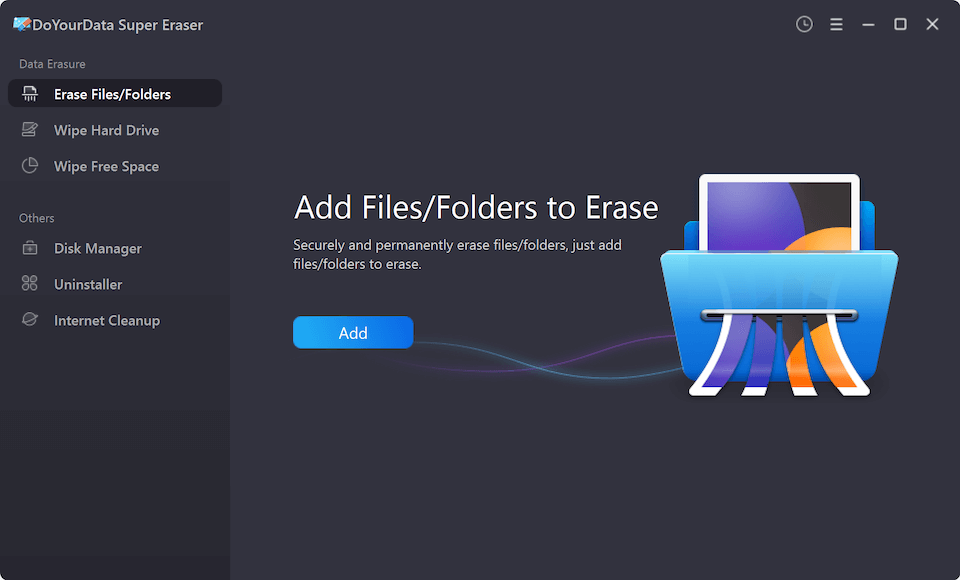
Step 3: Add Your Private Folder to the Erasure List
Click the Add button or drag and drop your private folder directly into the software interface. You can add multiple folders or files simultaneously if needed. Double-check the folder path to ensure you have selected the exact folder you wish to destroy permanently.
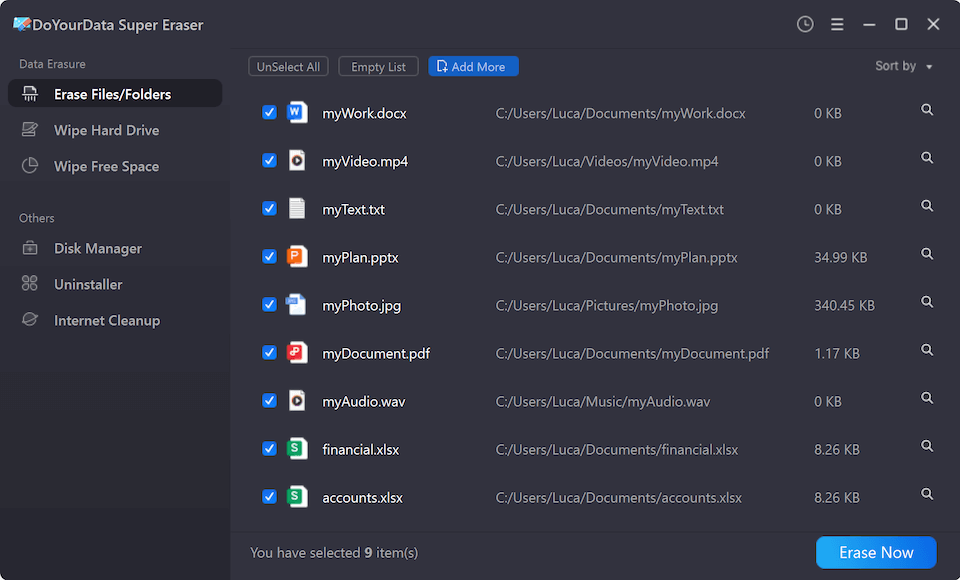
Step 4: Select DoD 5220.22-M Algorithm in Settings
Click Erase Now button. Before initiating the shredding process, select DoD 5220.22-M (3 passes) as your default data erasure algorithm.
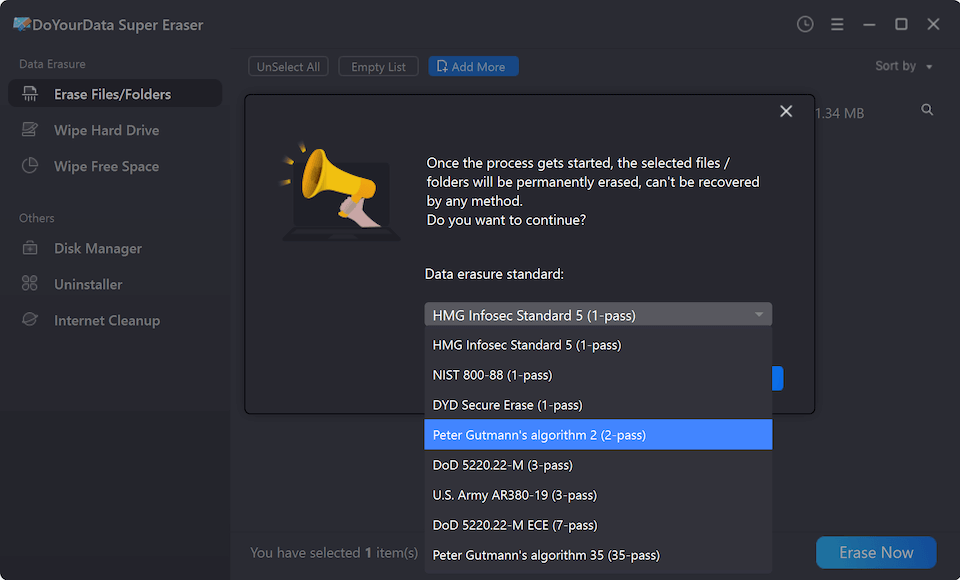
Step 5: Start to Shred the Private Folder
Once your folder is loaded and DoD 5220.22-M is selected, click the blue Continue button. DoYourData Super Eraser will execute the 3-pass DoD 5220.22-M overwriting algorithm on every file contained inside the selected private folder. Once finished, the folder and all its contents will be permanently erased beyond recovery.
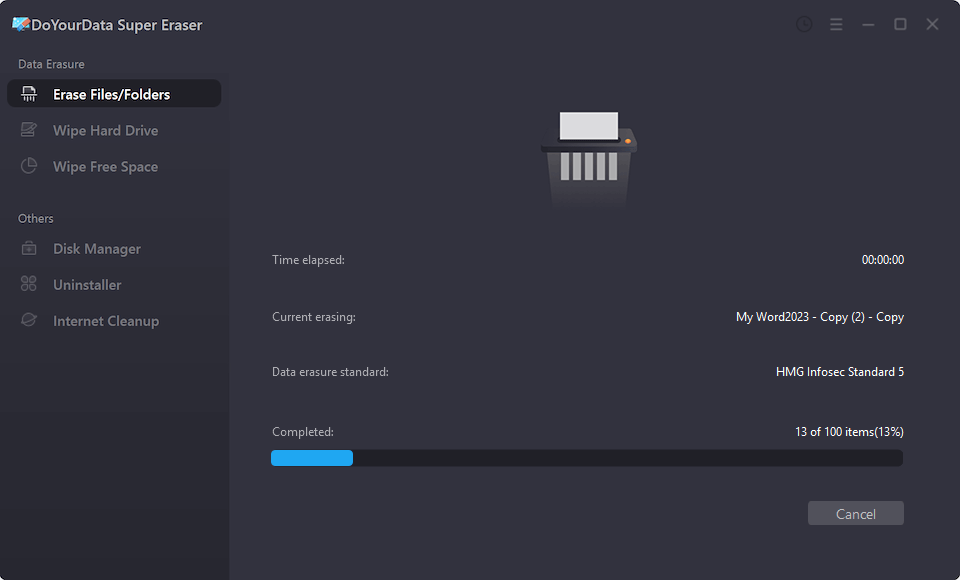
Overview of Data Erasure Algorithms in DoYourData Super Eraser
DoYourData Super Eraser supports several industry-grade data destruction standards. Here is how DoD 5220.22-M compares to other popular options:
| Algorithm Standard | Number of Passes | Best Suited Use Case |
|---|---|---|
| HMG Infosec Standard 5 | 1 Pass | Fast erasure for low-sensitivity temporary files |
| DoD 5220.22-M | 3 Passes | Recommended standard for private folders & confidential files |
| DoD 5220.22-M ECE | 7 Passes | High-security corporate & legal data destruction |
| Peter Gutmann | 35 Passes | Maximum theoretical security for extremely critical data |
FAQs about Shredding Files with DoD 5220.22-M
Conclusion
Protecting your digital privacy requires more than standard file deletion. Whenever you handle confidential financial documents, private personal files, or work projects, relying on the Recycle Bin or Trash puts your information at risk.
By learning how to shred private folder using DoD 5220.22-M algorithm with DoYourData Super Eraser, you gain full control over your digital security. The 3-pass overwriting protocol guarantees that your confidential data is wiped permanently, leaving zero chance for recovery on both Windows and Mac.
Download DoYourData Super Eraser today and experience fast, secure, military-grade private folder shredding in just a few simple clicks.

DoYourData Super Eraser
DoYourData Super Eraser, the award-winning data erasure software, offers certified data erasure standards including U.S. Army AR380-19, DoD 5220.22-M ECE to help you securely and permanently erase data from PC, Mac, HDD, SSD, USB drive, memory card or other device, make data be lost forever, unrecoverable!
Written & Updated by Shirly Chen
Shirly Chen has been writing data recovery, data erasure articles for DoYourData over 4 years. She has been working as a professional website content writer & editor for quite a long time. She also writes articles about disk clone, Mac optimization, disk backup, etc.