Can the Files Be Recovered by Software after Factory Reset?
A standard Windows or Mac factory reset reinstalls the operating system and unlinks your files, but it DOES NOT overwrite your personal data. Specialized software can scan and recover those 'deleted' files in just a few clicks. How to make the files unrecoverable? You can use the professional data erasure software DoYourData Super Eraser.
 Updated by Shirly Chen on September 18, 2026
Quick Navigation:
- Why Files Remain Recoverable After a Factory Reset
- Real-World Risk: Selling, Donating, or Recycling Your PC
- How to Make Factory Reset Files Unrecoverable
- FAQs about Wipe Data after Factory Reset
- Final Summary
Can a Factory Reset Computer Files Be Recovered by Software? Yes. Files removed during a standard factory reset can usually be recovered by data recovery software.

Many computer users assume that performing a factory reset is like running a giant digital eraser over their hard drive. It feels complete, clean, and irreversible. However, from a technical perspective, a standard factory reset only resets system settings and marks your personal files as 'deleted' without actually destroying the underlying raw data.
Because the raw binary data remains stored on the physical drive sectors, modern data recovery software can easily scan the drive, reconstruct the file fragments, and restore your private documents, photos, financial records, and browser histories. If you plan to sell, donate, or trade in your computer, relying solely on a factory reset leaves your confidential information exposed.
Why Files Remain Recoverable After a Factory Reset
To understand why data survives a system reset, it helps to know how operating systems manage files on your hard drive (HDD) or solid-state drive (SSD).
How Data Storage Works: The Book Index Analogy
Think of your hard drive as a massive book. Your personal files—such as photos, PDFs, and spreadsheets—are the content on the pages. The operating system uses a file system (like NTFS or FAT32) to maintain a master index (the book's table of contents). This index tells the computer exactly which physical drive sector holds each piece of data.
What Really Happens During a Quick Factory Reset
When you perform a standard factory reset, the system chooses the fastest route. Instead of laboriously writing over every byte of storage, it simply deletes the index entry pointing to your files and marks those storage sectors as 'free space' or 'available for new data.'
As far as Windows or macOS is concerned, the space is empty and ready for new files. But until new files actually overwrite those specific sectors, your old files remain 100% intact underneath. Recovery software bypasses the missing index and scans the physical drive sectors directly, effortlessly pulling back deleted photos, passwords, and sensitive records.
HDDs vs. SSDs: Is There a Difference?
The type of drive in your computer affects how easy or difficult recovery can be, but it does not make you immune:
- Traditional Hard Drives (HDDs): On magnetic HDDs, deleted data stays intact indefinitely until new files write over those exact sectors. Data recovery tools work with high success rates on HDDs after a factory reset.
- Solid-State Drives (SSDs): SSDs use a feature called TRIM to clean up unused memory cells in the background. While TRIM makes file recovery harder, it is not instantaneous or foolproof. External SSDs, unmanaged drives, or situations where TRIM was delayed leave plenty of recoverable data behind.
Real-World Risk: Selling, Donating, or Recycling Your PC
Every year, thousands of second-hand computers, refurbished laptops, and discarded hard drives are sold online containing personal data. Security researchers frequently purchase used drives on public marketplaces and find:
- Tax documents, banking statements, and credit card applications.
- Saved browser passwords, personal email archives, and photo albums.
- Confidential business contracts, client databases, and intellectual property.
Anyone with basic technical knowledge can download free recovery tools and scan a reset laptop. If you want complete peace of mind, you must ensure that your deleted files are overwritten beyond recovery.
Understanding the difference between standard deletion and military-grade data erasure is essential for protecting your privacy.
| Feature / Action | Standard Factory Reset | Permanent Data Wipe |
|---|---|---|
| Primary Mechanism | Deletes index pointers and reinstalls OS | Overwrites sectors with 0s, 1s, or random data |
| File Recoverability | HIGH (Recoverable via software) | ZERO (Impossible to recover) |
| Best Used For | Fixing software bugs or starting fresh | Selling, donating, or recycling computers |
How to Make Factory Reset Files Unrecoverable
Once a factory reset is completed, your personal files exist in the 'Free Space' of your hard drive. To prevent software from ever recovering those files, you need to write random binary code over that free space.
This is where DoYourData Super Eraser comes in. It is a certified, powerful data erasure tool designed to permanently destroy files, format partitions, and wipe free space on Windows and Mac systems without damaging your operating system.
Why Choose DoYourData Super Eraser?
- Wipe Free Space Mode: Target only the deleted data sectors. It shreds residual files while keeping your newly installed Windows/macOS operating system intact and fully operational.
- Military-Grade Erasing Algorithms: Supports internationally recognized data sanitization standards, including U.S. DoD 5220.22-M, DoD 5220.22-M (ECE), Peter Gutmann, and NIST 800-88.
- 100% Safe and Irreversible: Once erased by DoYourData Super Eraser, the data is destroyed forever. No data recovery software, computer expert, or lab tool can recover it.
- User-Friendly Interface: Designed with simplicity in mind. Non-technical users can complete a full wipe in just a few clicks.
Step-by-Step Guide: How to Wipe Free Space After Factory Reset
If you have already factory reset your computer and want to guarantee that your deleted personal files are completely gone, follow these quick steps using DoYourData Super Eraser:
Step 1: Download and Install DoYourData Super Eraser
Download DoYourData Super Eraser on your reset computer. Install and launch the application. (It takes up minimal space and runs cleanly).
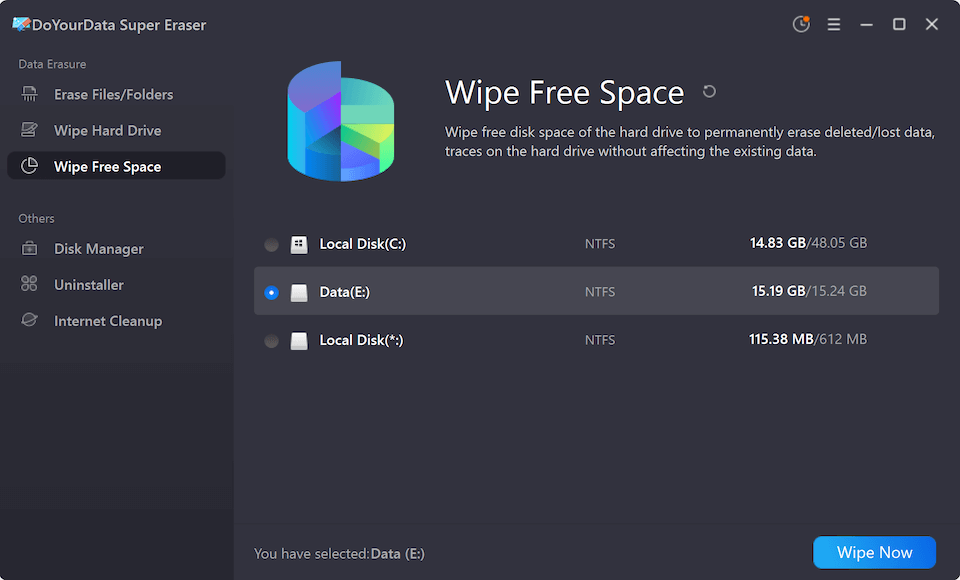
Step 2: Choose 'Wipe Free Space' Mode
On the main menu, select the third erasing option: Wipe Free Space. This mode targets only the unused storage area where your deleted files reside, ensuring your system files remain untouched. Select the drive partition where your deleted files were stored (typically C: drive on Windows or Macintosh HD on Mac). Click the Wipe Now button.
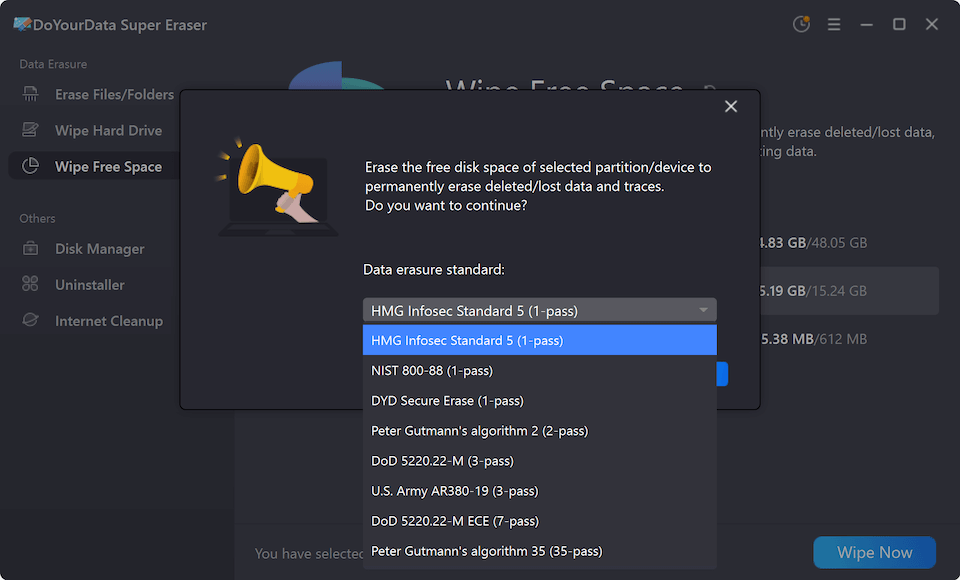
Step 3: Select the Data Erasure Standard
Choose a data erasure standard for permanent data wipe. Any standard is safe enough to wipe data completely and make the data unrecoverable.
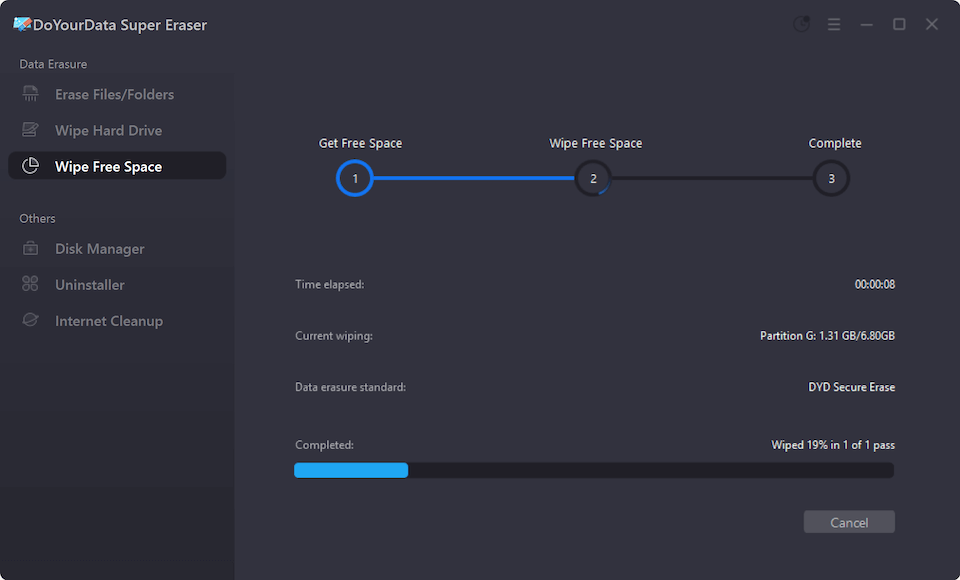
Step 4: Confirm and Complete the Erasure
Click Continue button to confirm the operation. DoYourData Super Eraser will overwrite every byte of free space with random binary data using certified algorithms. Once finished, all deleted files are permanently erased.
Important Tip: Running 'Wipe Free Space' after a factory reset provides a double layer of defense. The factory reset gives you a clean system OS, and DoYourData Super Eraser ensures that none of your old private data can be resurrected.
FAQs about Wipe Data after Factory Reset
Final Summary
A factory reset is a great troubleshooting tool, but it is not a privacy shield. If you are asking can a factory reset computer files be recovered by software, the clear answer is yes. Deleted files survive in the unallocated space of your hard drive until new data rewrites over them.
To eliminate data theft risks before handing your laptop to a new owner:
- Perform your standard Windows or Mac factory reset.
- Download and install DoYourData Super Eraser.
- Run 'Wipe Free Space' on your primary hard drive.
- Relax knowing your confidential files are permanently, irreversibly destroyed.

DoYourData Super Eraser
DoYourData Super Eraser, the award-winning data erasure software, offers certified data erasure standards including U.S. Army AR380-19, DoD 5220.22-M ECE to help you securely and permanently erase data from PC, Mac, HDD, SSD, USB drive, memory card or other device, make data be lost forever, unrecoverable!
Written & Updated by Shirly Chen
Shirly Chen has been writing data recovery, data erasure articles for DoYourData over 4 years. She has been working as a professional website content writer & editor for quite a long time. She also writes articles about disk clone, Mac optimization, disk backup, etc.