Data Erasure for Company Computers: Complete Guide to Secure Data Wiping
When a company upgrades its IT equipment, decommissioned computers, old laptops, and retired servers are often left behind. What happens to the sensitive business information stored on those devices? If you don't want to leave files vulnerable to recovery through easily accessible software, permanently wipe the data with DoYourData Super Eraser.
 Updated by Shirly Chen on September 15, 2026
Quick Navigation:
- The Risks of Incomplete Data Destruction in Business
- Understanding True Data Sanitization Standards
- The Best Solution: DoYourData Super Eraser
- Guide: How to Wipe Company Computers Permanently
- FAQs about Wiping Data on Company Computers
- Conclusion
In today's regulatory and cybersecurity landscape, ensuring complete data erasure for company computers is critical. Unsanitized hardware can lead to catastrophic data breaches, costly legal penalties, and severe brand damage. Whether you plan to donate old PCs, return leased laptops, or send hardware off for recycling, you must sanitize every drive beyond recovery.
This article explores why standard deletion methods fail, the regulatory requirements surrounding corporate data destruction, and how to execute permanent data wiping using certified software like DoYourData Super Eraser.
The Risks of Incomplete Data Destruction in Business
Leaving residual corporate data on retired workstations exposes your organization to severe security and legal hazards:
- Regulatory Non-Compliance and Penalties: Global data privacy regulations such as GDPR, HIPAA, CCPA, and PCI-DSS mandate strict protection for personal and financial information. Failing to erase client data before computer disposal can lead to massive fines and audit failures.
- Loss of Intellectual Property: Company computers contain trade secrets, employee records, financial plans, and client contracts. If these drives fall into the hands of competitors or malicious actors, your competitive edge and corporate privacy are compromised.
- Severe Reputational Damage: A single news story about confidential client details recovered from recycled corporate laptops can permanently destroy customer trust and destroy brand credibility.
Why Simple File Deletion and Formatting Fail
To protect corporate assets, IT administrators must understand how operating systems manage data storage. When you click 'Delete' or empty the Trash, the operating system does not remove the underlying bits. Instead, it marks the index pointer as free space, signaling that new files can overwrite that area.
Until new data actually overwrites those sectors, the original files remain completely intact. Advanced file recovery programs can easily scan the disk structures and restore confidential financial records, proprietary source code, customer personal data, and internal emails within minutes.
Even high-level disk formatting—such as Quick Format in Windows or macOS—leaves bulk data untouched. Standard formatting merely clears the file allocation system while leaving raw data blocks readable across both traditional Hard Disk Drives (HDDs) and Solid State Drives (SSDs).
Key Takeaway: Deleting a file or formatting a drive is like removing a book's table of contents while leaving all the pages intact. Anyone who turns the pages can still read everything.
Understanding True Data Sanitization Standards
True data erasure for company computers requires deliberate overwriting—replacing original data with random 0s, 1s, or meaningless text patterns across every sector of the storage medium. When executed correctly, overwriting destroys data permanently without damaging the underlying hardware, allowing computers to be safely reused, resold, or recycled.
Enterprise data wiping software uses established military-grade algorithms to guarantee zero recovery. Key international wiping standards include:
Common Data Wiping Algorithms
| Erasure Standard | Passes / Overwrites | Ideal Enterprise Application |
|---|---|---|
| U.S. Army AR380-19 | 3 Passes | Standard commercial disk sanitization and workstation recycling. |
| DoD 5220.22-M | 3 to 7 Passes | High-security enterprise wiping for sensitive corporate workstations. |
| Peter Gutmann Standard | 35 Passes | Maximum security sanitization for critical executive drives. |
The Best Solution: DoYourData Super Eraser
To streamline data erasure for company computers, IT teams need powerful, flexible, and easy-to-use software. DoYourData Super Eraser provides enterprise-grade data wiping capabilities designed for both Windows and Mac workstations.
DoYourData Super Eraser
- Enterprise-grade data erasure software.
- Permanently wipe data with certified data wiping algorithms.
- Easy-to-use with 3 flexible data wiping modes.
Equipped with advanced overwriting algorithms—including HMG Infosec, DoD 5220.22-M, NIST 800-88, and Gutmann—DoYourData Super Eraser guarantees that erased data is destroyed permanently and completely irretrievable by any data recovery software.
Key Features of DoYourData Super Eraser
- 3 Flexible Wiping Modes: Wipe specific files/folders, perform complete disk drive wipes, or sanitize unused free space to destroy deleted leftover traces.
- Broad Hardware Compatibility: Full support for HDDs, SSDs, NVMe drives, USB flash drives, memory cards, and RAID storage systems.
- Hardware-Friendly & Sustainable: Destroys data securely while leaving physical hardware 100% operational, supporting IT device recycling and corporate ESG initiatives.
- Simple & Intuitive Interface: No steep learning curve or complex command lines required. IT administrators can perform complete drive sanitization in just a few clicks.
Guide: How to Wipe Company Computers Permanently
Follow this simple process to safely prepare company computers for decommission, resale, or donation using DoYourData Super Eraser:
Step 1: Backup Critical Business Files
Data erasure is 100% permanent and irreversible. Before initiating the wipe process, ensure all critical business documents, client databases, and license keys are safely backed up to corporate cloud storage or an offsite encrypted server.
Step 2: Choose the Right Wiping Mode
Launch DoYourData Super Eraser. Depending on your operational requirements, choose one of the three built-in modes:
- Erase Files/Folders: Selectively shred sensitive confidential documents, financial sheets, or employee folders without affecting the rest of the system.
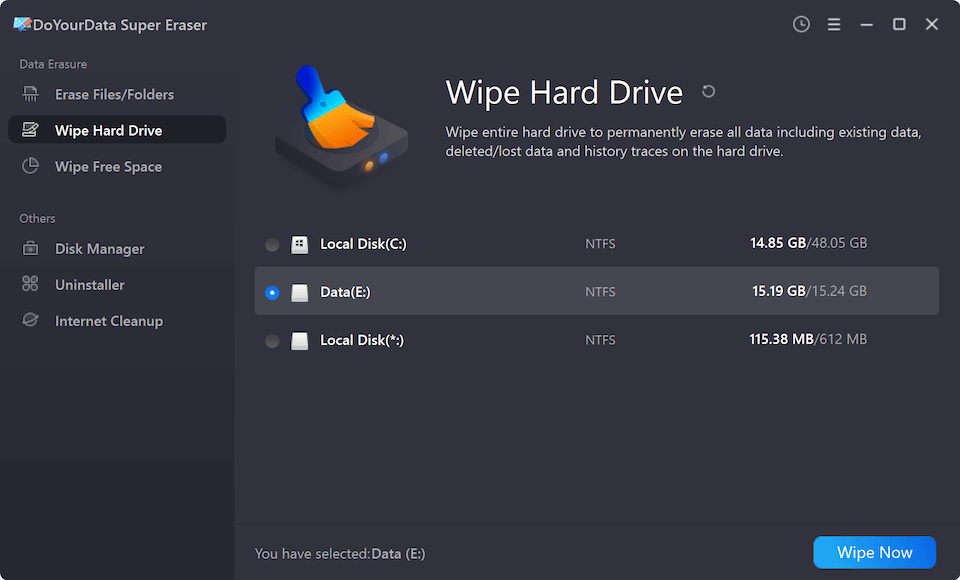
- Wipe Hard Drive: Erase an entire hard drive partition, secondary data drive, or external backup drive to clear all contents completely.
- Wipe Free Space: Clean unused disk space on active computers to destroy deleted file traces without disturbing existing operating system files or installed software.
Step 3: Select the Disk and Execute Erasure
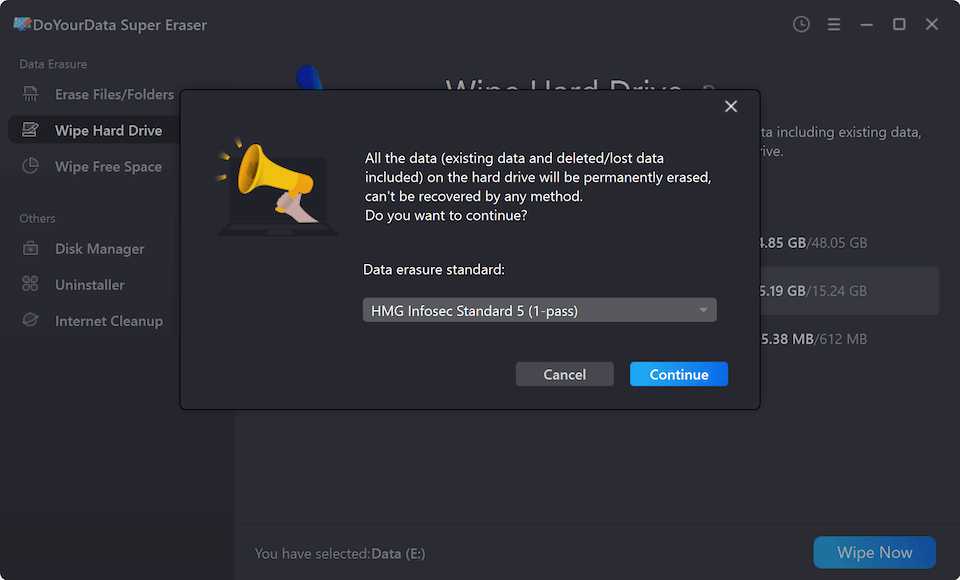
Select the targeted hard disk drive or partition, and click the 'Erase Now' button, choose your preferred wiping standard (e.g., DoD 5220.22-M). At last, click the 'Continue' button to start data wiping. DoYourData Super Eraser will overwrite all designated disk sectors, rendering previous data permanently unrecoverable.
FAQs about Wiping Data on Company Computers
Conclusion
Ensuring permanent data erasure for company computers is a critical security responsibility for every business. Standard file deletion leaves sensitive corporate data exposed, creating major compliance and financial risks. By using professional data wiping software like DoYourData Super Eraser, enterprise IT teams can confidently sanitize workstations, protect company intellectual property, and satisfy legal compliance standards.
Protect your business today. Download DoYourData Super Eraser to safely wipe company computers before disposal, recycling, or reallocation.

DoYourData Super Eraser
DoYourData Super Eraser, the award-winning data erasure software, offers certified data erasure standards including U.S. Army AR380-19, DoD 5220.22-M ECE to help you securely and permanently erase data from PC, Mac, HDD, SSD, USB drive, memory card or other device, make data be lost forever, unrecoverable!
Written & Updated by Shirly Chen
Shirly Chen has been writing data recovery, data erasure articles for DoYourData over 4 years. She has been working as a professional website content writer & editor for quite a long time. She also writes articles about disk clone, Mac optimization, disk backup, etc.