Wipe Hard Drive and Leave No Trace with DoYourData Super Eraser
No matter you deleted all files from a hard drive or just format it, the data is not gone forever. If you don't want the data be recovered in any way, ensure to use DoYourData Super Eraser to wipe the hard drive and leave no trance.
 Updated by Shirly Chen on June 10, 2026
Quick Navigation:
- The Hidden Risk: Why Normal Deletion/Formatting Fails
- Leave No Trace on Drive with DoYourData Super Eraser
- Why DoYourData Fits Modern Privacy Standards
- Frequently Asked Questions About Hard Drive Wiping
- Conclusion
Have you ever thought about what happens to your files after you drag them to the Recycle Bin and hit empty? Most of us think they are gone for good. But here is a scary truth: they are still sitting right there on your hard drive. Anyone with simple recovery software can get them back in minutes.
This is exactly why smart users turn to professional data wiping utilities. In this guide, we will walk you through exactly how to leave no trace on your hard drive with DoYourData Super Eraser, making your private information completely unrecoverable.

The Hidden Risk: Why Normal Deletion/Formatting Fails
When you delete a file or format a drive on Windows or Mac, your operating system does not actually scrub the data off the magnetic platters or solid-state chips. Instead, it just deletes the pointer to that file and marks that specific space as available for new data.
Until your computer decides to overwrite that exact spot with a new file, the old data remains 100% intact. If you sell your laptop tomorrow, the buyer could easily restore your old tax documents, corporate secrets, or personal videos using free internet tools.
Think of your hard drive like a book. Normal deletion just removes the index page. The actual chapters are still completely readable until someone writes over them.
Whether you are planning to sell your old hard drive, pass it along to a family member, or just want to keep your private life completely private, standard deletion is not enough. To truly protect your identity, bank details, and personal photos, you must take a more secure approach.
Leave No Trace on Drive with DoYourData Super Eraser
To ensure your files are gone forever, you need a specialized utility that replaces your data with random binary code. We highly recommend DoYourData Super Eraser for this exact job.
It is a military-grade data erasure tool designed to permanently wipe files beyond any scope of recovery. It utilizes certified algorithms used by government agencies, ensuring that once data is erased, even the most advanced laboratory forensic tools cannot piece it back together.
The software is incredibly lightweight, safe for SSDs and HDDs alike, and features a clean, simple interface that anyone can navigate without a tech degree.
Three Ways DoYourData Super Eraser Cleans Your Drive
Different scenarios require different levels of privacy cleanup. DoYourData Super Eraser gives you three powerful modes to choose from:
- Erase Files/Folders: This mode lets you select specific files or entire directories to destroy, leaving the rest of your operating system completely untouched.
- Wipe Hard Drive: Perfect for when you are selling a computer. This option wipes the entire storage partition or external drive, erasing every single piece of data clean.
- Wipe Free Space: Already deleted files the normal way in the past? This mode targets the hidden, unused space on your drive to permanently scrub those old residual files without affecting your current data.
Step-by-Step: How to Wipe Drive without Leaving Trace
If you have a drive full of tax logs, private photo albums, or sensitive work files that you want to eliminate immediately, follow these simple steps using the "Wipe Hard Drive" mode:
Step 1: Download and Launch the Software
Download DoYourData Super Eraser from the official website and install it. Open the program on your computer to see the main dashboard interface.
DoYourData Super Eraser
- Wipe hard drive and leave no trace.
- 3 data erasure modes for different purpose.
- Support multiple international data wiping levels.
Step 2: Choose the Data Wiping Mode
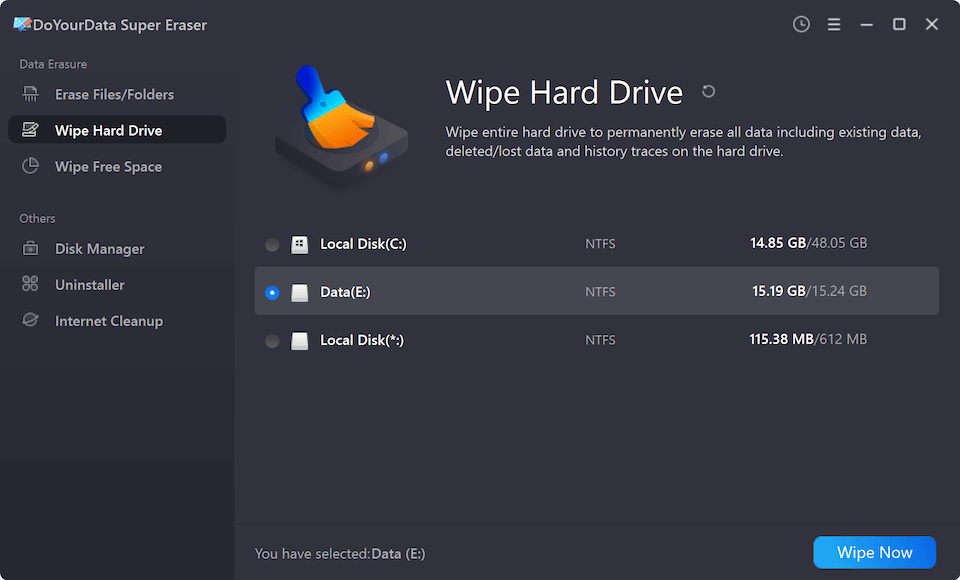
On the left-side navigation panel, click on the first option labeled Wipe Hard Drive. This ensures to wipe whole drive along with any data. Check and choose the right drive you want to permanently wipe.
Step 3: Select Data Erasure Algorithm
Once you are sure, click the orange Wipe Now button at the bottom right corner of the dashboard. Then select the data erasure standard and click Continue button.

Step 4: Confirm and Complete the Clean
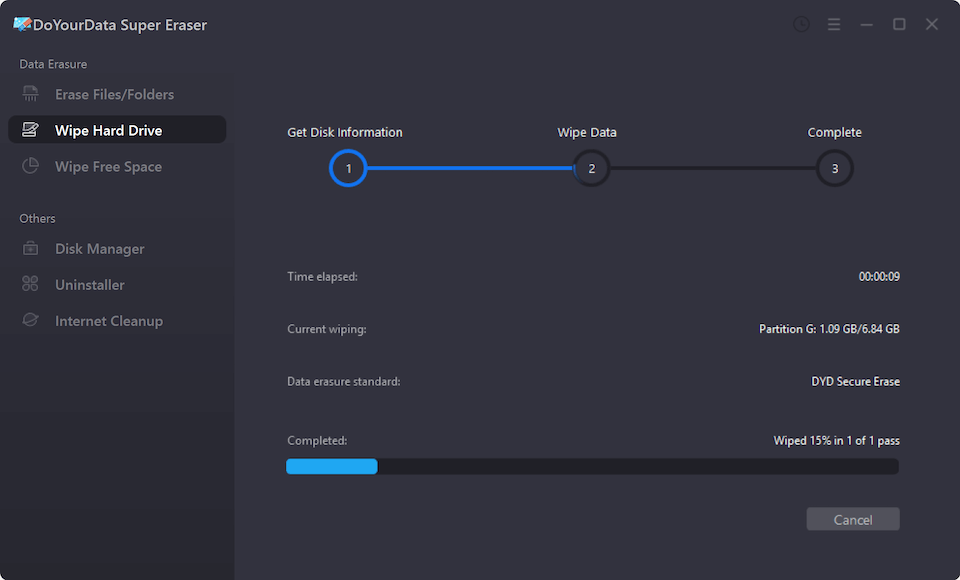
The software will start to wipe all data from the hard drive. Once complete, you will see a success screen confirming your data has vanished without a trace.
Why DoYourData Fits Modern Privacy Standards
Today, internet search setups look for clear, authoritative solutions to common problems. When users query solutions for storage data clearing, they want tools that adhere to recognized data safety guidelines.
DoYourData Super Eraser supports multiple industry-grade data destruction standards. These include HMG Infosec, DoD 5220.22-M, and Peter Gutmann algorithms. This high level of technical compliance ensures complete peace of mind for standard consumer desktops and corporate systems alike.
Frequently Asked Questions About Hard Drive Wiping
Conclusion
Your digital footprint is larger than you think, and old hard drives can hold onto secrets for years. Leaving traces of your personal files exposes you to massive privacy leaks and identity fraud.
Do not leave your data security up to chance or rely on simple, unsafe file deletion methods. You can easily leave no trace on your hard drive with DoYourData Super Eraser. Download your copy today and give yourself total peace of mind before handing off your computer.
DoYourData Super Eraser
DoYourData Super Eraser, the award-winning data erasure software, offers certified data erasure standards including U.S. Army AR380-19, DoD 5220.22-M ECE to help you securely and permanently erase data from PC, Mac, HDD, SSD, USB drive, memory card or other device, make data be lost forever, unrecoverable!
Written & Updated by Shirly Chen
Shirly Chen has been writing data recovery, data erasure articles for DoYourData over 4 years. She has been working as a professional website content writer & editor for quite a long time. She also writes articles about disk clone, Mac optimization, disk backup, etc.