How to Use DoYourData Super Eraser to Wipe Computer Data Safely
If you give away or sell a computer without properly wiping it, strangers can easily recover your personal data. To prevent privacy risks and potential identity theft, you can use DoYourData Super Eraser to permanently wipe data first.
 Updated by Shirly Chen on August 28, 2026
Quick Navigation:
- What Is DoYourData Super Eraser
- How the Data Erasure Algorithms Work
- How to Use DoYourData Super Eraser
- Important Tips Before You Wipe Computer Data
- Extra Tools Included in DoYourData Super Eraser
- FAQs about Wiping Data with Super Eraser
- Final Thoughts
Many computer users assume that deleting a file or formatting a hard drive permanently removes the data. Unfortunately, operating systems like Windows and macOS do not work that way. Simply deleting files or dragging them to the Recycle Bin or Trash is not enough. Anyone with standard data recovery software can bring those files back in minutes.
Are you planning to sell your old laptop, donate a used desktop, or clear out confidential personal files? Before you pass your computer to someone else, you must ensure your private information is completely gone.

To protect your financial records, photos, work documents, and passwords, you need a professional data erasure tool. This detailed guide shows you how to use DoYourData Super Eraser to wipe computer data permanently, making it 100% unrecoverable while keeping your hardware completely safe.
What Is DoYourData Super Eraser
DoYourData Super Eraser is a powerful, user-friendly data wiping software available for both Windows and Mac platforms. It is specifically designed to render files and storage devices completely unrecoverable by overwriting data with certified military and government standards.
DoYourData Super Eraser
- Securely wipe data permanently from different drives.
- Support multiple certified data erasure algorithms.
- Shred files and erase data to prevent data recovery.
Whether you need to shred a few private tax documents or completely clean a secondary internal or external drive, DoYourData Super Eraser provides an easy DIY solution without complex technical commands.
Key Features of DoYourData Super Eraser
- Flexible Erasure Modes: Offers three flexible wiping modes to fit every cleanup scenario.
- Military-Grade Algorithms: Uses international data destruction standards, including U.S. Army AR380-19, DoD 5220.22-M, and Peter Gutmann 35-pass wiping.
- 100% Safe for Hardware: Wipes data safely without causing physical harm to HDDs, SSDs, or external media.
- Broad Device Compatibility: Allows you to clean SSDs, mechanical hard drives, USB flash drives, SD cards, and digital camera storage.
- Erasure Reports: Generates logs so you can verify and keep records of completed data wipe operations.
Why Data Erasure Works: Certified data erasure replaces original data patterns with random binary zeros and ones. Once overwritten by DoYourData Super Eraser, no recovery software or forensic specialist can ever retrieve your files.
How the Data Erasure Algorithms Work
When you use DoYourData Super Eraser to wipe computer data, the program overwrites every selected storage sector with structured binary data. By replacing your readable files with randomized code patterns, the original information is destroyed forever.
The software supports several recognized data erasure standards. For instance:
- HMG Infosec Standard 5 (1 Pass): Overwrites data in a single pass. Fast and effective for basic daily cleanup.
- U.S. DoD 5220.22-M (3 Passes): Overwrites data across 3 secure passes. The standard choice for commercial and government data sanitization.
- U.S. Army AR380-19 (3 Passes): Uses a 3-pass sanitization standard designed for military-level security.
- Peter Gutmann Standard (35 Passes): A highly thorough 35-pass overwrite standard designed for maximum security on magnetic storage.
How to Use DoYourData Super Eraser
DoYourData Super Eraser is built with a clean, intuitive layout. You don't need advanced IT knowledge to run it. Follow the steps below for the three main wiping modes.
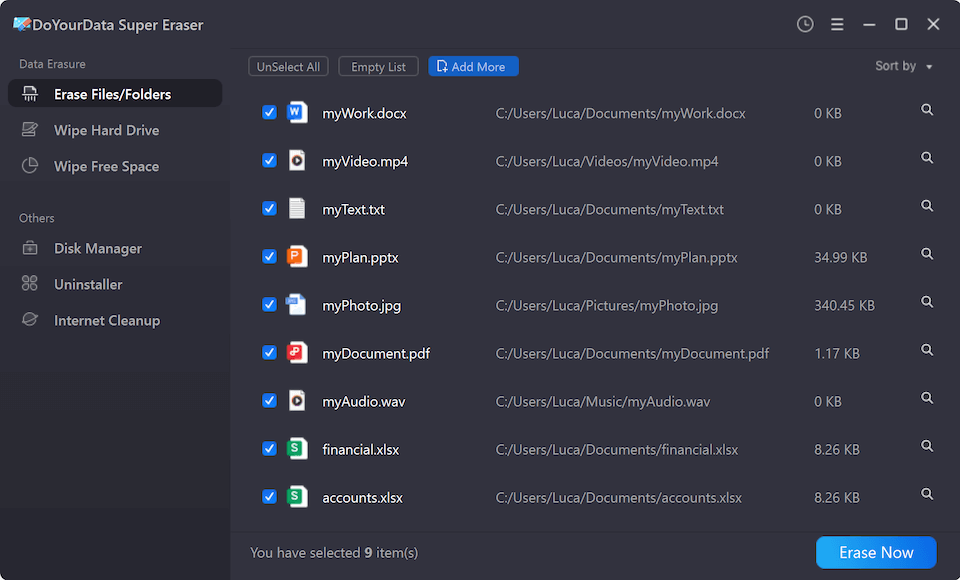
Mode 1: Erase Specific Files and Folders
Use this mode when you want to shred specific confidential files (like bank records or tax documents) without wiping the rest of your computer drive.
Step 1: Download and install DoYourData Super Eraser on your PC or Mac.
Step 2: Launch the software and choose Erase Files/Folders from the left-hand menu.
Step 3: Click the Add button to select the files or folders you wish to delete forever.
Step 4: Click Erase Now. A prompt will ask you to select the data wiping method. Click Continue to start the destruction process.
Mode 2: Wipe Entire Hard Drive Partition or External Media
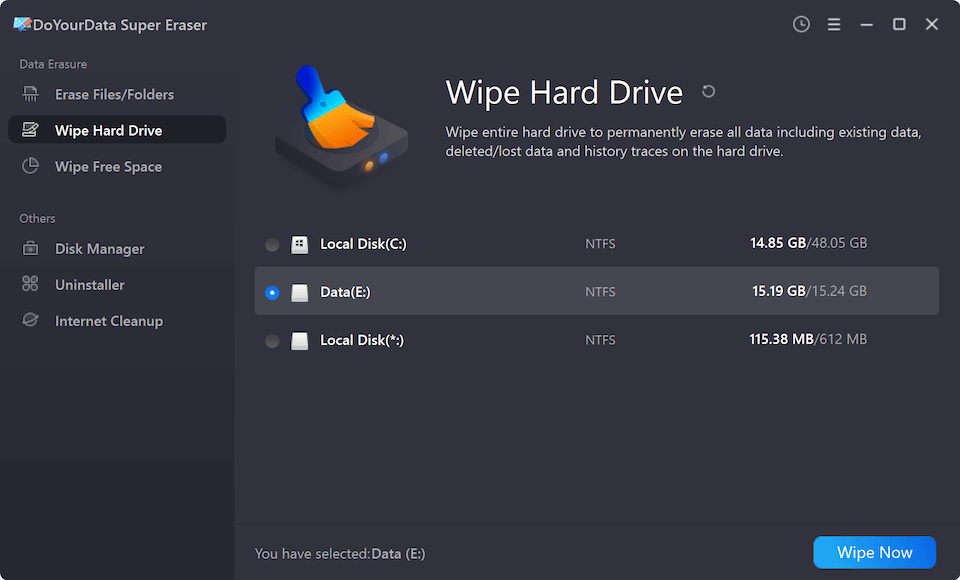
Use this mode when you want to erase an entire partition, USB flash drive, external hard drive, or memory card prior to selling or giving it away.
Step 1: Select Wipe Hard Drive from the main interface.
Step 2: Choose the hard drive partition, USB drive, or SD card you want to completely erase.
Step 3: Click Wipe Now, confirm your data erasure standard selection, and let the software overwrite all existing and historical data.
Mode 3: Wipe Free Space to Clear Previously Deleted Files
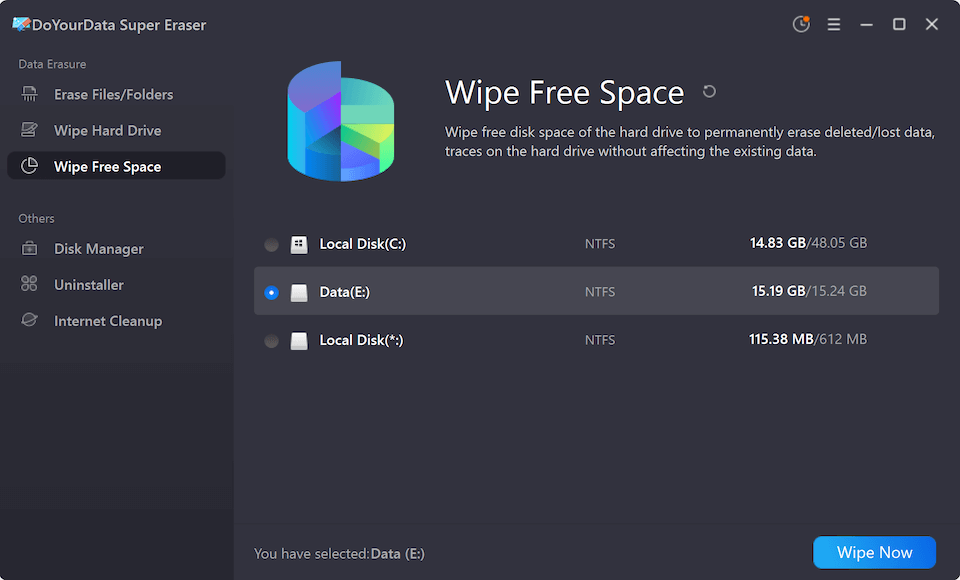
If you already deleted files using the normal Windows or Mac delete option, those files still linger in your system's unused space. This mode cleans the free space without deleting your existing operational files.
Step 1: Select Wipe Free Space from the menu.
Step 2: Select the hard drive or partition you want to clean.
Step 3: Click Wipe Now. The software will overwrite the empty storage areas by the selected data wiping algorithm, destroying all hidden traces of previously deleted files while keeping your current system intact.
Comparison: Choosing the Right Data Wiping Mode
To help you quickly decide which option best fits your situation, here is a breakdown of the three core modes in DoYourData Super Eraser:
| Wiping Mode | Best For | Impact on Existing Files |
|---|---|---|
| Erase Files/Folders | Targeted shredding of sensitive docs, photos, or business spreadsheets. | Deletes ONLY the selected files/folders. |
| Wipe Hard Drive | Complete cleanup of secondary drives, USBs, SD cards before selling. | Erases ALL data on the selected partition/drive. |
| Wipe Free Space | Cleaning leftover traces of files deleted via standard Trash/Recycle Bin. | SAFE: Keeps existing files completely intact. |
Important Tips Before You Wipe Computer Data
Data erasure with DoYourData Super Eraser is 100% irreversible. Once the process is finished, no software or recovery company can retrieve your files. Follow these precautionary steps before starting:
- Create a Complete Backup: Copy important photos, business documents, and system backups to an external hard drive or secure cloud storage before wiping.
- Verify Drive Selection: Double-check the target drive letter or partition to avoid accidentally wiping the wrong drive.
- Keep Power Connected: Ensure your laptop is plugged into a power source so the wiping process is not interrupted.
- Close Background Apps: Turn off active antivirus scans temporarily if they interfere with disk-writing tasks.
Extra Tools Included in DoYourData Super Eraser
Besides its primary data destruction modes, DoYourData Super Eraser comes packed with useful system tools to keep your computer running smoothly:
- Disk Manager: Helps scan damaged storage devices, format partition file systems (FAT32, exFAT, NTFS), and fix logical disk errors.
- Software Uninstaller: Completely removes unwanted software and cleans up leftover installation files and registry traces.
- Internet Cleanup: Clears browser caches, cookies, and online search history across all installed web browsers to protect your privacy.
FAQs about Wiping Data with Super Eraser
Final Thoughts:
When disposing of an old PC, selling a laptop, or recycling external hard drives, standard deletion is not enough. Taking proactive steps to sanitize your storage devices is essential in today's digital world.
When you use DoYourData Super Eraser to wipe computer data, you get military-grade security combined with a simple, three-step process. Protect your personal records, photos, and sensitive documents from unauthorized recovery today. Download DoYourData Super Eraser for Windows or Mac and enjoy total privacy peace of mind.

DoYourData Super Eraser
DoYourData Super Eraser, the award-winning data erasure software, offers certified data erasure standards including U.S. Army AR380-19, DoD 5220.22-M ECE to help you securely and permanently erase data from PC, Mac, HDD, SSD, USB drive, memory card or other device, make data be lost forever, unrecoverable!
Written & Updated by Shirly Chen
Shirly Chen has been writing data recovery, data erasure articles for DoYourData over 4 years. She has been working as a professional website content writer & editor for quite a long time. She also writes articles about disk clone, Mac optimization, disk backup, etc.