DoYourData Super Eraser Free Data Erasure Software: Securely Wipe Data
Free to download the software DoYourData Super Eraser for data wiping. With the software, it's easy and safe to shred files or erase data permanently. It can guarantee the wiped data will not be recovered in any way.
 Updated by Shirly Chen on August 25, 2026
Quick Navigation:
- What Is DoYourData Super Eraser Free Data Erasure Software?
- 3 Flexible Data Erasure Modes Provided by Super Eraser
- Certified Data Wiping Algorithms You Can Trust
- How to Use DoYourData Super Eraser: A Step-by-Step Guide
- Key Advantages of Choosing DoYourData Super Eraser
- FAQs about DoYourData Free Data Erasure Software
- Conclusion
Have you ever wondered what really happens when you drag a private document to your Recycle Bin or Trash and hit empty? Most people assume those files are destroyed forever. However, the truth might surprise you.
When you delete a file, your operating system does not actually wipe the data from your drive. Instead, it simply removes the file reference pointer and marks that storage space as available. Until new data overwrites that exact spot, your sensitive files remain completely intact.
Anyone equipped with a basic, free data recovery tool can restore your photos, financial records, and personal documents within minutes. That is why relying on standard deletion puts your digital privacy at continuous risk. This is precisely where DoYourData Super Eraser free data erasure software comes to your rescue.
What Is DoYourData Super Eraser Free Data Erasure Software?
DoYourData Super Eraser is a powerful, professional-grade data sanitization utility designed to destroy unwanted files, wipe deleted files, or wipe an entire drive beyond any possibility of recovery.
DoYourData Super Eraser
- Free to download and shred some files/folders.
- Professional data erasure software for Windows and Mac.
- Permanently wipe data to prevent data recovery.
Unlike standard deletion tools, Super Eraser overwrites the underlying binary storage sectors with zero bytes or random code patterns. Once overwritten, no data recovery software, hardware forensic laboratory, or technical specialist can bring your information back to life.
Whether you are preparing to sell an old computer, donate a laptop, give away an old drive, or pass a USB drive to a friend, Super Eraser ensures your private life remains completely confidential.
Trial Version vs. Professional License: Understanding Your Options
To help users experience the speed and reliability of permanent data destruction, DoYourData provides flexible options tailored to different user needs.
| Feature / Capability | Free Trial Version | Professional License |
|---|---|---|
| File & Folder Shredding | Free to shred a few selected files/folders | Unlimited file & folder shredding |
| Full Hard Drive / Partition Wiping | Requires upgrade to Pro license | Unlimited full drive and partition wiping |
| Wipe Free Disk Space | Requires upgrade to Pro license | Unlimited wiping of already deleted data |
| Technical Support & Updates | Basic support | Free updates and priority support |
With the trial version of DoYourData Super Eraser, you can free to shred a few files or folders to test its capabilities and guarantee peace of mind. If you want to wipe more data or drive, professional license is required to unlock full unlimited access.
3 Flexible Data Erasure Modes Provided by Super Eraser
DoYourData Super Eraser offers three versatile modules designed for specific privacy protection scenarios:
Mode 1. Erase Files & Folders
This mode allows you to handpick specific files or entire directories for instant destruction. It is perfect when you need to destroy tax forms, bank statements, or confidential business sheets without affecting other data on your computer.
Mode 2. Wipe Hard Drive
When you need to clean an entire partition, external hard disk, USB drive, or SD card, this mode formats and overwrites all existing and hidden files. It is an ideal choice before selling or recycling old storage hardware.
Mode 3. Wipe Free Space
Even if you deleted files months ago using normal methods, their residual traces still sit in your drive's unallocated free space. This mode scans and overwrites empty disk sectors, permanently locking down your past activity while leaving your active files safe.
Certified Data Wiping Algorithms You Can Trust
To ensure absolute security, DoYourData Super Eraser implements internationally recognized data destruction standards. These military-grade algorithms ensure that erased information is rendered 100% unrecoverable.
- HMG IS5 (1 pass): A fast overwriting standard ideal for quick daily cleanups.
- U.S. Army AR380-19 (3 passes): A robust military-standard wipe for enhanced privacy.
- DoD 5220.22-M ECE (7 passes): A widely adopted government-grade sanitization algorithm.
- Peter Gutmann (35 passes): The ultimate high-security erasure method for extreme data sensitivity.
How to Use DoYourData Super Eraser: A Step-by-Step Guide
Erasing data securely does not require complex technical skills. Follow these simple steps to permanently delete your files using DoYourData Super Eraser:
Step 1: Download and install DoYourData Super Eraser on your Windows PC or Mac computer.
Step 2: Launch the program and select your preferred mode. For example, you can choose the mode Erase Files/Folders to permanently shred specified files and folders.
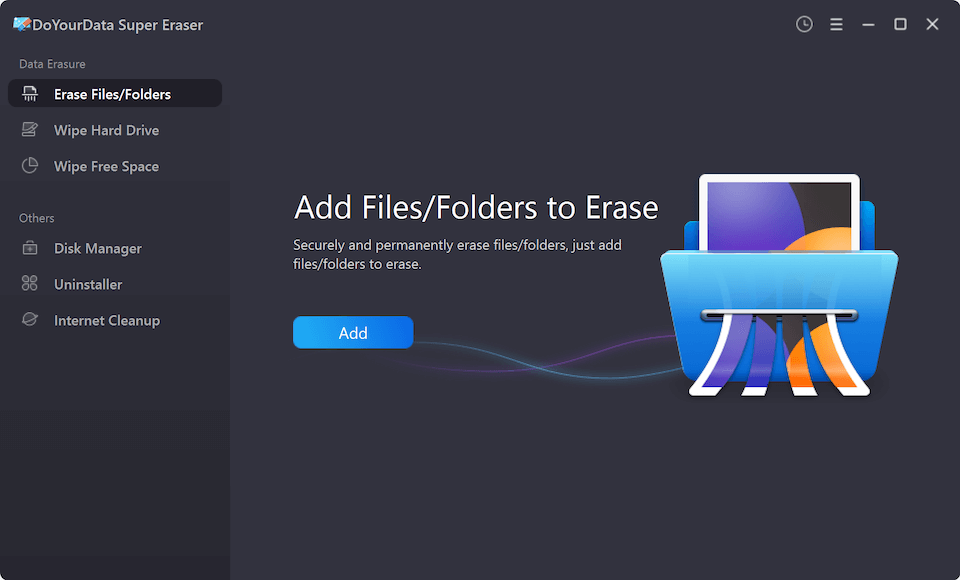
Step 3: Click 'Add' to choose the targeted files or folders you wish to remove.
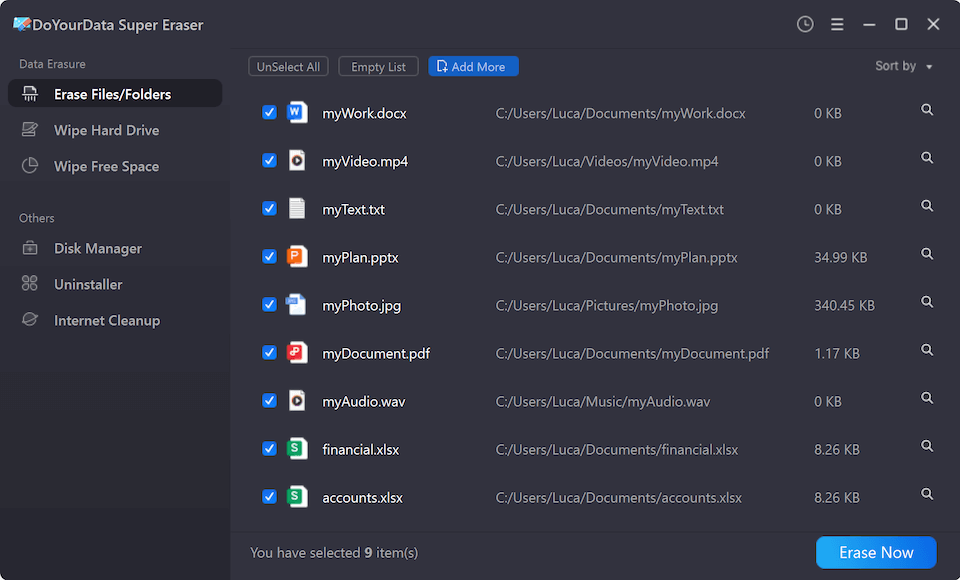
Step 4: Click the 'Erase Now' button. There will be a pop-up window appears. Check and select a data erasure algorithm for data erasing.
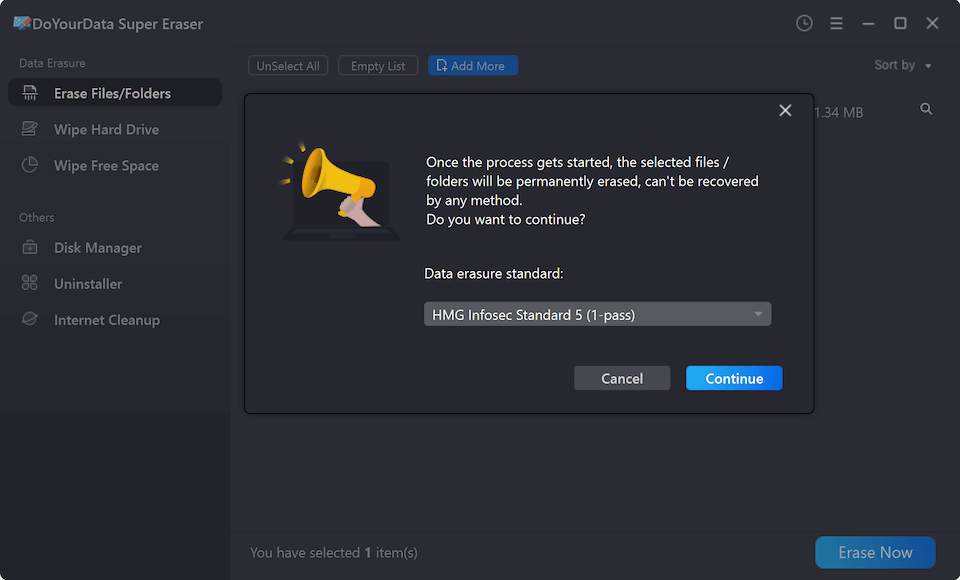
Step 5: Click the 'Continue' button to confirm your choice and start file shredding. The software will securely shred the selected items immediately.
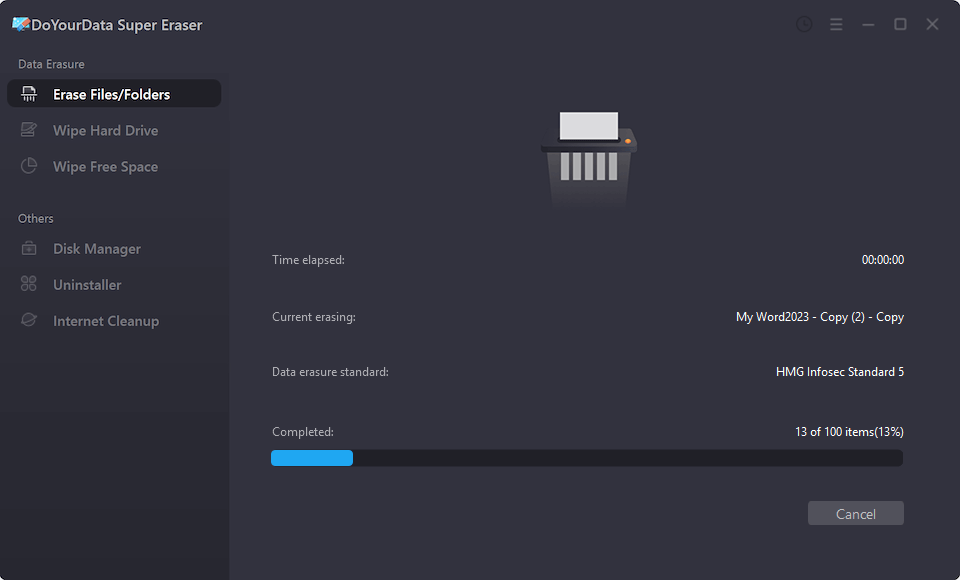
Key Advantages of Choosing DoYourData Super Eraser
- 100% Safe Operation: Permanently wipes data without causing physical wear or logic damage to your storage devices.
- Universal Compatibility: Supports Windows 11/10/8/7/Vista and macOS (including Apple Silicon M1/M2/M3/M4/M5 chips).
- Wide Device Support: Works seamlessly on HDDs, SSDs, USB flash drives, memory cards, digital cameras, and RAID servers.
- Beginner-Friendly Interface: Simple, intuitive navigation designed for users of all technical levels.
FAQs about DoYourData Free Data Erasure Software
Conclusion
Protecting your digital privacy should always be a top priority. Simple file deletion leaves hidden traces that put your personal records at risk.
By choosing DoYourData Super Eraser free data erasure software, you can effortlessly destroy unwanted files beyond recovery. Download the trial version today to shred your files for free, or upgrade to the professional version for complete storage sanitization!

DoYourData Super Eraser
DoYourData Super Eraser, the award-winning data erasure software, offers certified data erasure standards including U.S. Army AR380-19, DoD 5220.22-M ECE to help you securely and permanently erase data from PC, Mac, HDD, SSD, USB drive, memory card or other device, make data be lost forever, unrecoverable!
Written & Updated by Shirly Chen
Shirly Chen has been writing data recovery, data erasure articles for DoYourData over 4 years. She has been working as a professional website content writer & editor for quite a long time. She also writes articles about disk clone, Mac optimization, disk backup, etc.