How to Wipe All Data from Western Digital External Drive Permanently
Standard formatting or deleting files leaves raw sectors recoverable by commercial software like Do Your Data Recovery. How to permanently erase all files from WD external hard drives (My Passport, Elements, EasyStore, My Book) beyond data recovery? Use professional data destruction software like DoYourData Super Eraser to overwrite sectors with international standards (U.S. DoD 5220.22-M, Peter Gutmann 35 passes). The software works seamlessly across Windows 11/10/8/7 and macOS Golden Gate, Tahoe, Sequoia, etc.
 Updated by Shirly Chen on September 30, 2026
Quick Navigation:
- Understanding Deleting vs. Formatting vs. Permanent Wiping
- How to Permanently Wipe Western Digital External Drive
- Alternative Methods: Using Native System Tools
- Comparison of WD External Drive Erasure Methods
- FAQs about Wiping Western Digital External Drive
- Final Verdict
Western Digital (WD) external hard drives—such as WD My Passport, WD Elements, WD My Book, and WD EasyStore—are among the most popular storage devices worldwide. Whether you use them for system backups, photo archives, or work projects, these drives store a tremendous amount of sensitive personal and financial information.
When the time comes to sell, donate, return, or dispose of your WD external drive, simply dragging files to the Recycle Bin or performing a quick format is not enough. Standard formatting only deletes the file system index while leaving the actual data raw and intact on the disk sectors. Anyone using basic data recovery software can easily retrieve your confidential files in minutes.
To protect your privacy completely, you must permanently destroy the underlying data beyond any possibility of recovery. In this comprehensive guide, you will learn how to wipe all data from Western Digital external drive permanently on both Windows and Mac using military-grade data erasure standards.
Understanding Deleting vs. Formatting vs. Permanent Wiping
Many drive owners assume that deleting files or reformatting a hard drive completely cleans it. However, from a computer forensics standpoint, these operations work very differently:
- Deleting Files: Moves files to the Trash or Recycle Bin. Even after emptying the bin, the binary data remains fully stored on the physical disk magnetic platters or flash memory blocks.
- Quick or Full Formatting: Resets the file allocation table (NTFS, FAT32, APFS, or exFAT) and checks for bad sectors, but it does not overwrite the actual disk sectors containing your private files.
- Permanent Data Wiping: Overwrites every single storage sector on the drive with binary zeroes, ones, or random pseudo-patterns multiple times. Once overwritten, the original data is permanently destroyed and 100% unrecoverable.
How to Permanently Wipe Western Digital External Drive
The most reliable and user-friendly way to permanently overwrite and wipe all data from a Western Digital external drive is using professional data erasure software. DoYourData Super Eraser is designed specifically for this purpose, offering military-grade algorithms that guarantee 0% chance of data recovery.
Why Choose DoYourData Super Eraser?
- Certified Overwrite Algorithms: Supports recognized wiping standards including U.S. Army AR380-19, DoD 5220.22-M (3 passes), DoD 5220.22-M (ECE), and Peter Gutmann (35 passes).
- Complete WD Series Compatibility: Fully supports all Western Digital models, including WD My Passport, WD Elements, WD EasyStore, WD My Book, and WD Game Drive.
- Flexible Erasure Modes: Erase specific files/folders, wipe entire hard drive partitions, or sanitize free disk space without affecting existing operating system files.
- Safe for Storage Hardware: Overwrites storage sectors safely without causing physical harm or degrading drive lifespan.
Step-by-Step Guide: Wiping an Entire WD External Drive
Follow these simple steps to erase your Western Digital drive completely:
Step 1: Download and install DoYourData Super Eraser on your Windows PC or Mac computer. Connect your Western Digital external drive via USB cable.
DoYourData Super Eraser
- Safe and effective data erasure software.
- Compatible with Windows and Mac operating systems.
- Permanently wipe data to prevent data recovery.
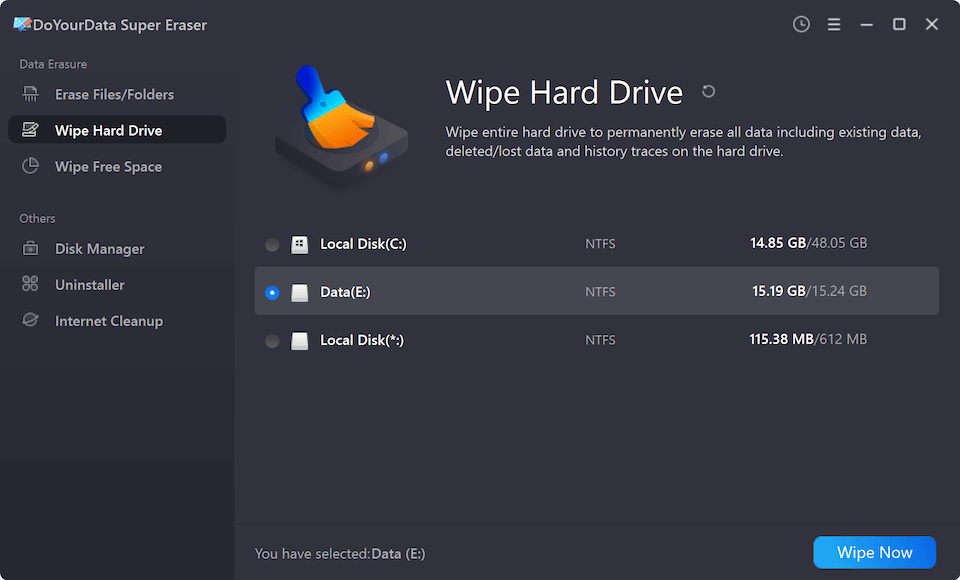
Step 2: Launch the program and select the 'Wipe Hard Drive' mode from the left sidebar. Choose your connected Western Digital external drive from the list of available disks, then click the 'Wipe Now' button.
Step 3: Check and select a data erasure standard. There are multiple certified data wiping algorithms supported. Any algorithm can ensure permanent data erasure.
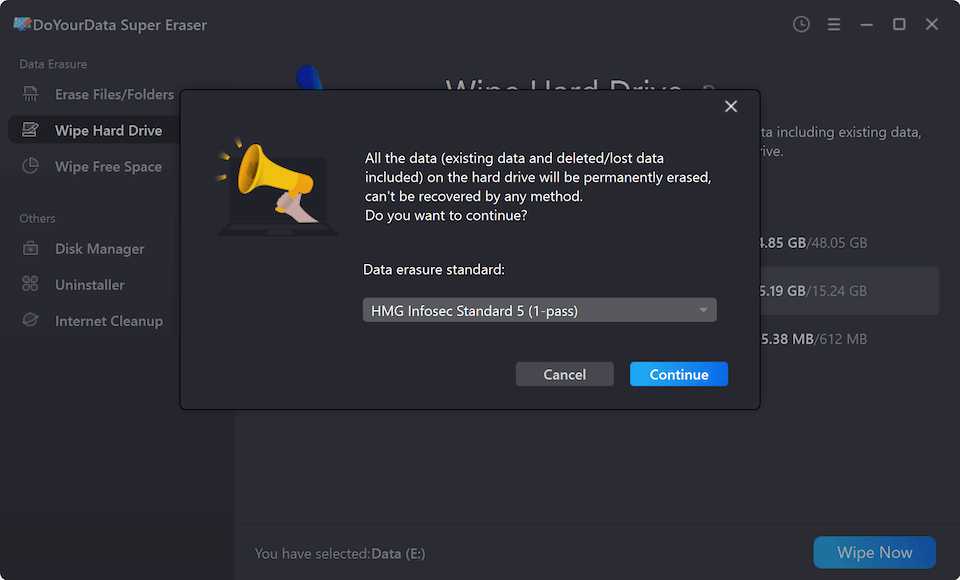
Step 4: Confirm the operation and click on 'Continue' button to start wiping. The software will perform a deep, sector-by-sector overwrite process across the entire drive.
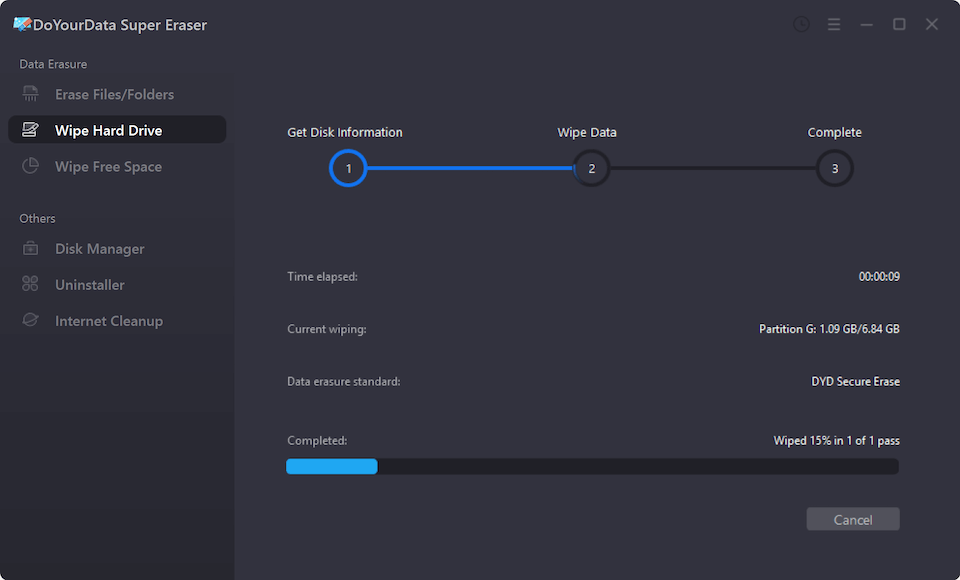
Once the process completes, your Western Digital drive will be completely sanitized. All photos, documents, financial logs, and videos will be permanently destroyed beyond recovery.
Alternative Methods: Using Native System Tools
If you prefer to use native operating system utilities, both Windows and macOS offer built-in tools that can zero-fill or format your external hard drive.
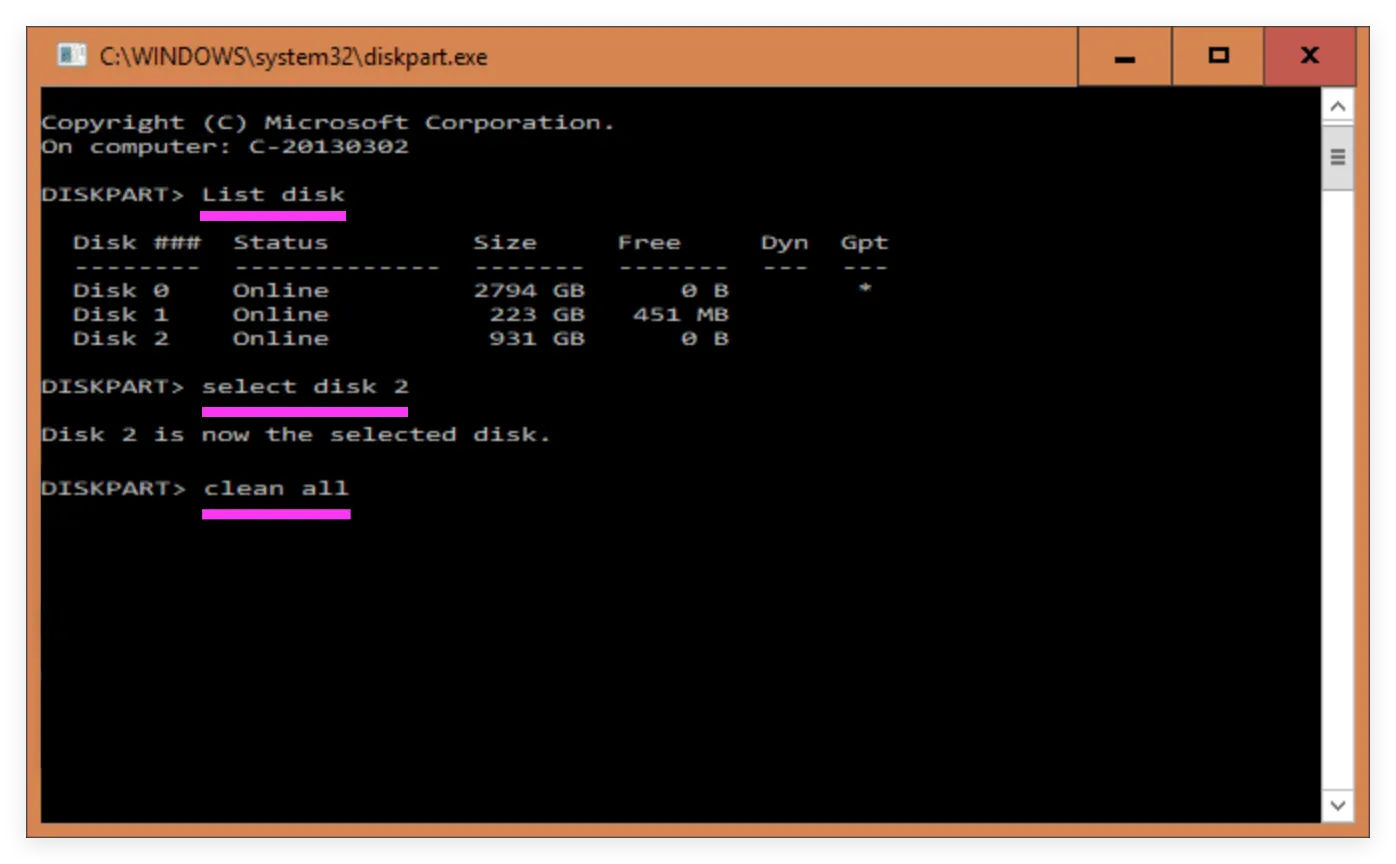
Windows includes a built-in command-line tool called DiskPart. The 'clean all' command writes zero fills to every sector on the target drive:
- Connect your WD external drive to your PC.
- Press 'Win + R', type '
cmd', and press 'Ctrl + Shift + Enter' to run as Administrator. - Type '
diskpart' and press Enter. - Type '
list disk' to display all connected drives. Identify your WD drive number (e.g., Disk 1 or Disk 2). - Type '
select disk X' (replace X with your WD drive number). - Type '
clean all' and press Enter. (This process takes several hours depending on drive capacity).
Comparison of WD External Drive Erasure Methods
Here is a breakdown comparing standard deletion, native OS formatting, and DoYourData Super Eraser:
| Method | Erasure Depth | Data Recovery Potential | Ease of Use | Recommended Use Case |
|---|---|---|---|---|
| File Deletion | Surface level index update | 100% Recoverable | Very Easy | Daily file organizing |
| Quick Format | File system header reset | 90% Recoverable | Very Easy | Re-purposing personal drives |
| DiskPart | Single / multi-pass zero fill | Unlikely (Very Hard) | Moderate / Slow | Basic manual clean |
| DoYourData Super Eraser | Military-grade sector overwrite | 0% Recoverable (Permanent) | Very Easy | Selling, donating, recycling WD drives |
FAQs about Wiping Western Digital External Drive
Final Verdict
Protecting your private information should always be your top priority before parting ways with a storage device. Simply deleting files or reformatting your Western Digital external drive leaves your personal photographs, business credentials, and financial files vulnerable to data recovery software.
By utilizing DoYourData Super Eraser, you can wipe all data from Western Digital external drive permanently with confidence. Download DoYourData Super Eraser today, sanitize your WD hard drive safely, and protect your digital privacy completely!

DoYourData Super Eraser
DoYourData Super Eraser, the award-winning data erasure software, offers certified data erasure standards including U.S. Army AR380-19, DoD 5220.22-M ECE to help you securely and permanently erase data from PC, Mac, HDD, SSD, USB drive, memory card or other device, make data be lost forever, unrecoverable!
Written & Updated by Shirly Chen
Shirly Chen has been writing data recovery, data erasure articles for DoYourData over 4 years. She has been working as a professional website content writer & editor for quite a long time. She also writes articles about disk clone, Mac optimization, disk backup, etc.