DoYourData Super Eraser - KillDisk Data Erasure: Guide & Comparison
If you want an easy and professional data erasure solution, DoYourData Super Eraser is the best choice for you. The software is intuitive for home users and the certified data erasure algorithms can help you permanently wipe data to prevent data recovery and data leakages.
 Updated by Shirly Chen on August 3, 2026
Quick Navigation:
- What Is Permanent Data Erasure?
- Deep Dive: DoYourData Super Eraser Features
- Deep Dive: Active@ KillDisk Data Erasure Features
- DoYourData Super Eraser vs. KillDisk Data Erasure
- Step-by-Step: How to Permanently Erase Data with DoYourData Super Eraser
- FAQs about DoYourData and KillDisk Data Erasure
- Conclusion
When you delete a file on your computer, drag it to the Recycle Bin or Trash, and empty it, you might feel that your private files are gone forever. However, standard operating system deletion methods do not destroy your underlying files. They simply remove the reference pointer to that data, leaving the actual file contents intact on your hard drive or solid-state drive until overwritten.
If you plan to sell your computer, recycle an old external drive, or dispose of sensitive financial records, standard deletion puts your privacy at risk. Unrecoverable data destruction requires professional wiping software. This is why tools like DoYourData Super Eraser - KillDisk data erasure solutions are in high demand.
In this detailed guide, we will analyze DoYourData Super Eraser alongside KillDisk data erasure, explore how certified sanitization algorithms work, and provide step-by-step instructions on permanently wiping sensitive data from your Windows or Mac or other storage devices.
What Is Permanent Data Erasure?
Permanent data erasure, also known as data sanitization or file shredding, is a software-based method of overwriting storage sectors with random character patterns, binary zeros, and ones. Unlike simple formatting, certified data erasure ensures that data recovery software cannot retrieve any deleted information.
Both DoYourData Super Eraser and KillDisk utilize military-grade data erasure algorithms to overwrite storage locations multiple times. These standards include:
- HMG Infosec Standard 5 (1 Overwriting round)
- Peter Gutmann's algorithm 2 (2 Overwriting rounds)
- U.S. Army AR380-19 (3 Overwriting rounds)
- DoD 5220.22-M ECE (7 Overwriting rounds)
- Peter Gutmann's algorithm 35 (35 Overwriting rounds).
Deep Dive: DoYourData Super Eraser Features
DoYourData Super Eraser is a modern, user-friendly data wiping tool engineered for both Windows and Mac platforms. It provides an accessible interface designed for home users, small business owners, and IT professionals who need fast, guaranteed file destruction without navigating complicated technical scripts.
DoYourData Super Eraser
- Top-class data erasure software for Windows and Mac.
- Easy to use for home and technical users.
- Permanently wipe data with certified algorithms.
Here are the main highlights of DoYourData Super Eraser:
- Erase Files/Folders: Selective File & Folder Shredding: Allows you to pick specific confidential documents, tax forms, or photo folders and erase them permanently without affecting the rest of your drive.
- Wipe Hard Drive: Drive & Partition Wiping: Completely overwrites entire hard drive partitions, USB flash drives, memory cards, or external HDDs/SSDs in one click.
- Wipe Free Space: Clean Previously Deleted Files: Overwrites the unused 'free space' on your hard drive to permanently destroy files you previously deleted using standard Windows or Mac commands.
- Privacy Cleaning Tools: System Privacy Utilities: Includes built-in tools to clean browser history, cookies, temporary system files, and uninstall unwanted software.
Deep Dive: Active@ KillDisk Data Erasure Features
Active@ KillDisk is a legacy data erasure utility widely known in corporate IT environments. It is designed primarily for enterprise disk wiping and bare-metal server sanitization.
Key characteristics of KillDisk data erasure include:
- Bootable Disk Media: Allows creation of bootable USB drives or ISO images to wipe system disks without booting into the operating system.
- Multi-Disk Parallel Wiping: Supports sanitizing multiple physical hard drives or RAID arrays simultaneously.
- Enterprise Customization: Provides customizable PDF erasure certificates and automated command-line batch modes.
DoYourData Super Eraser vs. KillDisk Data Erasure
When evaluating DoYourData Super Eraser - KillDisk data erasure solutions, selecting the right software depends on your specific technical needs and comfort level.
💡 Comparison Insight
Key Takeaway for Everyday Users: While Active@ KillDisk excels in IT enterprise labs requiring command-line scripting and bootable environments, DoYourData Super Eraser offers a far more modern, intuitive desktop GUI. It enables ordinary users to shred specific files, wipe external USB drives, or clean free space without complex configurations.
Feature Comparison Table
Here is a side-by-side comparison of DoYourData Super Eraser and KillDisk data erasure software:
| Feature / Requirement | DoYourData Super Eraser | Active@ KillDisk |
|---|---|---|
| User Interface | Modern, 1-Click Graphical Interface | Technical / Enterprise-focused |
| Selective File & Folder Erasure | Yes (Easy Drag & Drop) | Limited in basic versions |
| Wipe Free Space Only | Yes (Preserves existing files) | Yes |
| Cross-Platform (Win/Mac) | Fully Supported (Windows & Mac) | Windows, Linux, MacOS X |
| Ease of Use for Beginners | Very High (No training needed) | Moderate to Technical |
Step-by-Step: How to Permanently Erase Data with DoYourData Super Eraser
If you want to erase private files or sanitize a storage drive, follow this easy step-by-step tutorial using DoYourData Super Eraser.
Step 1: Download and Install Software
Download DoYourData Super Eraser from the official DoYourData website for Windows or Mac. Install the application by following the standard setup wizard.
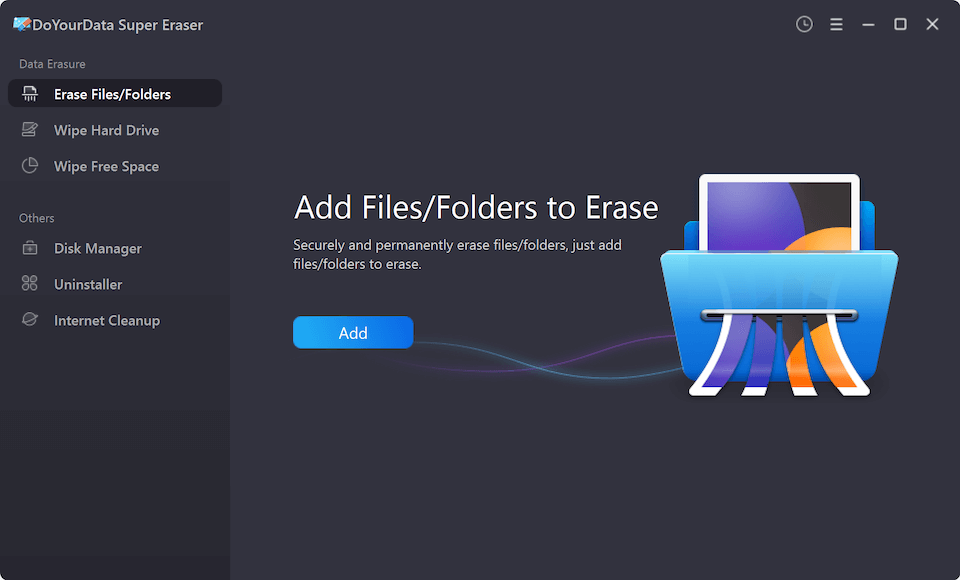
Step 2: Choose an Erasure Mode
Launch the software. Select one of the three erasure modes from the main menu:
- Erase Files/Folders (for specific files or directories)
- Wipe Hard Drive (for complete drive or USB wiping)
- Wipe Free Space (to permanently clear deleted file traces)
Step 3: Select Your Target Files or Drive
If you chose File/Folder mode, click 'Add' or drag and drop your private files into the program. If you chose Drive mode, select the specific partition or external USB drive.
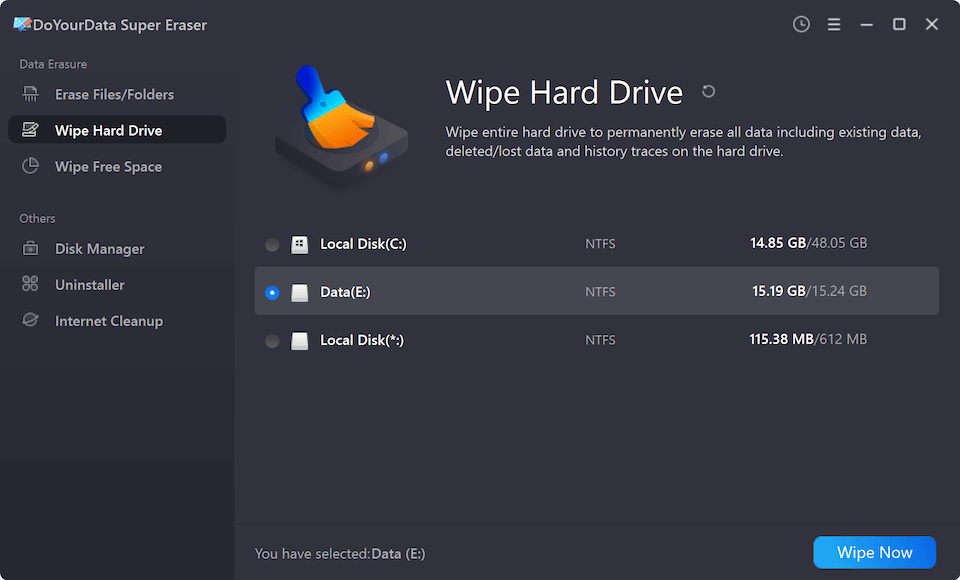
Step 4: Select Your Erasure Algorithm
After clicking the Erase Now (or Wipe Now) button, there will be a window pops up, pick your preferred data destruction standard, such as DoD 5220.22-M (3 passes) or Peter Gutmann (35 passes).

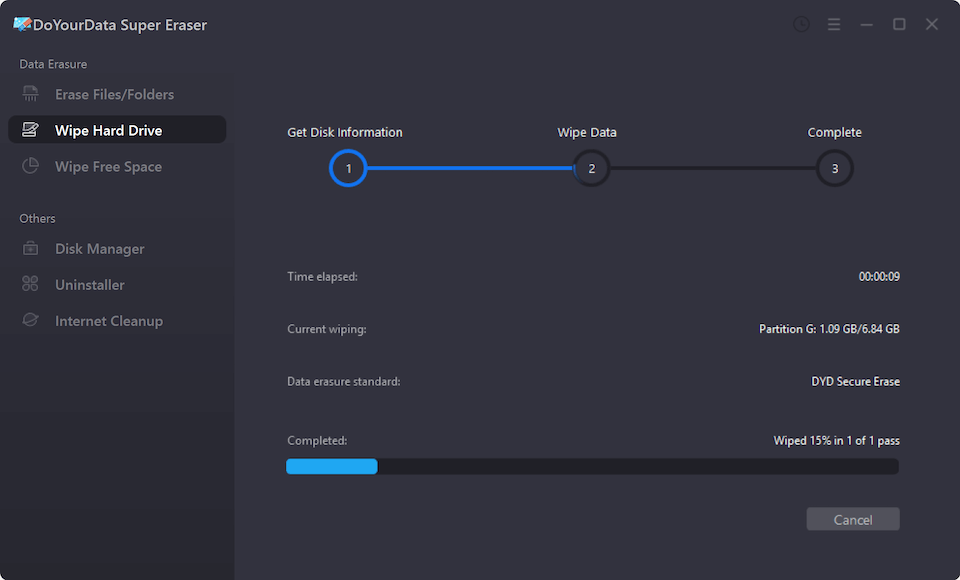
Step 5: Execute Permanent Erasure
Click the Continue button to confirm the data erasure process. DoYourData Super Eraser will overwrite every sector of the selected data, rendering it 100% unrecoverable.
FAQs about DoYourData and KillDisk Data Erasure
Conclusion
In today's digital landscape, protecting personal and business privacy requires proactive data sanitization. Standard deletion leaves confidential files exposed to data recovery tools.
When evaluating DoYourData Super Eraser - KillDisk data erasure solutions, DoYourData Super Eraser stands out as the most accessible, efficient, and versatile choice for everyday desktop users on Windows and Mac. It provides military-grade security with single-click convenience.
Download DoYourData Super Eraser today to ensure your sensitive files and private records remain 100% unrecoverable.
DoYourData Super Eraser
DoYourData Super Eraser, the award-winning data erasure software, offers certified data erasure standards including U.S. Army AR380-19, DoD 5220.22-M ECE to help you securely and permanently erase data from PC, Mac, HDD, SSD, USB drive, memory card or other device, make data be lost forever, unrecoverable!
Written & Updated by Shirly Chen
Shirly Chen has been writing data recovery, data erasure articles for DoYourData over 4 years. She has been working as a professional website content writer & editor for quite a long time. She also writes articles about disk clone, Mac optimization, disk backup, etc.