Top Acer Computer Disk Wipe Tool: Best Way to Permanently Erase Data
Are you planning to sell, donate, or recycle your Acer laptop or desktop computer? Or maybe you just want to clear out an old internal SSD or external hard drive before reusing it? If so, completely wiping your disk data is one of the most important security steps you can take. DoYourData Super Eraser is the best choice to permanently wipe data and avoid data recovery.
 Updated by Shirly Chen on September 10, 2026
Quick Navigation:
- Factory Reset and Formatting Can't Fully Protect Privacy
- Best Acer Computer Disk Wipe Tool: DoYourData Super Eraser
- How to Permanently Wipe Data on Acer Computers
- What to Do Before Wiping Your Acer Computer Disk
- FAQs about Data Erasure on Acer Computer
- Conclusion
Many Acer users assume that running a standard Windows Factory Reset or formatting a drive is enough to clean their computer. Unfortunately, that is a common and risky misconception. Standard deletion and formatting only hide the files from view; the actual data remains intact on the storage device until it gets overwritten. Anyone with a basic data recovery program can bring back your sensitive photos, banking details, personal documents, and passwords in just a few clicks.

To protect your privacy, you need a specialized Acer computer disk wipe tool that completely overwrites every sector of your hard drive or SSD. In this guide, we will break down why ordinary factory resets fall short, compare the top data wiping options, and provide a clear step-by-step tutorial on how to permanently erase your data using DoYourData Super Eraser.
Factory Reset and Formatting Can't Fully Protect Privacy
When you delete a file on your Acer computer, Windows simply marks the space occupied by that file as 'available' for new information. The old data remains untouched in the background until new files are saved over it. This applies to standard drive formatting as well.
Even when you perform an Acer eRecovery Management reset or a built-in Windows 10/11 factory reset, residual data can remain. While a factory reset reinstalls the operating system and strips user accounts, advanced data recovery software can often rebuild lost files from the drive space. This leaves your personal privacy exposed if your device ends up in the wrong hands.
A dedicated Acer computer disk wipe tool works differently. Instead of just removing file pointers, it fills every single memory block on your storage drive with random binary patterns (zeros and ones). This process completely destroys the original data, making recovery technically impossible—even for professional data recovery labs.
Comparing: Built-In Windows Tools vs. Professional Data Eraser
To help you choose the right approach for your Acer computer, let's look at how common data removal methods compare in terms of security, ease of use, and overall effectiveness.
| Method | Security Level | Data Recoverable? | Best Used For |
|---|---|---|---|
| Emptying Recycle Bin / Quick Format | Low | Yes (Very Easy) | Basic file organizing |
| Windows Factory Reset ('Clean Drive') | Medium | Yes (Possible with advanced tools) | Clearing OS glitches for personal re-use |
| DoYourData Super Eraser | Military-Grade | No (100% Irrecoverable) | Selling, donating, or recycling Acer PCs |
Best Acer Computer Disk Wipe Tool: DoYourData Super Eraser
When you need absolute certainty that your private information is gone forever, DoYourData Super Eraser stands out as the premier Acer computer disk wipe tool. Engineered specifically to safely shred data across all types of storage media, it provides complete data destruction without damaging your drive hardware.
DoYourData Super Eraser
- Top data erasure software for computer.
- Safe to wipe data and prevent data recovery.
- Support multiple certified data erasure standards.
Key Features of DoYourData Super Eraser
- Wide Compatibility: Compatible with all Acer Aspire, Swift, Predator, Nitro, Spin, and TravelMate laptops, as well as Acer desktop series.
- Multi-Storage Support: Supports traditional Hard Disk Drives (HDDs), Solid State Drives (SSDs), NVMe drives, USB flash drives, memory cards, and external hard drives.
- Government-Grade Algorithms: Uses certified data destruction algorithms, including HMG IS5, DoD 5220.22-M, U.S. Army AR380-19, and Peter Gutmann 35-pass wiping.
- SSD Safe & Optimized: Safe for SSDs with specialized algorithms that minimize write cycles while guaranteeing full data erasure.
- Three Flexible Wiping Modes: Flexible wiping modes let you wipe specific files, erase entire hard drive partitions, or wipe free disk space.
How to Permanently Wipe Data on Acer Computers
DoYourData Super Eraser features a clean, user-friendly interface that makes data wiping straightforward, even if you are not a tech expert. Below are the three wiping options available depending on your exact needs.
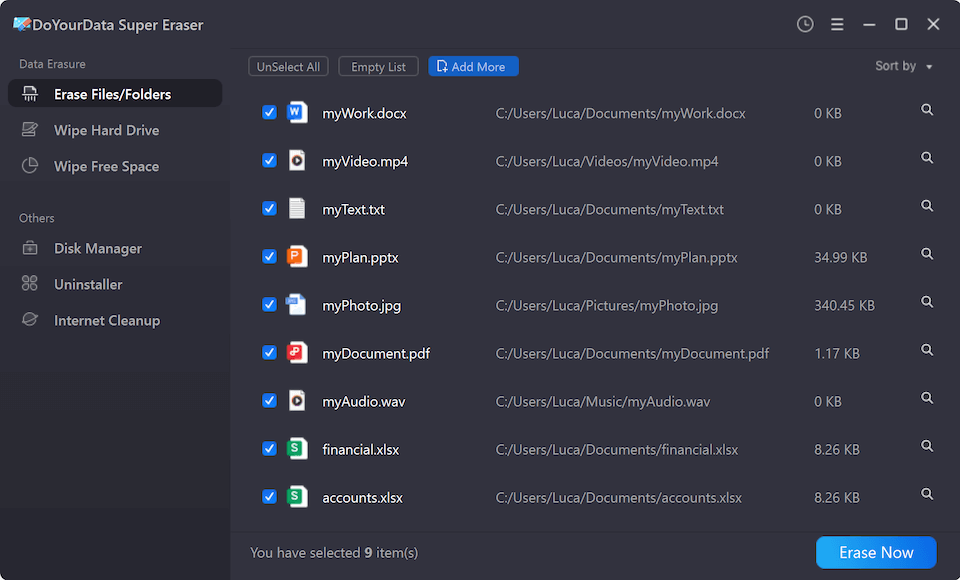
Mode 1: Selective File & Folder Erasure
If you only want to destroy confidential documents or personal folders on your Acer PC without affecting the rest of your system, follow these steps:
- Download, install, and open DoYourData Super Eraser on your Acer computer.
- Select the 'Erase Files/Folders' tab from the left sidebar.
- Click 'Add' to choose the specific files or folders you want to delete.
- Click the 'Erase Now' button to permanently shred the selected items.
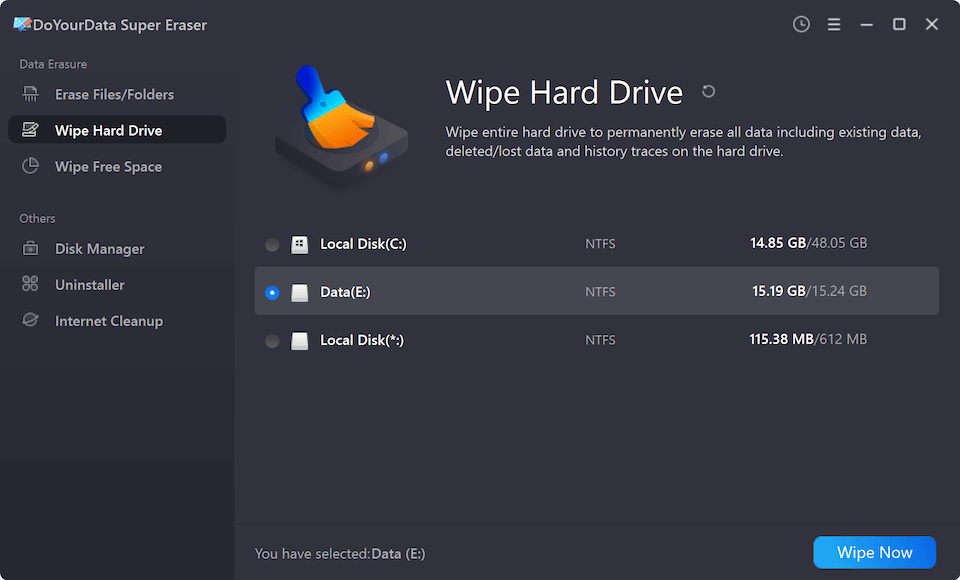
Mode 2: Complete Disk Partition Wipe
If you want to completely erase an entire secondary hard drive, partition, USB flash drive, or external hard drive connected to your Acer computer:
- Launch DoYourData Super Eraser and click on the 'Wipe Hard Drive' tab.
- Select the specific drive or partition on your Acer PC that you wish to wipe.
- Click 'Wipe Now' and confirm the operation to completely overwrite all existing data on that partition.
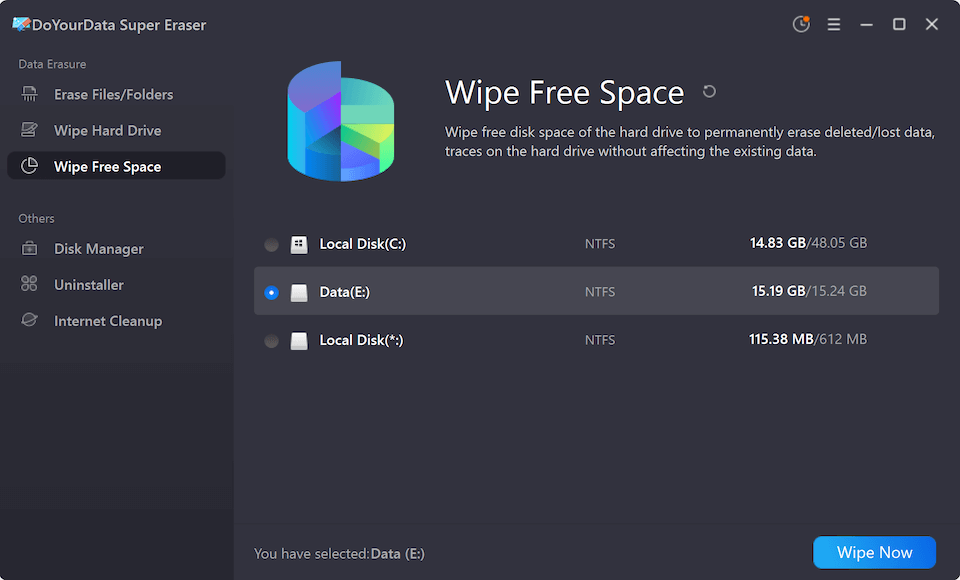
Mode 3: Wipe Free Space (Erase Deleted Files Only)
If you want to keep your Windows operating system and current software intact, but want to make sure previously deleted files can never be recovered:
- Open DoYourData Super Eraser and choose the 'Wipe Free Space' tab.
- Select the target hard drive (e.g., C: drive or D: drive).
- Click 'Wipe Now' to sanitize all free disk space. Your existing files will remain safe, while all deleted traces will be permanently wiped.
What to Do Before Wiping Your Acer Computer Disk
Data wiping is a permanent, non-reversible action. Once the process begins, no software, lab, or technician can retrieve your files. To prevent accidental data loss, keep these essential precautions in mind:
- Backup Essential Data: Create a complete backup of all important files, photos, financial documents, and personal projects to an external drive or cloud service before starting.
- Save License Keys: Make sure you have exported or saved your product keys, software licenses, and login credentials for applications like Microsoft Office.
- Keep Power Connected: Ensure your Acer laptop is plugged into a wall charger throughout the wiping process to prevent power interruption.
- Reinstall Operating System: If you plan to sell or donate the computer, perform a standard Windows reinstall after wiping your secondary drives or free space.
FAQs about Data Erasure on Acer Computer
Conclusion
Protecting your private data is crucial whenever you transition to a new computer, prepare an old device for resale, or clear out external storage. While standard Windows formatting or factory resets offer basic surface-level cleanup, they fail to prevent data recovery.
By using a dedicated Acer computer disk wipe tool like DoYourData Super Eraser, you can permanently overwrite all sensitive files, partitions, or free space with total confidence. Take control of your digital privacy today.

DoYourData Super Eraser
DoYourData Super Eraser, the award-winning data erasure software, offers certified data erasure standards including U.S. Army AR380-19, DoD 5220.22-M ECE to help you securely and permanently erase data from PC, Mac, HDD, SSD, USB drive, memory card or other device, make data be lost forever, unrecoverable!
Written & Updated by Shirly Chen
Shirly Chen has been writing data recovery, data erasure articles for DoYourData over 4 years. She has been working as a professional website content writer & editor for quite a long time. She also writes articles about disk clone, Mac optimization, disk backup, etc.