Certified Software to Overwrite Hard Drive Before Selling Computer
Before selling, donating, or recycling a Windows PC or Mac, executing a standard format or factory reset is not enough. Data recovery tools can easily unerase your private files. Using certified software to overwrite hard drive before selling computer replaces sensitive data with random binary zeroes and ones using government-level data erasure standards. DoYourData Super Eraser provides 100% irreversible wipe capabilities for SSDs, HDDs, and external drives.
 Updated by Shirly Chen on September 9, 2026
Quick Navigation:
- Why Overwrite Hard Drive Before Selling Computer
- DoYourData Super Eraser: Certified Data Wiping Algorithms
- How to Wipe a Computer Hard Drive Before Selling
- FAQs about Overwriting Hard Drive before Selling Computer
- Conclusion:
Selling, trading in, or recycling your old computer is a fantastic way to clear space and recover cash. However, handing over your computer without securely wiping its internal storage opens the door to serious privacy risks.

To guarantee your privacy, you must use certified software to overwrite hard drive before selling computer. Data overwriting writes random patterns of zeroes, ones, or junk data across every sector of the disk. Once overwritten with certified standards, no data recovery software, laboratory tool, or forensic expert can recover a single byte of your old information.
Why Overwrite Hard Drive Before Selling Computer
Many users assume that dragging files to the Recycle Bin or formatting the hard drive deletes their personal data forever. Unfortunately, this is a dangerous misconception.When you delete a file or perform a quick format, the operating system only removes the directory entry or pointer to that data. The actual content—your bank records, tax forms, family photos, saved browser passwords, and business files—remains intact on the disk surface until overwritten by new data.
Anyone who buys your old computer can download free file recovery software and bring back your deleted documents in just a few clicks. So it's necessary to wipe the data permanently with data wiping tool first.Not all data destruction tools are created equal. Free command-line routines or basic shredders often miss hidden drive partitions, unused disk space, reallocated sectors, or system caches.
Using certified data erasure software guarantees that every storage sector—including free space—is systematically overwritten according to international data wiping regulations.
- Complete Data Destruction: Simple formatting leaves raw data intact; certified wiping destroys raw data forever.
- Compliance with Security Standards: Certified software adheres to strict standards defined by government agencies like the US Department of Defense (DoD) and NIST.
- SSD & NVMe Compatibility: Modern Solid State Drives (SSDs) use wear-leveling algorithms. Certified software ensures SSD-safe wiping without physically damaging the hardware life span.
- Proof of Sanitization: Top-tier wiping software generates a official wiping certificate confirming your disk was sanitized successfully.
DoYourData Super Eraser: Certified Data Wiping Algorithms
DoYourData Super Eraser is a premier, enterprise-grade data wiping utility designed for Windows and Mac. It features military-standard algorithms that meet or exceed global data destruction standards. Whether you need to wipe an external hard drive, USB flash drive, secondary partition, or clean up free space on your system drive, DoYourData Super Eraser delivers 100% permanent data destruction.
DoYourData Super Eraser
- Best data erasure software for Windows and Mac.
- Support multiple certified data wiping algorithms.
- 3 Modes to shred files or wipe hard drive data permanently.
Here are the certified data wiping algorithms integrated into DoYourData Super Eraser:
|
Wiping Algorithm |
Pass Count |
Best Suited Use Case |
|---|---|---|
|
HMG IS5 (Base) |
1 Pass |
Fast daily overwriting for non-sensitive public files. |
|
DoD 5220.22-M |
3 Passes |
Standard US Department of Defense protocol for sensitive personal data. |
|
U.S. Army AR380-19 |
3 Passes |
Military specification for sanitizing commercial magnetic disks. |
|
DoD 5220.22-M (ECE) |
7 Passes |
Enhanced DoD standards with alternating bit inversion for extra security. |
|
Peter Gutmann Standard |
35 Passes |
Maximum security algorithm for highly confidential enterprise & financial data. |
How to Wipe a Computer Hard Drive Before Selling
Wiping your computer drive properly depends on whether you are erasing a non-system partition/external disk or your main C: / macOS system drive. Follow these tested instructions.
Phase 1: Essential Pre-Wipe Checklist
- Back Up Vital Files: Transfer all personal photos, documents, and license keys to an external storage drive or cloud account.
- Deauthorize Accounts: Log out of Apple ID, iCloud, iMessage, Microsoft 365, Adobe Creative Cloud, and web browsers.
- Unplug External Storage: Disconnect backup drives, secondary flash drives, and external storage to avoid accidentally selecting the wrong target disk.
Phase 2: How to Wipe the System Drive (Windows & Mac)
Because your operating system (Windows or macOS) cannot erase itself while running, wiping a system drive requires a smart two-step approach:
Step 1: Factory Reset the Computer System
A factory reset restores your computer operating system to default settings and removes all personal user profile folders, apps, and credentials. On Windows 11/10, navigate to Settings > System > Recovery > Reset this PC and choose 'Remove Everything'.
On macOS, open System Settings > General > Transfer or Reset > Erase All Content and Settings.
Step 2: Wipe Free Space with DoYourData Super Eraser
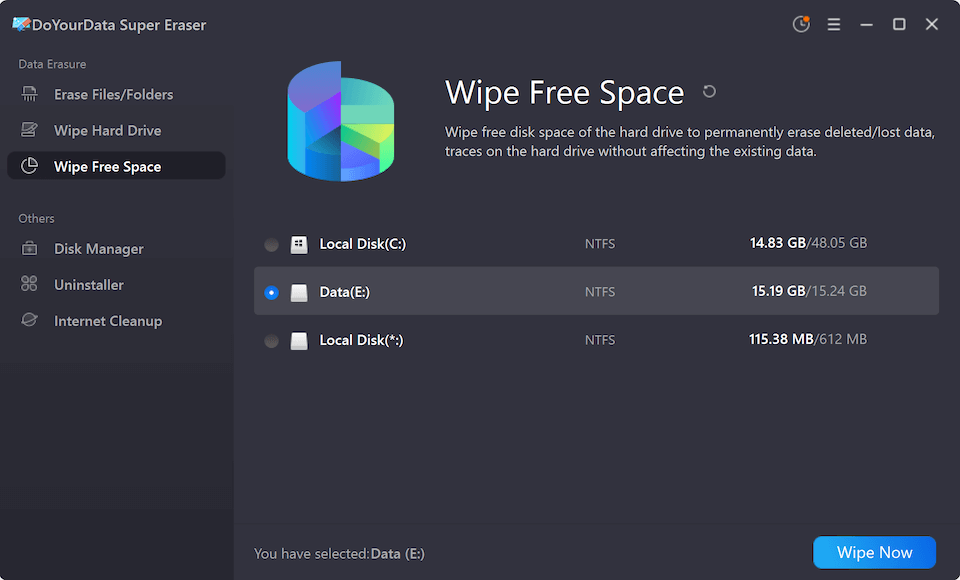
After factory resetting, boot back into the fresh, clean operating system. While your personal files are gone from view, their raw data still resides in the disk's 'Free Space'. Download and install DoYourData Super Eraser. Select the 'Wipe Free Space' mode, target your primary drive (C: drive or Macintosh HD), choose your preferred wiping algorithm (e.g., DoD 5220.22-M), and click 'Wipe Now'. This permanently overwrites all deleted file traces without damaging the newly installed OS!
Phase 3: How to Wipe External Drives or Non-System Hard Drives
If you are selling a secondary internal hard drive, an external SSD, or a USB flash drive, you can wipe the entire disk in one quick action:
Step 1: Launch DoYourData Super Eraser on your PC or Mac.
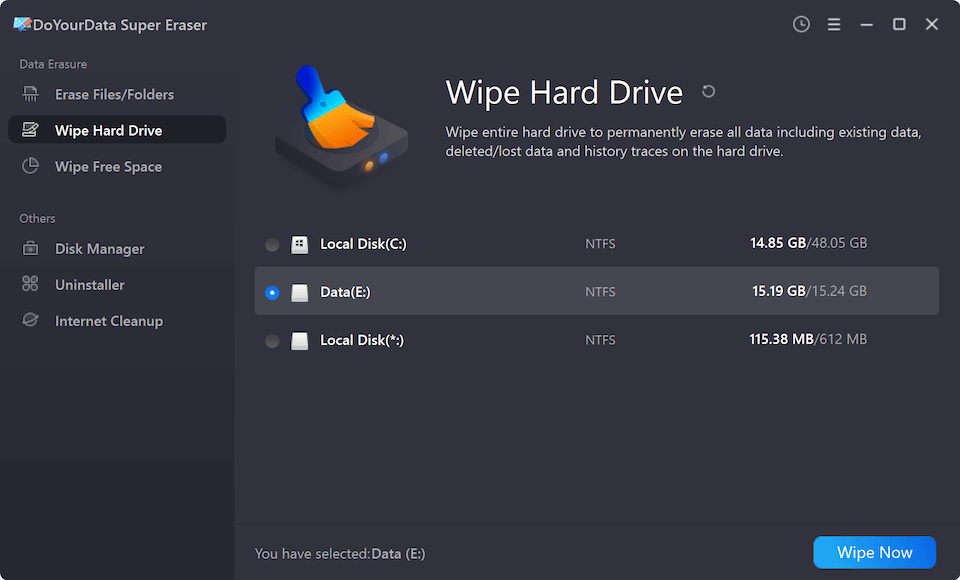
Step 2: Select the 'Wipe Hard Drive' option from the main interface menu.
Step 3: Choose the target hard drive or external volume from the disk list.
Step 4: Select a certified erasure algorithm (such as DoD 5220.22-M 3 passes).
Step 5: Click 'Wipe Now' and confirm the operation. The software will completely sanitize the drive.
FAQs about Overwriting Hard Drive before Selling Computer
Conclusion:
Selling your old computer is rewarding, but handing over your private data is a risk you should never take. Simple file deletion and quick formatting are insufficient safeguards against modern file recovery tools.
By choosing certified software to overwrite hard drive before selling computer, you ensure that every photo, banking record, and confidential document is erased beyond recovery. Factory reset your system drive to clear user profiles, then run DoYourData Super Eraser to clean the free space or wipe external drives completely.
Download DoYourData Super Eraser today and sell your computer with 100% peace of mind!

DoYourData Super Eraser
DoYourData Super Eraser, the award-winning data erasure software, offers certified data erasure standards including U.S. Army AR380-19, DoD 5220.22-M ECE to help you securely and permanently erase data from PC, Mac, HDD, SSD, USB drive, memory card or other device, make data be lost forever, unrecoverable!
Written & Updated by Shirly Chen
Shirly Chen has been writing data recovery, data erasure articles for DoYourData over 4 years. She has been working as a professional website content writer & editor for quite a long time. She also writes articles about disk clone, Mac optimization, disk backup, etc.