DoYourData Super Eraser Deep Review 2026: Tool for Permanent Data Wipe
When you delete a file on Windows or Mac, your operating system doesn't actually destroy the data. It simply hides the file and marks that space as available for new data. Before selling or donating your computer or drive, it's not enough by simply deleting files. Use the reliable tool DoYourData Super Eraser to wipe data permanently.
 Updated by Shirly Chen on June 3, 2026
Quick Navigation:
- What is DoYourData Super Eraser?
- The Key Features Of DoYourData Super Eraser
- Pros and Cons of DoYourData Super Eraser
- Step-by-Step Guide: How to Use DoYourData Super Eraser
- When Should You Use DoYourData Super Eraser?
- FAQs about DoYourData Super Eraser
- Final Verdict
When deciding to sell your old laptop, donate your PC, or pass a USB drive to a friend. You probably think that dragging your files to the Recycle Bin and hitting "Empty" means those files are gone forever. Unfortunately, that is a common misconception. Anyone with a basic, free data recovery tool can recover your private files within minutes.
That is where specialized data wiping software comes into play. In this detailed DoYourData Super Eraser deep review 2026, we will put this popular tool to the test. We will break down exactly how it works, explore its key features, look at the pros and cons, and see why it is a must-have tool for everyday home users who value their privacy.
Why Privacy Matters More Than Ever in 2026: With modern data recovery algorithms becoming smarter, simply deleting files isn't enough. Permanent, military-grade erasure is the only way to ensure your personal life stays completely private.
What is DoYourData Super Eraser?
DoYourData Super Eraser is a professional, easy-to-use data destruction software designed for both Windows and Mac users. Developed by DoYourData, a trusted name in data recovery and storage management, this software does the exact opposite of a recovery tool: it makes sure files disappear permanently.
DoYourData Super Eraser
- Top and most professional data erasure software in 2026.
- Permanently wipe data with international data wiping methods.
- Shred files or wipe drive flexibly in 3 different modes.
The software uses advanced data wiping algorithms that comply with government and military standards. It overwrites your original data multiple times with random characters or blank codes. Once Super Eraser finishes its job, the data is destroyed beyond any hope of recovery. No data recovery software, no forensic laboratory, and no tech expert can ever bring those files back to life.
What makes it stand out in 2026 is its pure simplicity. You don't need a degree in computer science or cyber-security to use it. The interface is clean, bright, and tailored specifically for everyday home users who just want to keep their information safe.
The Key Features Of DoYourData Super Eraser
Many people think data wipers can only delete individual files. DoYourData Super Eraser goes way beyond that by offering three distinct, powerful wiping modes. This gives you complete control over how you protect your storage drives.
1. Erase Files and Folders
This mode lets you handpick specific files or entire folders that you want to destroy. It is perfect if you have an old folder of tax returns, bank statements, or confidential personal journals that you want gone immediately without touching the rest of your computer.
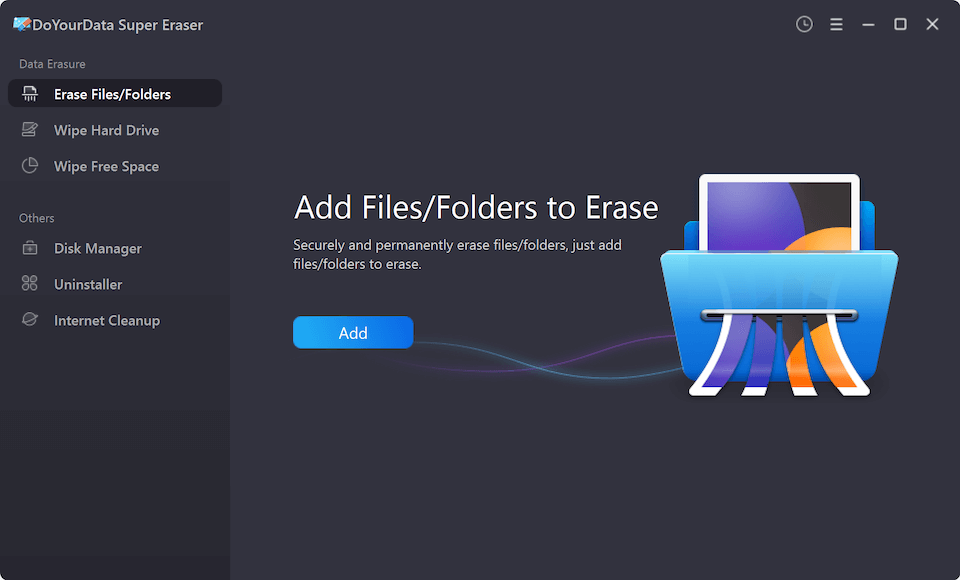
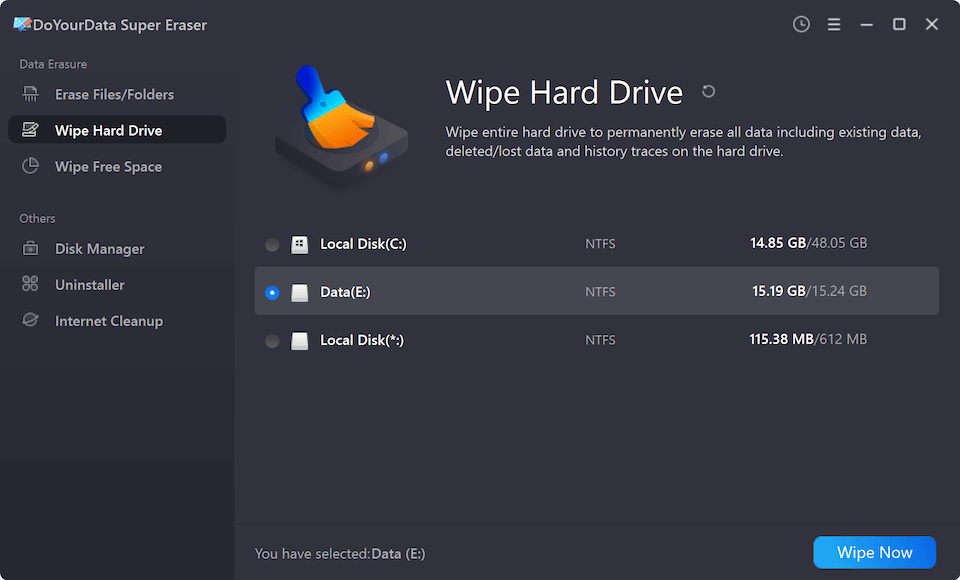
2. Wipe Hard Drive Partition
Do you need to wipe an entire external hard drive, an old USB thumb drive, a digital camera memory card, or a specific partition on your PC? This mode completely cleans out the entire target drive. It formats and overwrites everything, making it the perfect choice before selling or giving away external storage hardware. It can wipe SSD, HDD, pen drives, and SD cards.
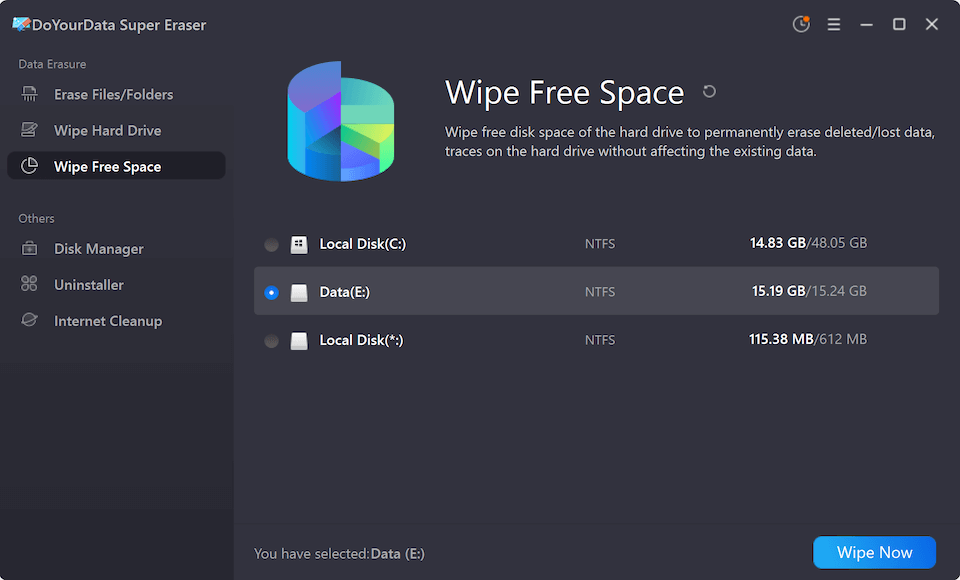
3. Wipe Free Space
This is one of the most useful features for home users. Remember how we said previously deleted files still linger hidden on your hard drive? "Wipe Free Space" scans your empty hard drive space and permanently overwrites those invisible, half-deleted files. It leaves your current files untouched while permanently locking down your past history.
Bonus System Utilities Included
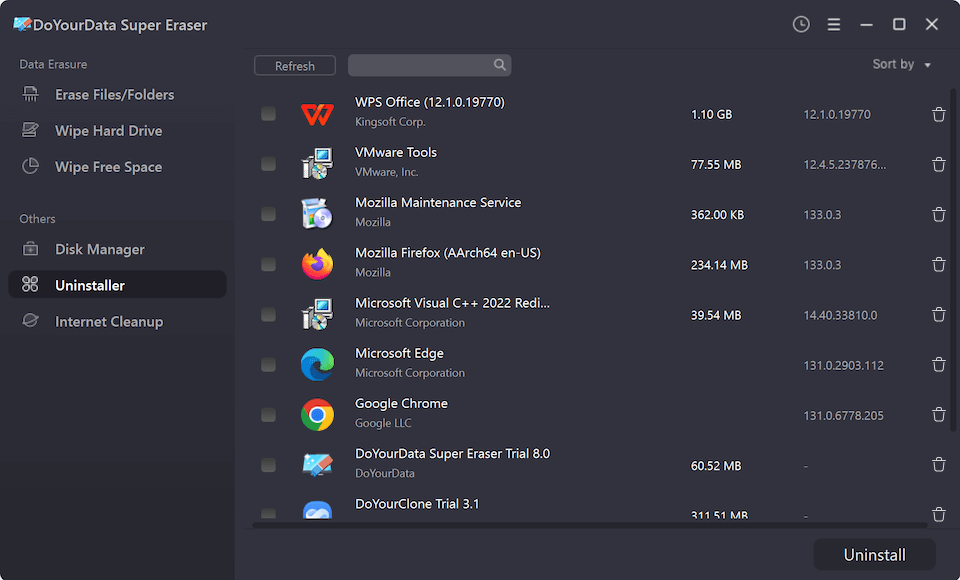
Beyond permanent erasure, Super Eraser includes a built-in uninstaller to completely remove unwanted apps along with their hidden leftover files.
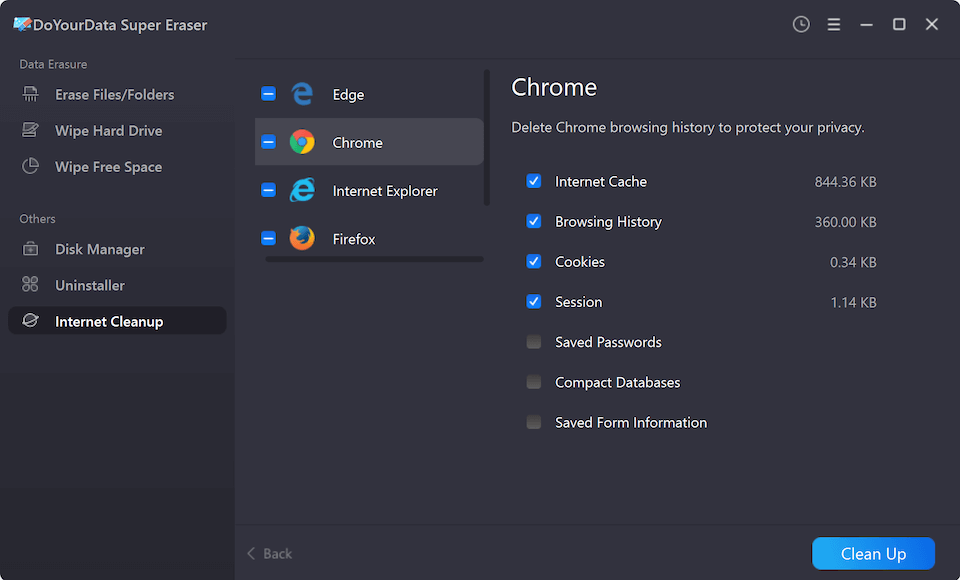
It also features an internet privacy cleaner to wipe away browser caches, tracking cookies, and history from major browsers like Chrome, Edge, and Safari.
Pros and Cons of DoYourData Super Eraser
Every piece of software has its strengths and minor drawbacks. Let's look at a clear, honest breakdown of the advantages and disadvantages of DoYourData Super Eraser in 2026.
The Pros / Advantages:
- Super User-Friendly Interface: The software layout is incredibly clear. Even if you aren't good with computers, you can navigate it with ease.
- Certified Erasure Methods: It offers multiple wiping standards, from simple one-pass overwrites to high-security DoD 5220.22-M and Peter Gutmann methods.
- Excellent Compatibility: It works smoothly across old mechanical HDDs and modern high-speed Solid State Drives (SSDs), as well as USBs and SD cards.
- Safe and Verifiable: It shows you a report proving your data has been completely neutralized.
- Cross-Platform Support: It operates perfectly on both Windows 11/10/8/7 and macOS, including the latest operating system updates.
The Cons / Disadvantages:
- Time-Consuming High-Security Wipes: Because permanent data erasure requires rewriting physical sectors multiple times, high-security modes can take some time to finish, especially on larger hard drives.
- No Accidental Recovery: The software works so perfectly that if you accidentally wipe the wrong file, it is gone forever. There is no "undo" button or backup recovery option.
Step-by-Step Guide: How to Use DoYourData Super Eraser
Using this software is as simple as 1-2-3. Here is exactly how a home user can securely erase individual files in just a few clicks.
Step 1: Open the Program. First, download and install the program on your computer. Open up the application, and you will see the primary dashboard.
Step 2: Choose Your Files. On the left-side menu, make sure "Erase Files/Folders" is selected. Click on the large "Add" button in the middle to browse your computer and select the files or folders you want to delete forever.
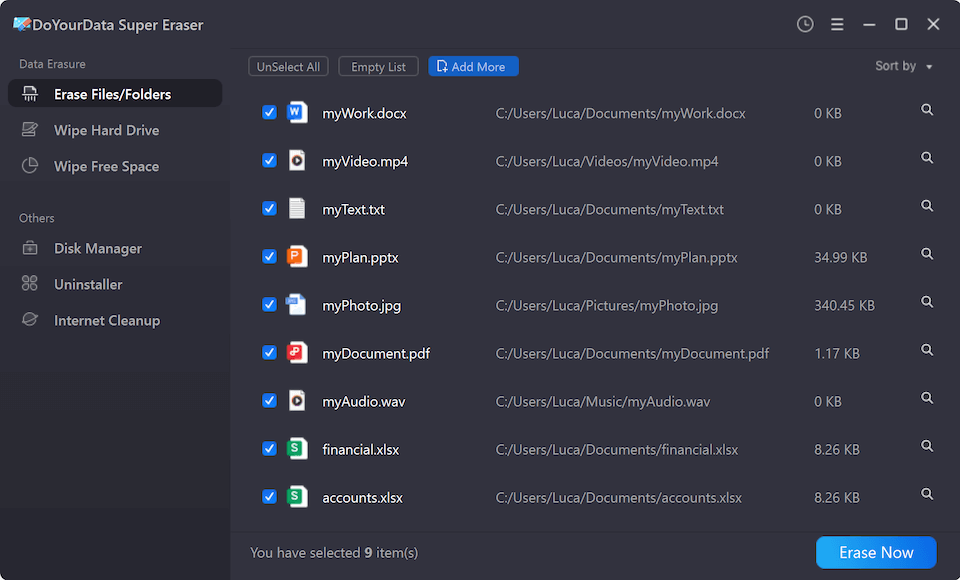
Step 3: Select Data Erasure Standard. Double-check your list of selected files to make absolutely sure you don't need them anymore. When you are ready, click the bright "Erase Now" button at the bottom right.
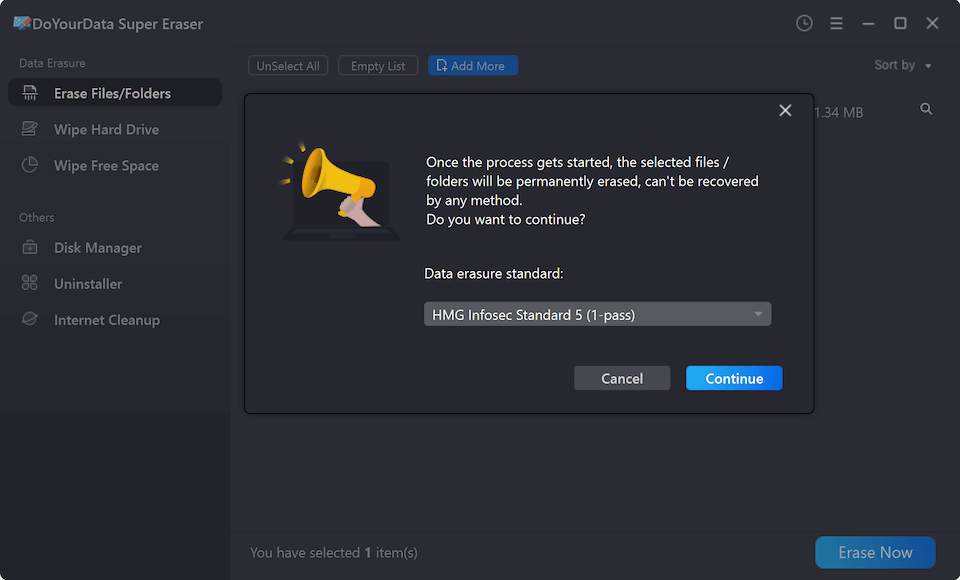
Step 4: Erase and Secure. After confirming the data erasure standard, click "Continue" button. The software will securely overwrite and destroy the data in a matter of moments.
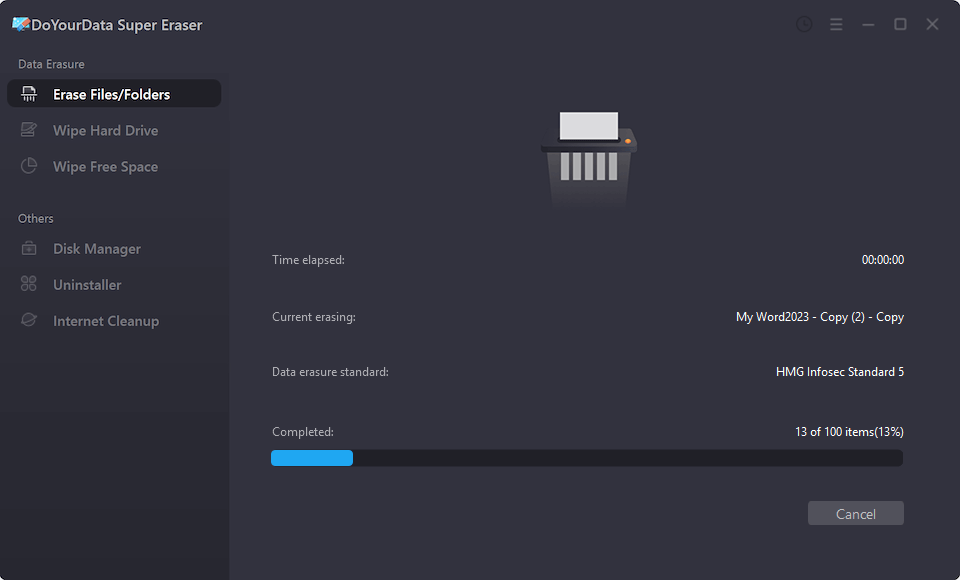
💡 Pro-Tip for Home Users: Always back up your important everyday files before running any data erasure tool. Super Eraser means business—once the process starts, recovery is impossible!
When Should You Use DoYourData Super Eraser?
To make this DoYourData Super Eraser deep review 2026 even more helpful, let's explore a few everyday, real-world situations where you will definitely need this tool:
- Selling or Donating an Old Computer: Before listing an old device on eBay, Facebook Marketplace, or Craigslist, use the "Wipe Hard Drive" tool to clear out your profile, banking information, and family photos.
- Clearing Sensitive Financial Records: If you share a family computer or work laptop, use "Erase Files/Folders" to discard sensitive medical records, tax documents, or passwords so other users cannot access them.
- Recycling External Storage Media: If you are throwing away an old flash drive or memory card that no longer works properly, use "Wipe Hard Drive" first so no one can grab it out of the trash and salvage your files.
FAQs about DoYourData Super Eraser
Final Verdict
Is DoYourData Super Eraser Worth It in 2026? When it comes to data privacy, peace of mind is truly priceless. Leaving your deleted personal files exposed on your storage drives is a major privacy risk that is easily avoided.
As we conclude our DoYourData Super Eraser deep review 2026, it is clear that this software strikes the perfect balance between high-end digital security and beautiful simplicity. It completely removes the complex headache of data destruction, giving everyday home users a straightforward way to keep their private information permanently private.
If you are looking for an affordable, highly efficient, and incredibly safe tool to shred files or wipe clean hard drives, DoYourData Super Eraser is an exceptional choice.
DoYourData Super Eraser
DoYourData Super Eraser, the award-winning data erasure software, offers certified data erasure standards including U.S. Army AR380-19, DoD 5220.22-M ECE to help you securely and permanently erase data from PC, Mac, HDD, SSD, USB drive, memory card or other device, make data be lost forever, unrecoverable!
Written & Updated by Shirly Chen
Shirly Chen has been writing data recovery, data erasure articles for DoYourData over 4 years. She has been working as a professional website content writer & editor for quite a long time. She also writes articles about disk clone, Mac optimization, disk backup, etc.