How to Erase Sensitive Database Files Completely Without Recovery Footprint
Deleting database files (.mdf, .ldf, .accdb, .sqlite, .db) via normal OS deletion or SQL DROP commands only unlinks database pointers. Transaction logs, temporary journal files, and physical disk sectors still retain raw sensitive data that recovery software can easily retrieve. To erase sensitive database files completely without recovery footprint, you must perform certified sector overwriting. Use professional data destruction software like DoYourData Super Eraser to shred target database files and make the shredded files unrecoverable.
 Updated by Shirly Chen on October 20, 2026
Quick Navigation:
- Why Standard Deletion Leaves a Persistent Recovery Footprint
- Why DoYourData Super Eraser Is the Premier Solution for Database Destruction
- Best Practices for Database Privacy and Data Lifecycle Management
- FAQs about Erasing Database Files Permanently
- Conclusion
Database files are the digital heart of modern businesses, financial platforms, healthcare institutions, and web applications. They store immense amounts of sensitive information, including user passwords, credit card numbers, personal health records, corporate secrets, and customer transaction histories.
Whether you are decommissioning a legacy server, upgrading local workstation storage, retiring a client project, or ensuring strict compliance with privacy regulations like GDPR and HIPAA, properly disposing of database files is critical. Many IT administrators and developers assume that executing a 'DROP DATABASE' command, deleting database files from File Explorer, or emptying the Recycle Bin permanently removes sensitive data. Unfortunately, that assumption leaves your organization exposed to severe data breaches.

In this guide, we will examine why standard database deletion leaves persistent digital footprints and show you step-by-step how to erase sensitive database files completely without recovery footprint using DoYourData Super Eraser.
Why Standard Deletion Leaves a Persistent Recovery Footprint
Understanding how database engines and operating systems manage storage reveals why standard deletion methods fail to deliver true data sanitization.
1. Operating Systems Only Remove Allocation Pointers
When you delete a database file (such as SQL Server .mdf, MySQL .ibd, Access .accdb, or SQLite .db) in Windows or macOS, the operating system only removes the directory pointer. The actual binary records remain intact on physical storage sectors.
2. Transaction Logs and Write-Ahead Journals
Database management systems rely on write-ahead logging (WAL) and transaction logs (.ldf files) to ensure data integrity. Even if you drop a primary database table, past transactions and record histories remain stored in unallocated transaction log files.
3. Temporary Caches and Backup Snapshots
Database engines create temporary cache files, swap instances, and automatic backup snapshots during routine operations. Standard deletion routines miss these hidden shadow copies scattered across system directories.
4. Recovery Software and Forensic Inspection
Commercial file recovery software and raw disk scanners can effortlessly bypass operating system pointers. They scan raw disk sectors, locate orphaned database headers, and reconstruct entire tables in seconds.
Understanding Military-Grade Data Destruction Standards
DoYourData Super Eraser supports internationally recognized data destruction protocols to ensure
regulatory compliance:
- HMG IS5 (1 Pass): Overwrites sectors with simple zeros, suitable for rapid routine sanitization.
- DoD 5220.22-M (3 Passes): The official U.S. Department of Defense standard. It executes 3 sequential passes using zeros, ones, and random characters with verification.
- U.S. Army AR380-19 (7 Passes): A 7-pass military-grade protocol recommended for high-security corporate and financial database compliance.
- Peter Gutmann Standard (35 Passes): An extreme data destruction algorithm executing 35 overwrite passes, guaranteeing 100% destruction against advanced hardware inspection.
Method Comparison: Standard Database Deletion vs. Military-Grade Erasure
Here is a side-by-side comparison showing how different methods affect sensitive database files and privacy compliance:
| Deletion Method | What Happens to Database Data? | Can Data Be Recovered? | Compliance & Security Level |
|---|---|---|---|
| SQL 'DROP DATABASE' / Delete | Directory pointers cleared | Yes (Very Easy) | Unsafe (High Breach Risk) |
| Recycle Bin / Shift + Delete | Index pointers unlinked | Yes (Easy with Software) | Unsafe (Non-Compliant) |
| DoYourData Super Eraser | Sectors overwritten with random data | No (100% Impossible) | Maximum (Military Grade) |
Why DoYourData Super Eraser Is the Premier Solution for Database Destruction
To eliminate database files without leaving any recovery footprint, you need a certified data wiping tool engineered for deep sector sanitization.
DoYourData Super Eraser is a powerful, professional data destruction software designed for both Windows PC and Mac. It overwrites physical storage sectors occupied by target database files with random binary characters, destroying original data structures completely.
DoYourData Super Eraser
- The best file shredder and data wiping software.
- Compatible with both Windows and macOS.
- Permanently erase data to make data unrecoverable.
By implementing internationally recognized government and military data erasure standards—such as DoD 5220.22-M and Peter Gutmann 35-pass algorithms—DoYourData Super Eraser guarantees that shredded database records can never be recovered by any software or laboratory technique.
Step-by-Step Guide: How to Erase Sensitive Database Files Completely
Follow this thorough guide to completely sanitize database files and eliminate residual traces from your system:
Phase 1: Pre-Erasure Preparation
- Stop Active Database Services: Before attempting to shred database files, stop the database service (e.g., MySQL, SQL Server, PostgreSQL, or MongoDB) to unlock active file handles.
- Locate All Related Files: Locate all associated database files, including primary data files (.mdf, .db, .sqlite), transaction logs (.ldf, .wal), and configuration files.
Phase 2: Shredding Database Files with DoYourData Super Eraser
Step 1: Launch Software: Download, install, and launch DoYourData Super Eraser on your computer.
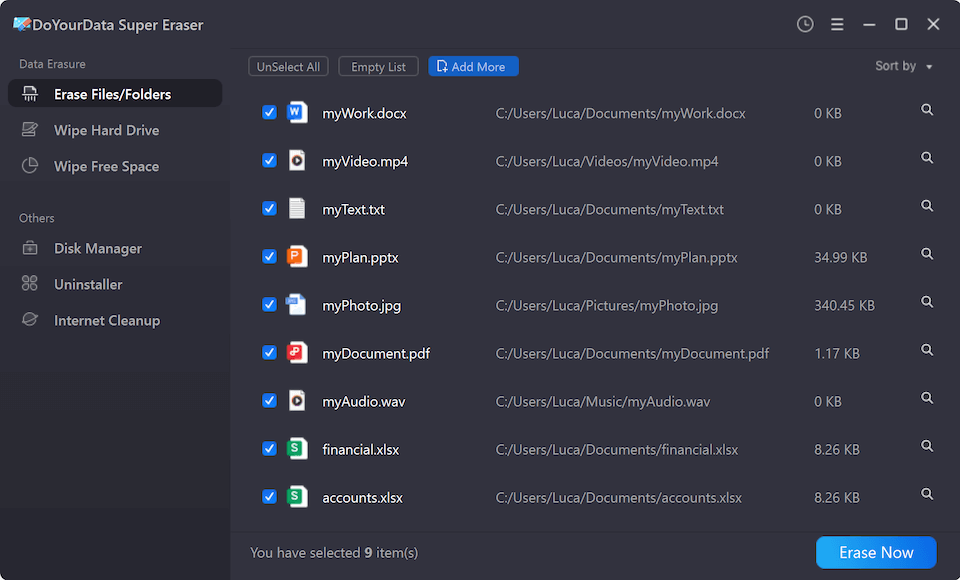
Step 2: Choose Mode: Select 'Erase Files/Folders' mode from the main dashboard.
Step 3: Import Target Files: Click 'Add' to browse and select all target database files, transaction logs, and parent database directories.
Step 4: Execute Erasure: Click 'Erase Now', select your preferred military-grade data erasure standard (such as DoD 5220.22-M), and confirm by clicking 'Continue'.
Phase 3: Wiping Free Space to Eliminate Residual Footprints
If you previously deleted database files using normal computer methods, those files still reside in unallocated drive sectors. To destroy all past database traces:
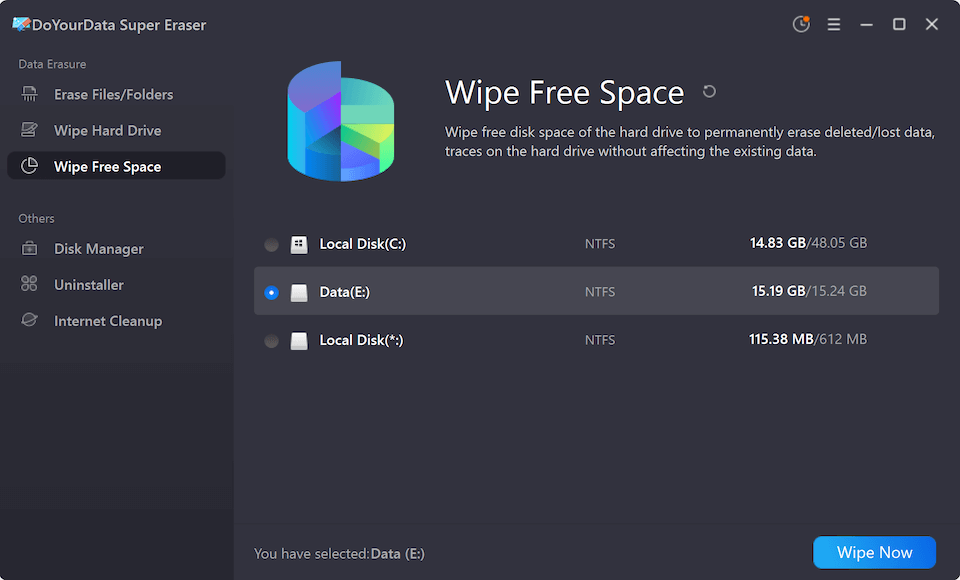
- Select Wipe Free Space: Switch to 'Wipe Free Space' mode in DoYourData Super Eraser.
- Select System Drive: Select the drive volume where the database was originally stored (typically C: drive or dedicated server data partitions).
- Execute Free Space Wipe: Click 'Wipe Now' to overwrite all unallocated storage sectors clean without touching active system files.
Best Practices for Database Privacy and Data Lifecycle Management
In addition to using certified software, adopting these best practices ensures complete data lifecycle security:
- Encrypt Databases at Rest: Implement transparent data encryption (TDE) for active databases so that raw files remain protected throughout their lifecycle.
- Include Automated Backups: When shredding primary database files, remember to locate and erase offsite or local automated backup archives.
- Perform Regular Staging Audits: Schedule quarterly audits to locate and wipe orphaned temporary tables, cache files, and staging databases.
FAQs about Erasing Database Files Permanently
Conclusion
Protecting sensitive organizational data requires taking complete control of your database lifecycle. Simple file deletions and SQL drop commands leave lingering transaction logs and raw disk artifacts that expose your business to severe breach risks.
By learning how to erase sensitive database files completely without recovery footprint using DoYourData Super Eraser, you ensure total data destruction. Shred database files, wipe free disk space, and maintain absolute privacy compliance with total peace of mind.

DoYourData Super Eraser
DoYourData Super Eraser, the award-winning data erasure software, offers certified data erasure standards including U.S. Army AR380-19, DoD 5220.22-M ECE to help you securely and permanently erase data from PC, Mac, HDD, SSD, USB drive, memory card or other device, make data be lost forever, unrecoverable!
Written & Updated by Shirly Chen
Shirly Chen has been writing data recovery, data erasure articles for DoYourData over 4 years. She has been working as a professional website content writer & editor for quite a long time. She also writes articles about disk clone, Mac optimization, disk backup, etc.