Secure Data Destruction Software for Compliance NIST 800-88
NIST SP 800-88 defines clear, recognized benchmarks for permanent data sanitization. Adhering to these guidelines ensures compliance with major international data privacy regulations. DoYourData Super Eraser supports NIST 800-88 and other certified algorithms that can ensure the data is wiped permanently.
 Updated by Shirly Chen on October 9, 2026
Quick Navigation:
- Understanding NIST SP 800-88 Standards Made Simple
- Why Secure Data Destruction Software Is Essential for Compliance
- Key Features to Look for in NIST 800-88 Compliant Software
- DoYourData Super Eraser: Solution for NIST 800-88 Compliance
- FAQs about Data Destruction for Compliance NIST 800-88
- Conclusion
In today's digital landscape, protecting sensitive business information, customer records, and financial data is more critical than ever. Whether your organization is upgrading storage hardware, recycling old PCs, or disposing of decommissioned server drives, simply deleting files or formatting hard drives is not enough.
Standard deletion leaves confidential files fully recoverable using basic data recovery software. This creates massive security risks and exposes businesses to severe compliance penalties under regulations like HIPAA, GDPR, PCI-DSS, and CCPA.
To eliminate these risks, organizations turn to NIST Special Publication 800-88—the global gold standard for media data sanitization. Selecting the right and secure data destruction software for compliance NIST 800-88 guarantees that your confidential data is permanently destroyed beyond recovery. In this guide, we will break down NIST 800-88 standards in plain language and show you how to maintain total data security using DoYourData Super Eraser.
Understanding NIST SP 800-88 Standards Made Simple
Published by the National Institute of Standards and Technology (NIST), Special Publication 800-88 provides guidelines for sanitizing electronic storage media.
Unlike legacy standards like DoD 5220.22-M (which was designed for magnetic tape and older hard drives), NIST 800-88 is modern. It accounts for flash-based media, NVMe SSDs, hybrid drives, and high-density magnetic storage.
The Three Levels of NIST 800-88 Data Sanitization
NIST 800-88 categorizes media destruction into three distinct levels based on the sensitivity of the data and the future use of the device:
- Clear: Overwrites user-addressable storage locations with logical techniques (such as writing zeros or random patterns). This prevents basic software-based data recovery tools from retrieving files. It allows the storage device to be safely reused within the organization.
- Purge: Applies logical and internal firmware level commands (such as NVMe Secure Erase or ATA Purge) to make target data unrecoverable, even using advanced laboratory techniques. This level is ideal when reassigning drives outside your organization.
- Destroy: Physically renders the media unable to store data through degaussing, shredding, incineration, or melting. While 100% effective, physical destruction destroys the hardware entirely.
Why Secure Data Destruction Software Is Essential for Compliance
Relying on standard operating system tools to clean drives leaves businesses dangerously exposed.
The Flaw in Normal Formatting
When you format a partition in Windows or macOS, the operating system only clears file allocation tables. The actual file contents remain written on the physical drive sectors until new data eventually overwrites them. Data recovery software can easily resurrect formatted files in minutes.
Meeting Strict Regulatory Requirements
Data privacy laws mandate strict proof of data sanitization when hardware reaches its end of life:
- HIPAA (Healthcare): Requires healthcare organizations to permanently destroy patient health information (PHI).
- GDPR (Global / Europe): Enforces the 'Right to be Forgotten' and mandates secure disposal of European consumer records.
- PCI-DSS (Finance): Requires complete sanitization of credit card records and financial transaction logs.
Using certified data destruction software protects your organization from multi-million dollar data breach fines and reputational damage.
Key Features to Look for in NIST 800-88 Compliant Software
When evaluating secure data destruction software for compliance NIST 800-88, look for tools that offer flexible, certified, and easy-to-use erasure methods:
- Multi-Algorithm Support: The software must offer overwrite algorithms that align with NIST 800-88 Clear specifications, alongside support for DoD 5220.22-M and Gutmann protocols.
- SSD & NVMe Optimization: Solid-State Drives (SSDs) handle data differently than traditional HDDs. The software must include specialized algorithms that sanitize SSD cells without damaging drive health.
- Flexible Erasure Modes: Ability to erase individual files, selected folders, formatted drives, or unallocated free disk space.
- User-Friendly Interface: Software should operate smoothly without requiring complicated command-line scripts or specialized hardware appliances.
DoYourData Super Eraser: Solution for NIST 800-88 Compliance
For businesses, IT managers, and personal users seeking a reliable and powerful data sanitization tool, DoYourData Super Eraser is an ideal choice.
DoYourData Super Eraser
- Most reliable and secure data destruction software.
- Support NIST 800-88 and other certified data wiping algorithms.
- 3 data erasure modes to meet different requirements.
DoYourData Super Eraser is a certified, professional-grade data destruction software designed to wipe sensitive files, complete hard drives, and external storage devices permanently.
Three Versatile Erasure Modes in DoYourData Super Eraser
DoYourData Super Eraser provides three flexible modes to cover every data destruction scenario:
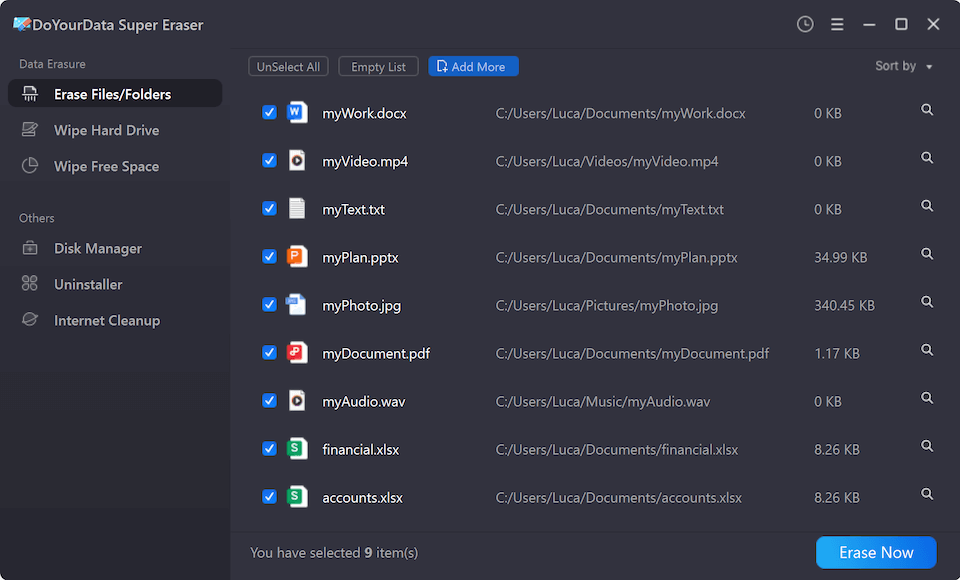
- Erase Files/Folders: Allows you to selectively destroy confidential spreadsheets, financial contracts, or private folders without wiping the entire operating system.
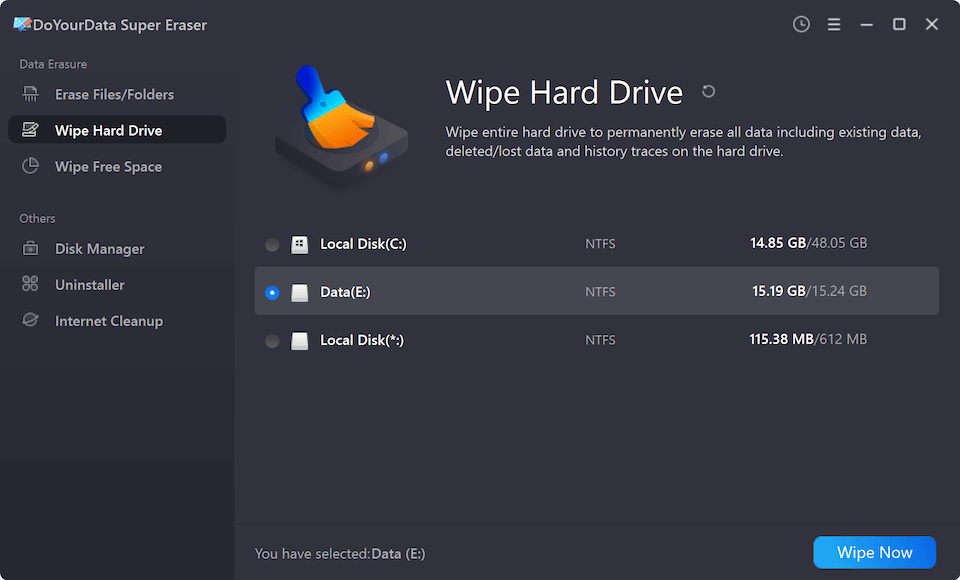
- Wipe Hard Drive: Completely sanitizes an entire hard drive, secondary partition, USB flash drive, or SD card in one go. Ideal before selling, donating, or recycling storage hardware.
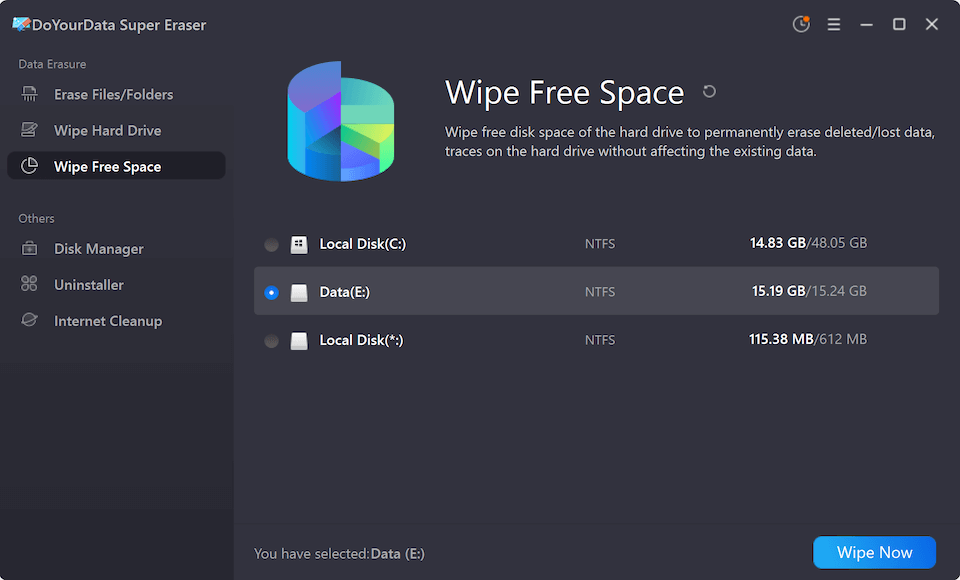
- Wipe Free Space: Wipes unallocated disk space where previously deleted files reside. This guarantees old deleted files are destroyed permanently without affecting active operating system files.
Step-by-Step Guide: How to Destroy Data Safely with DoYourData
Performing NIST-compliant data destruction using DoYourData Super Eraser is quick and straightforward.
Method 1: Permanently Wipe Specific Files & Folders
- Download and install DoYourData Super Eraser on your computer.
- Launch the program and select 'Erase Files/Folders' from the main menu.
- Click 'Add' to browse and select the sensitive documents or folders you want to destroy.
- Click 'Erase Now' and confirm. Choose the algorithm NIST 800-88 or another one.
- Click 'Continue' button to start shredding. The selected files will be overwritten and permanently destroyed.
Method 2: Wipe an Entire Hard Drive or External Device
- Connect the target hard drive, external SSD, or USB drive to your PC.
- Open DoYourData Super Eraser and choose 'Wipe Hard Drive'.
- Select the target drive or partition you want to sanitize.
- Click 'Wipe Now'. Select NIST 800-88 or another data erasure algorithm.
- Start wiping by clicking 'Continue' button. All existing data, hidden files, and partitions will be completely erased.
Method 3: Wipe Free Space to Clean Previously Deleted Files
- Open DoYourData Super Eraser and select 'Wipe Free Space'.
- Choose your active system drive (C:) or secondary drive.
- Click 'Wipe Now'. You can choose the wiping method, like NIST 800-88 or others.
- The software will safely overwrite all unallocated sectors, ensuring previously deleted files can never be recovered.
FAQs about Data Destruction for Compliance NIST 800-88
Conclusion
Ensuring complete data privacy during hardware disposal, system upgrades, or routine drive maintenance requires a clear sanitization strategy. Standard deletion methods leave confidential records exposed to data recovery tools.
By choosing a dedicated secure data destruction software for compliance NIST 800-88 like DoYourData Super Eraser, you can permanently destroy private documents, sanitize entire drives, and clean free space with 100% confidence. Protect your business, maintain regulatory compliance, and eliminate data leak risks today.

DoYourData Super Eraser
DoYourData Super Eraser, the award-winning data erasure software, offers certified data erasure standards including U.S. Army AR380-19, DoD 5220.22-M ECE to help you securely and permanently erase data from PC, Mac, HDD, SSD, USB drive, memory card or other device, make data be lost forever, unrecoverable!
Written & Updated by Shirly Chen
Shirly Chen has been writing data recovery, data erasure articles for DoYourData over 4 years. She has been working as a professional website content writer & editor for quite a long time. She also writes articles about disk clone, Mac optimization, disk backup, etc.