Best Mac Disk Wipe Software - DoYourData Super Eraser for Mac
Are you getting ready to sell your old Mac, trade it in, or give it to a friend? Or maybe you just want to clear off some highly sensitive files from your external drive. Whatever your reason, you might think that dragging files to the Trash and emptying it is enough. Unfortunately, it isn't. You can use DoYourData Super Eraser for Mac to permanently wipe data first.
 Updated by Shirly Chen on July 2, 2026
Quick Navigation:
- Why You Need Data Erasure Software for Mac
- Best Drive Wipe Software for Mac - DoYourData
- FAQs about DoYourData Super Eraser for Mac
- Conclusion
When you delete files normally, macOS only removes the index pointer. The actual data stays hidden on your storage drive until new data overwrites it. Anyone with standard data recovery software can bring those files back in minutes.

To protect your privacy, you need a certified data erasure tool. Today, we are reviewing the absolute benchmark in this category: the best Mac disk wipe software - DoYourData Super Eraser for Mac.
Why You Need Data Erasure Software for Mac
Many Mac users rely completely on the built-in Disk Utility or simply empty the Trash bin. While these methods hide files from your daily view, they do not scrub the physical drive sectors.
With modern recovery software, hackers, buyers, or second-hand store owners can recover your old photos, financial documents, or passwords. This is where dedicated disk-wiping utilities become essential. They overwrite the data tracks with random characters, ensuring the original information is gone forever.
Best Drive Wipe Software for Mac - DoYourData
DoYourData Super Eraser for Mac is an elite-grade, secure, and permanent data erasure tool built specifically for macOS. Over the last decade, it has become the trusted standard for over 3 million users across 160 countries.
It features an extremely clean, user-friendly interface that lets beginners wipe data safely without advanced computer skills. It fully supports all file systems like APFS, HFS/HFS+, exFAT, and FAT32. More importantly, it runs smoothly on Intel, T2-secured, and the latest Apple Silicon (M1, M2, M3, M4, M5) Macs.
DoYourData Super Eraser for Mac
- The best data erasure software for Mac.
- Support new M5 Macs and macOS 27 Golden Gate.
- Permanently wipe data to avoid data recovery.
Three Flexible Erasure Modes
Every wiping situation is different. DoYourData Super Eraser for Mac includes three distinct wiping modes tailored to your specific privacy needs:
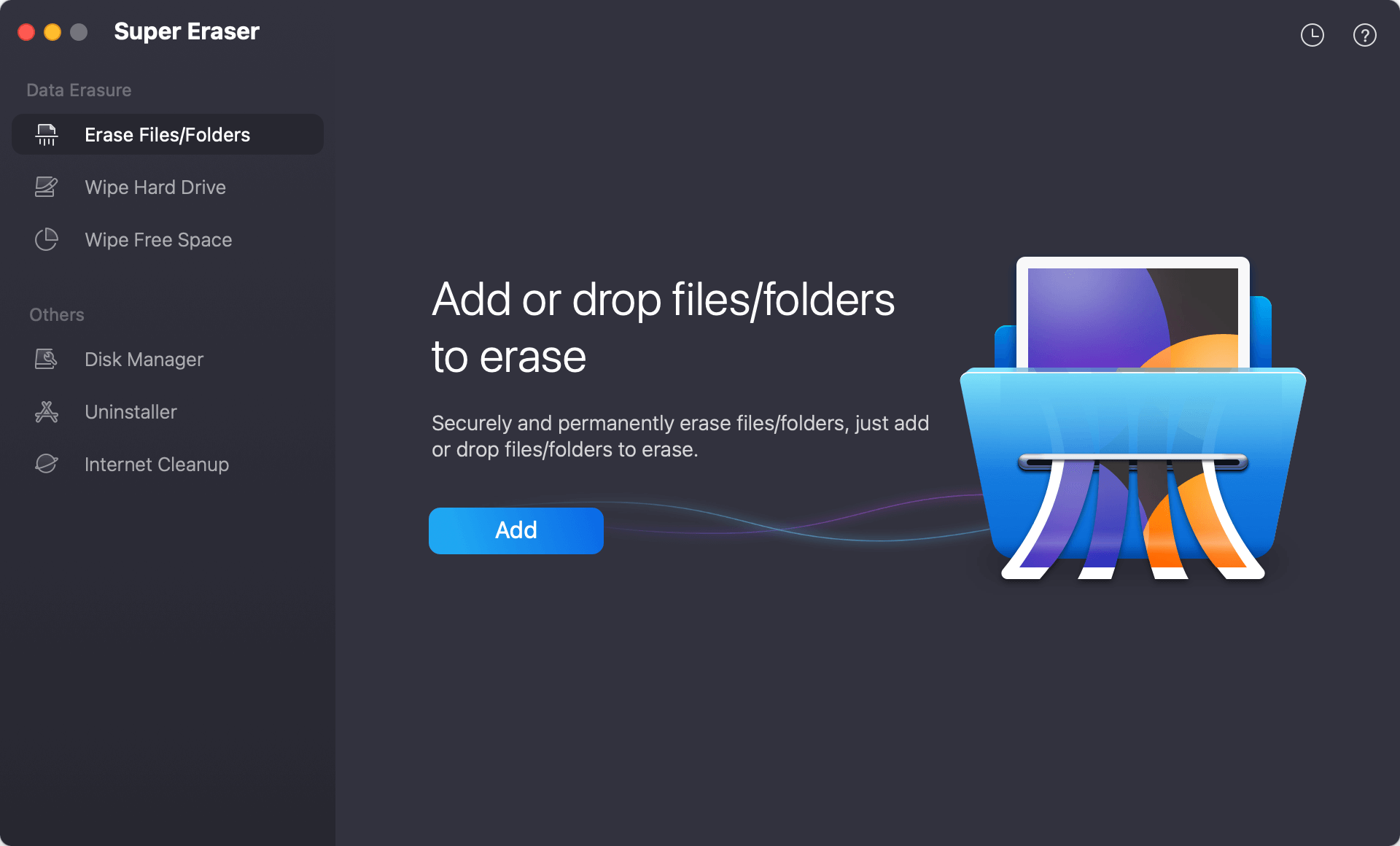
- Mode 1: Selective File/Folder Erasure. This works like a digital paper shredder. If you only want to destroy specific files or personal folders without changing anything else on your drive, you just drop them into the app to shred the files/folders with this mode.
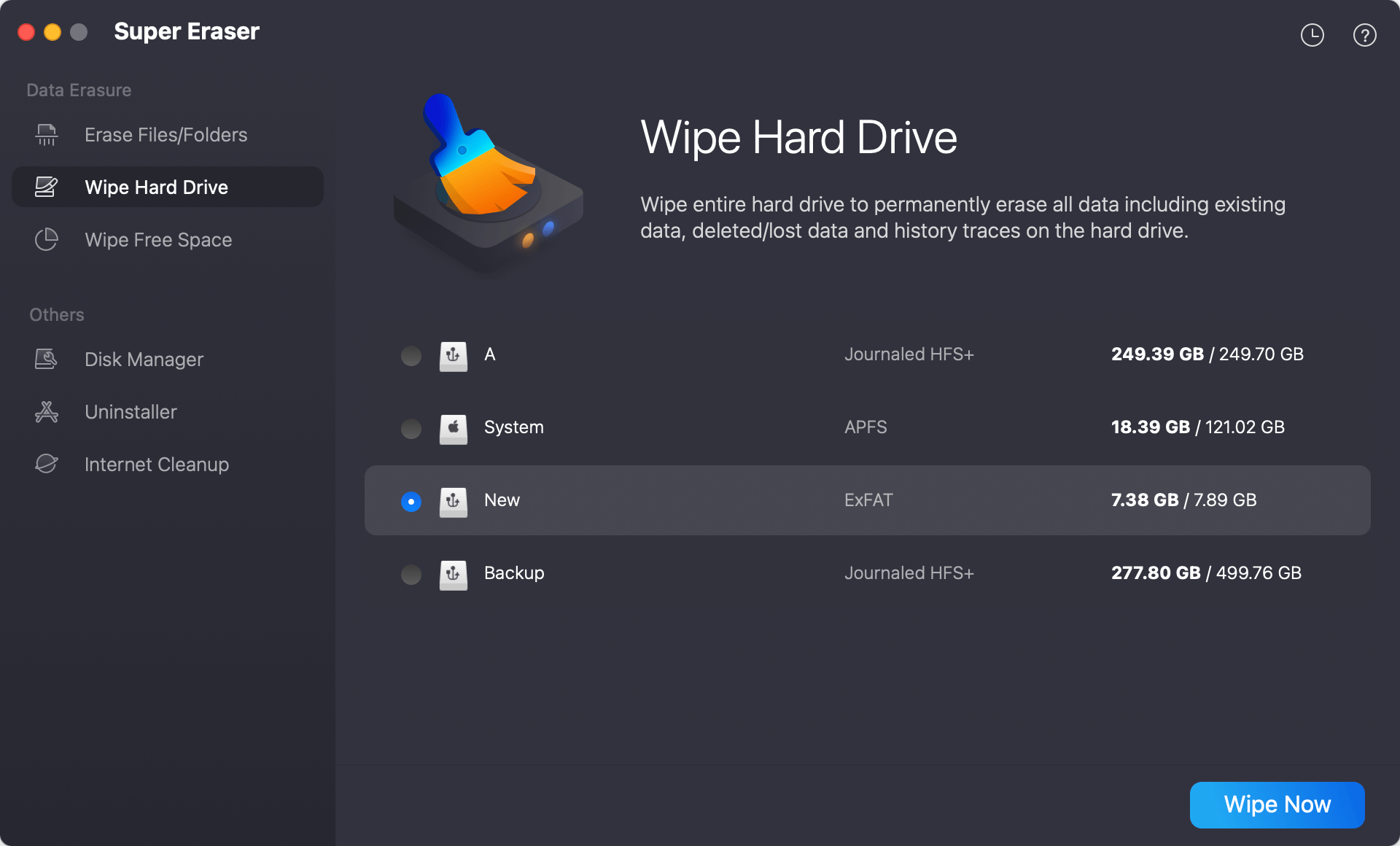
- Mode 2: Wipe Entire Hard Drive. Perfect for when you are selling or disposing of an external HDD, SSD, USB flash drive, or memory card. This mode wipes every single bit of existing and history data on the selected drive, rendering it completely empty.
- Mode 3: Wipe Free Disk Space. If you have already deleted files normally in the past, their traces are still scattered on your drive's empty space. This mode safely overwrites only that free space, wiping out old deleted files while keeping your current files perfectly safe.
💡 Important Note: Data erased by DoYourData Super Eraser for Mac is 100% unrecoverable. No data recovery program or professional laboratory can retrieve it. Always double-check your selection before clicking the erase button!
Advanced Military-Grade Erasure Standards
What makes this software truly superior is its underlying data destruction tech. It utilizes globally recognized military and government erasure algorithms ranging from 1 pass up to 35 passes, including:
- NIST 800-88 & HMG Infosec Standard 5: Fast, secure single-pass overwrite standards ideal for daily data cleaning.
- U.S. Army AR380-19 & DoD 5220.22-M: Highly secure multi-pass standards approved for official government sanitation.
- Peter Gutmann's Algorithm: An ultra-secure 35-pass algorithm designed for extreme privacy situations.
Additionally, the software provides comprehensive erasure log reports. You can view exactly what was cleared and export the report as certified proof that your device has been securely wiped.
Bonus Optimization Tools Built-In
Beyond being an incredible data shredder, DoYourData Super Eraser for Mac offers three extra utility modules to keep your Mac running efficiently:
- Mac Disk Manager: An easy tool to view your storage, format hard drives, rename drives, and safely eject external media.
- Internet Privacy Cleanup: Scans and removes your online footprints, including browsing history, cookies, caches, and saved passwords from Safari, Chrome, and Firefox.
- Complete Uninstaller: Helps you cleanly uninstall unwanted apps and removes all hidden residual files, app caches, and leftover logs that waste space.
How to Wipe a Storage Drive with Super Eraser (Step-by-Step)
Wiping a drive with this software is incredibly direct. Follow these simple steps to completely wipe an external storage drive:
Step 1: Download, install, and open DoYourData Super Eraser for Mac on your computer. Connect the external hard drive, SSD, or USB drive you want to clear.
Step 2: Select the Wipe Hard Drive mode from the left-side panel. Choose your connected target drive from the list and click the Wipe Now button.
Step 3: The software will show the popup window to show the data erasure algorithms. You can check and choose any one to wipe data.
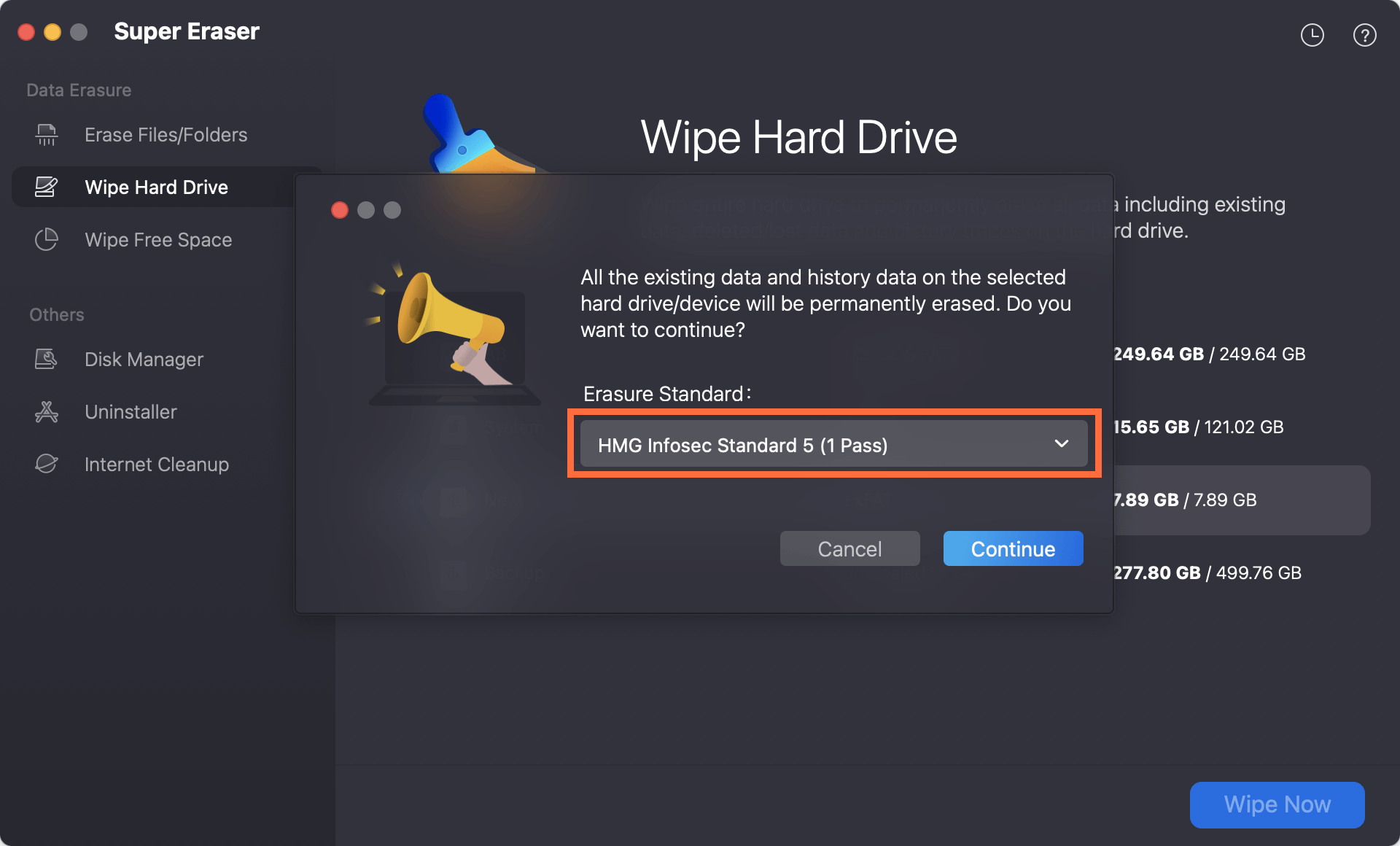
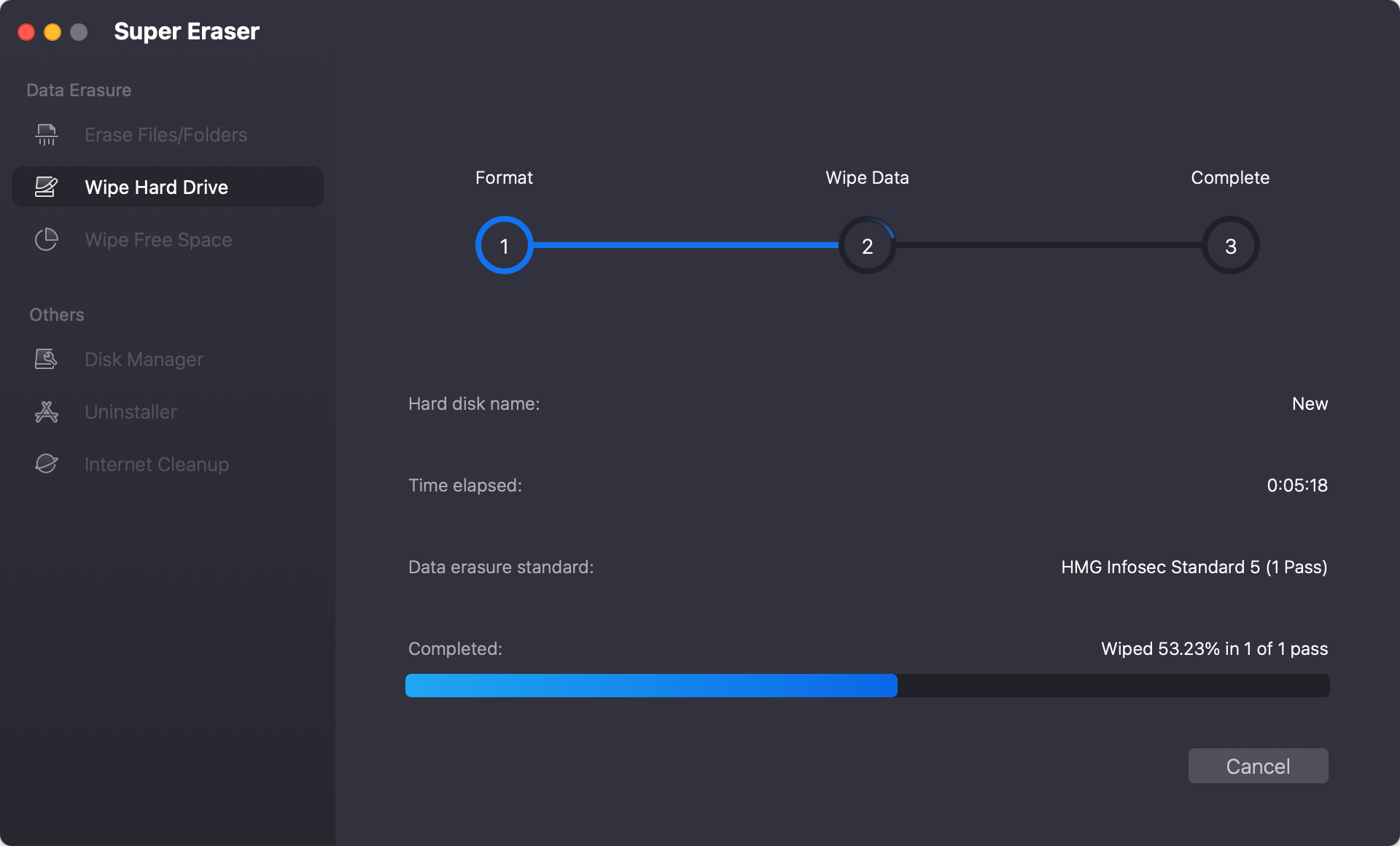
Step 4: After selecting the erasure algorithm, click Continue button to start. The software will automatically run its overwrite algorithm. Within a short time, your drive will be perfectly clean and safe to give away.
FAQs about DoYourData Super Eraser for Mac
Conclusion
Your digital privacy is incredibly valuable. Leaving sensitive files on a device you plan to sell or donate is an unnecessary security risk. Choosing the Best Mac disk wipe software - DoYourData Super Eraser for Mac gives you absolute confidence that your personal data is permanently gone.
With its multi-mode layout, industrial-strength erasure protocols, and helpful built-in cleaners, it offers everything a Mac user needs to stay protected. Download your free trial of DoYourData Super Eraser for Mac today and take complete control over your data security!
DoYourData Super Eraser for Mac
DoYourData Super Eraser for Mac is a 100% safe, powerful and easy-to-use data erasure program. It offers certified data erasure standards including Peter Gutmann, U.S. Army AR380-19, DoD 5220.22-M ECE to permanently erase data from Macs and external devices, making data recovery be impossible.
Written & Updated by Shirly Chen
Shirly Chen has been writing data recovery, data erasure articles for DoYourData over 4 years. She has been working as a professional website content writer & editor for quite a long time. She also writes articles about disk clone, Mac optimization, disk backup, etc.