Secure File Shredder Application for Apple Silicon Chips Mac
DoYourData Super Eraser for Mac provides permanent data destruction engineered natively for ARM64 architecture, APFS solid-state drives, and modern macOS security frameworks. Whether you are selling your laptop, returning a work device, or managing sensitive business files, relying on file shredding habits leaves your digital footprint completely closed to unauthorized access.
 Updated by Shirly Chen on Novmenber 10, 2026
Quick Navigation:
- The Architecture Challenge: Shredding Data on Apple Silicon & APFS SSDs
- Key Features of DoYourData Super Eraser for Apple Silicon Mac
- How to Download and Use Secure File Shredder on Apple Silicon Mac
- FAQs about File Shredder for Apple Silicon Macs
- Conclusion
When you drag a confidential document to the Trash and click Empty Trash on your Mac, you might assume it is gone for good. Unfortunately, macOS does not actually remove the raw binary file content from your storage drive during a standard file deletion process.
Instead, macOS simply marks the file directory index pointers as available space. Until those storage blocks are overwritten with fresh data, specialized data recovery software can retrieve your deleted files, like financial spreadsheets, personal photos, sensitive client documents, and banking PDFs with relative ease. For Mac users operating on modern hardware, this security gap poses a significant privacy risk.
To guarantee permanent destruction, you need a specialized utility program. You should download secure file shredder application configured for Apple Silicon chips Mac to overwrite binary sectors directly and render file reconstruction technically impossible.
The Architecture Challenge: Shredding Data on Apple Silicon & APFS SSDs
If you own a Mac powered by Apple Silicon chips—including the M1, M2, M3, M4, M5, or latest M6 series hardware—data destruction requires a fundamentally different technical approach than older Intel-based Macs.
Apple Silicon Mac architectures feature unified memory and integrated SSD controllers built directly into the SoC (System on Chip). Combined with the Apple File System (APFS), modern Macs manage data storage through complex wear-leveling algorithms, hardware encryption chips, and automated background TRIM operations.
Legacy file shredding software developed strictly for Intel processors runs under translation layers like Rosetta 2. These legacy applications frequently fail to interface correctly with modern APFS wear-leveling controllers, leaving stray residual file copies hidden inside wear-leveling blocks or snapshots.
Native ARM64 file shredders solve this issue completely. By executing low-level disk operations specifically configured for Apple Silicon unified memory controllers, native applications bypass abstraction hurdles and deliver true DoD 5220.22-M and NIST 800-88 compliant file destruction directly on solid-state drives.
Key Features of DoYourData Super Eraser for Apple Silicon Mac
DoYourData Super Eraser for Mac is engineered from the ground up as a native ARM64 binary optimized specifically for Apple Silicon architecture and modern macOS environments.
- 100% Native ARM64 Performance: Runs natively on M1 through M5 series chips without relying on emulation. This delivers high-speed wiping passes while maintaining minimal CPU thermal impact.
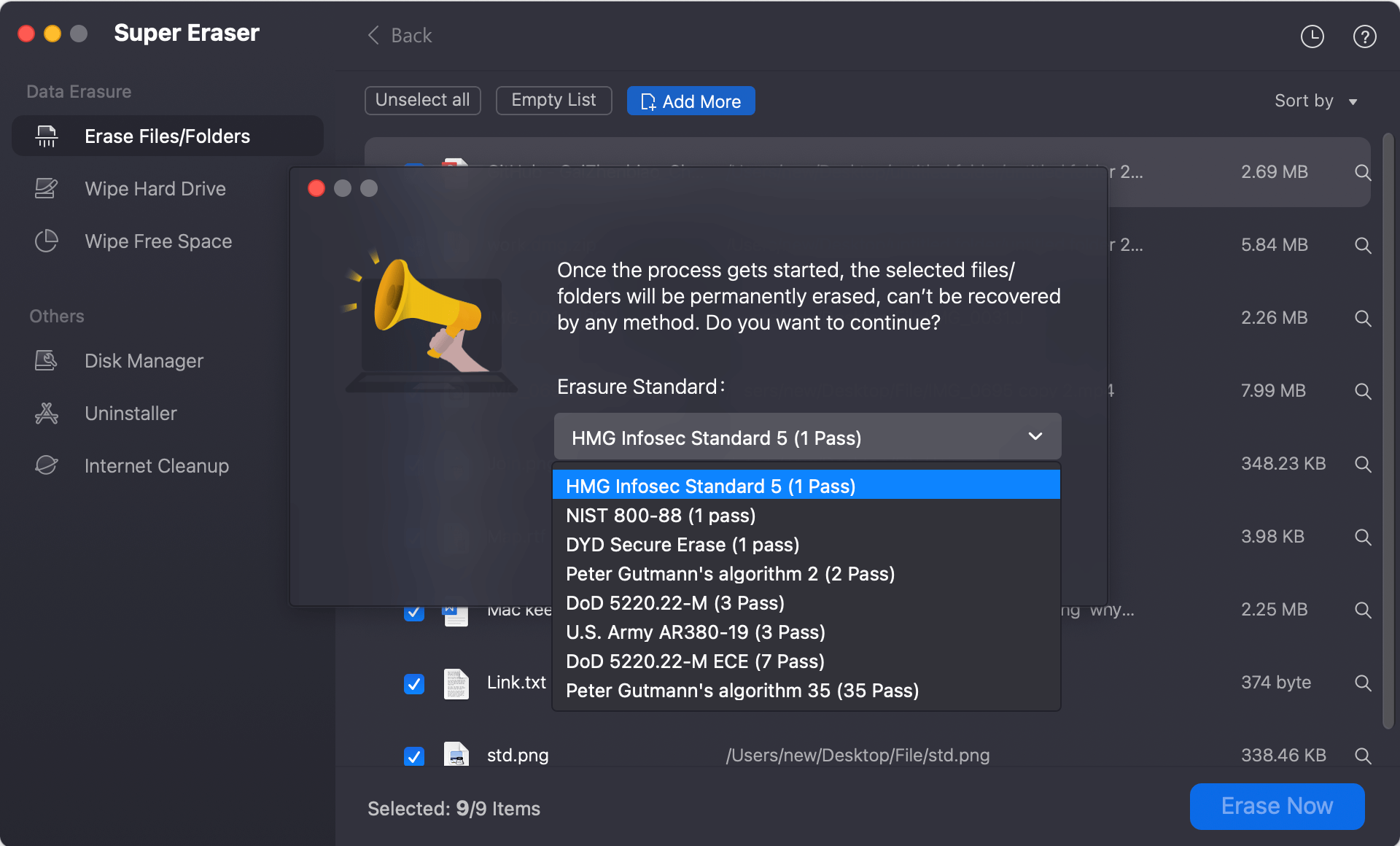
- Military-Grade Wiping Standards: Offers multiple compliance-grade erasure algorithms, including HMG IS5, DoD 5220.22-M (3-pass), U.S. Army AR380-19, and Peter Gutmann 35-pass overwriting protocols.
- APFS & SSD Optimization: Specifically programmed to account for APFS snapshot structures and SSD wear-leveling rules, ensuring complete destruction of both primary files and residual data fragments.
- Zero Chance of Data Recovery: Once a file or folder is wiped through DoYourData, even enterprise-grade laboratory data recovery utilities cannot recover a single byte of information.
Three Flexible Shredding Modes Tailored to Your Privacy Needs
Different privacy scenarios require different wiping workflows. DoYourData Super Eraser for Mac includes three versatile erasure modes designed for daily file cleanups, complete folder purges, or total hard drive decommissioning:
Mode 1: Selective File & Folder Shredding
Select individual documents, confidential PDFs, financial logs, or media folders. Drag and drop the targeted items into the software interface and click Wipe Now to permanently destroy them without affecting rest of your system data.
Mode 2: Wipe Free Disk Space (Unused Storage Purge)
If you have already deleted files via Empty Trash in the past, their residual traces remain in your unused drive sectors. Running the Wipe Free Space tool overwrites all free storage blocks on your APFS drive, permanently destroying previously deleted files while keeping existing files completely safe.
Mode 3: Complete Hard Drive & Volume Erasure
Ideal for users planning to sell, donate, or trade in their Apple Silicon Mac. Wipe entire external drives, USB flash sticks, or secondary storage partitions to destroy all data, history, caches, and hidden files in one master pass.
How to Download and Use Secure File Shredder on Apple Silicon Mac
Getting started with permanent file wiping on your Mac takes only a few simple steps. Follow this guide to download secure file shredder application configured for Apple Silicon chips Mac and execute your first secure wipe:
Step 1: Download the Installer Download DoYourData Super Eraser for Mac installer package (.dmg) optimized for Apple Silicon systems. Open the downloaded disk image file and drag DoYourData Super Eraser into your Mac Applications folder.
DoYourData Super Eraser for Mac
- Secure file shredder tool for Apple Silicon Mac.
- Shred specified files or folders permanently.
- Support certified data erasure algorithms.
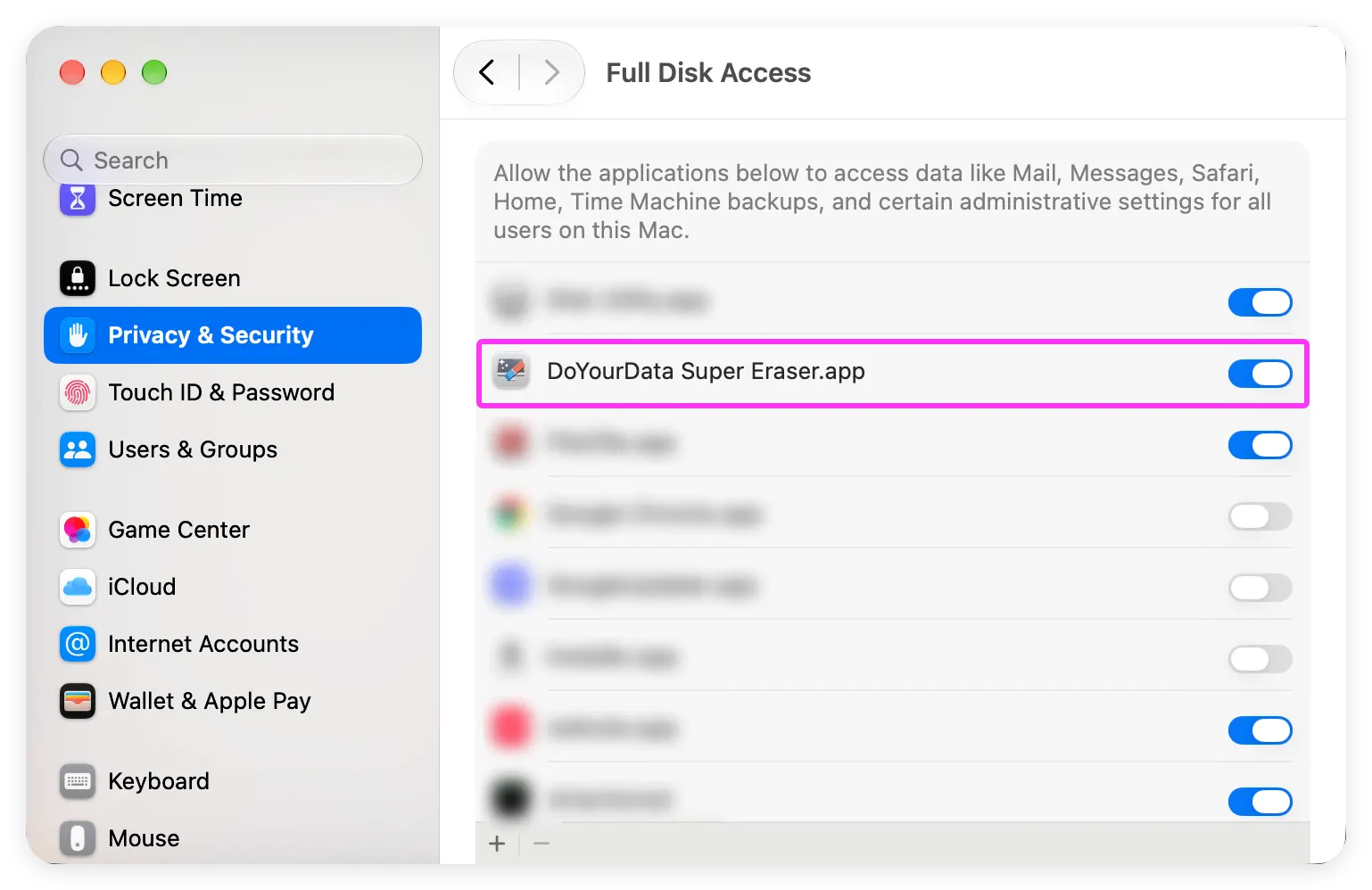
Step 2: Grant Disk Access Permissions Launch the application. On modern macOS versions (including macOS Sequoia, Tahoe, and Golden Gate), grant Full Disk Access in System Settings to allow low-level APFS storage block overwriting.
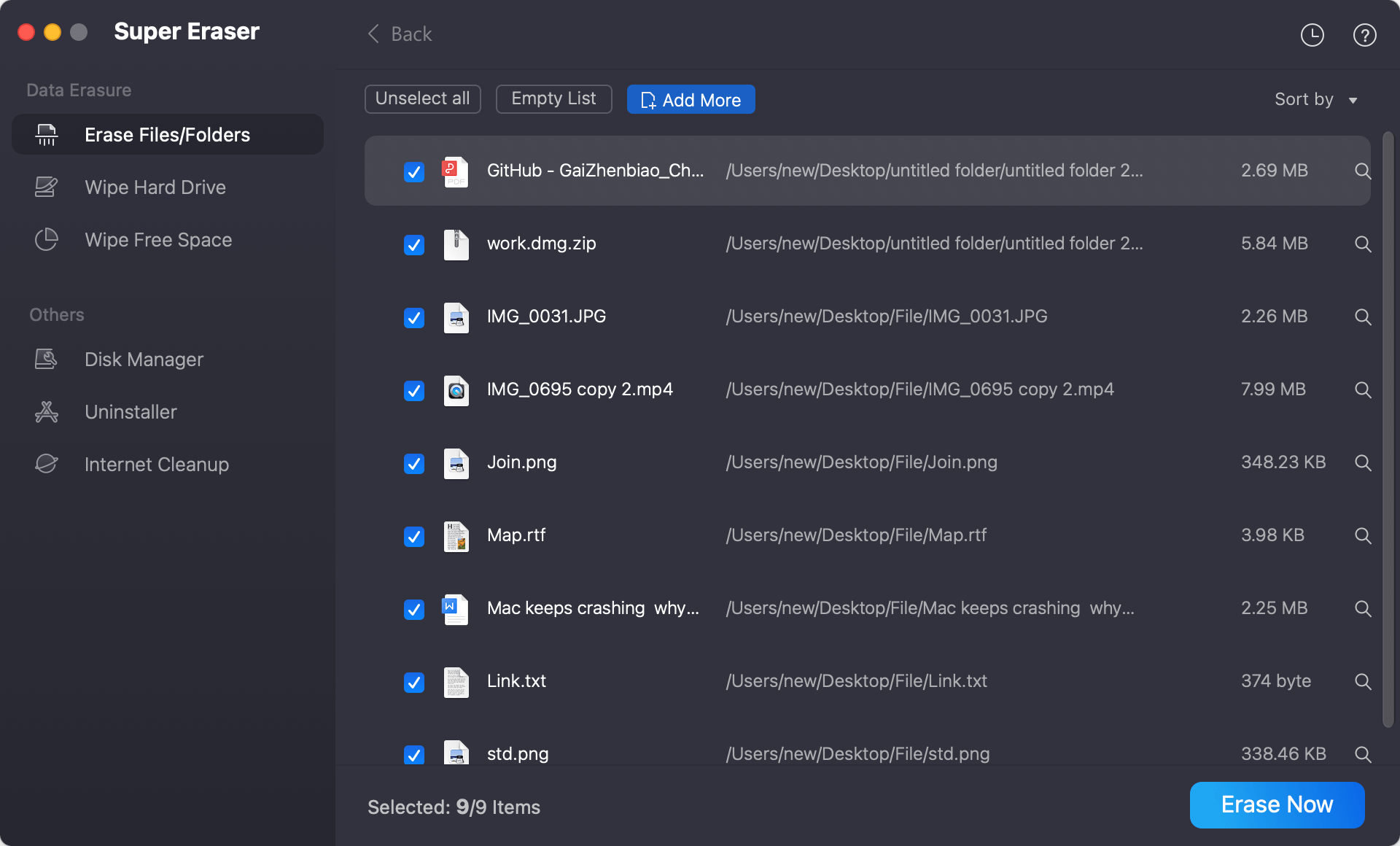
Step 3: Select Your Shredding Mode Choose Erase Files/Folders mode and add or drag your confidential files into the secure wiping window. Confirm the process by clicking Erase Now button.
Step 4: Choose Data Erasure Standard In the popup window, check and choose a data erasure algorithm from the drop-down list. Click Continue button to confirm and start shredding. Once complete, the data is permanently erased forever.
FAQs about File Shredder for Apple Silicon Macs
Conclusion:
Standard file deletion is simply not enough when dealing with private personal records, corporate intellectual property, or confidential financial data. On modern Apple Silicon hardware, ensuring true data privacy requires software designed specifically for ARM architecture and APFS storage mechanics.
Take control of your data security today. Download secure file shredder application configured for Apple Silicon chips Mac from DoYourData and keep your private files permanently beyond the reach of unauthorized data recovery.
DoYourData Super Eraser for Mac
DoYourData Super Eraser for Mac is a 100% safe, powerful and easy-to-use data erasure program. It offers certified data erasure standards including Peter Gutmann, U.S. Army AR380-19, DoD 5220.22-M ECE to permanently erase data from Macs and external devices, making data recovery be impossible.
Written & Updated by Shirly Chen
Shirly Chen has been writing data recovery, data erasure articles for DoYourData over 4 years. She has been working as a professional website content writer & editor for quite a long time. She also writes articles about disk clone, Mac optimization, disk backup, etc.