Permanently Wipe Commercial Data before Returning Leased MacBook
Returning a corporate leased MacBook at the end of a hardware lifecycle or employee offboarding requires strict data hygiene. Simply deleting work files or running standard macOS factory resets often leaves confidential commercial identity folders, and local credentials hidden inside system caches. DoYourData Super Eraser for Mac can permanently wipe these data and make sure it's unrecoverable.
 Updated by Shirly Chen on Novmenber 9, 2026
Quick Navigation:
- Hidden Data Security Risks of Returning Corporate Leased MacBooks
- Where Do Commercial Identity Folders Reside on macOS?
- Challenges of Wiping Commercial Data on Modern macOS
- Essential Pre-Return Checklist for Leased Corporate MacBooks
- DoYourData Super Eraser: Permanent Commercial Identity Sanitization
- FAQs about Wiping Commercial Identity Folders
- Conclusion
To guarantee complete compliance with corporate non-disclosure agreements (NDAs) and privacy mandates, employees and IT departments must use military-grade data destruction standards. This comprehensive guide details how to permanently wipe commercial identity folders prior to returning corporate leased MacBook hardware using DoYourData Super Eraser for Mac, preventing unauthorized data recovery and protecting sensitive corporate assets.

Hidden Data Security Risks of Returning Corporate Leased MacBooks
Corporate leasing programs allow organizations and remote professionals to maintain state-of-the-art Apple hardware. However, when a lease period ends or a contract concludes, returning your corporate MacBook without proper data sanitization introduces immense security vulnerabilities.
Many professionals assume that dragging company folders to the Trash and emptying it—or executing macOS 'Erase All Content and Settings'—completely destroys their enterprise records. In reality, modern solid-state drives (SSDs) and the APFS file system prioritize write efficiency over immediate physical data destruction.
When files are deleted standardly, macOS merely removes the file system directory pointers. The actual binary data blocks containing commercial identity folders, corporate authentication keys, internal financial spreadsheets, and proprietary client records remain intact in unallocated storage blocks until overwritten. Forensic recovery software can easily retrieve these deleted files, putting both your personal reputation and your former employer's trade secrets at risk.
To eliminate this threat, you must permanently wipe commercial identity folders prior to returning corporate leased MacBook equipment using multi-pass sanitization algorithms compliant with international enterprise standards.
Where Do Commercial Identity Folders Reside on macOS?
Commercial identity folders encompass all directories, caches, configuration files, and token stores that establish an individual's or enterprise's identity on a corporate network. These repositories contain sensitive assets that extend far beyond obvious Desktop or Documents folders.
1. Enterprise Authentication & Keychains
- macOS Keychain Databases (~/Library/Keychains): Contains saved corporate VPN credentials, Wi-Fi certificates, server passwords, and encrypted application tokens.
- SSH Configuration & Known Hosts (~/.ssh): Stores SSH authorization keys, RSA key pairs, and remote server access credentials.
- Developer & Cloud CLI Configurations (~/.aws, ~/.azure, ~/.gcp, ~/.docker): Holds enterprise credentials, access tokens, and container registries.
2. Commercial Browser Profiles & Communication Caches
- Browser Profiles & Cookies (~/Library/Application Support/): Contains saved enterprise logins, session cookies, OAuth tokens, and autofill corporate identity data across Chrome, Safari, Edge, and Firefox.
- Enterprise Messaging Archives (~/Library/Containers/com.tinyspeck.slackmacgap, Microsoft Teams): Stores cached attachments, employee contact directories, and internal chat transcripts.
- Outlook & Apple Mail Repositories (~/Library/Group Containers/): Contains local database copies of emails, client proposals, and confidential attachments.
3. System Caches & Unallocated Disk Space
- System & Application Caches (~/Library/Caches): Stores temporary working copies of opened confidential files.
- Unallocated SSD Free Space: Contains residual fragments of previously deleted identity folders that were cleared via normal Trash emptying.
Challenges of Wiping Commercial Data on Modern macOS
Sanitizing enterprise folders on modern Mac hardware presents technical complexities due to Apple's security and hardware design.
APFS Wear-Leveling and Copy-on-Write (CoW)
Apple File System (APFS) utilizes Copy-on-Write metadata management alongside SSD controller wear-leveling. Wear-leveling distributes write operations evenly across flash memory cells to prolong hardware life. If software attempts a standard file overwrite, the SSD controller often writes the new data to a different flash block, leaving the original commercial identity folder untouched in unallocated space.
Apple Silicon Security & System Integrity Protection (SIP)
MacBook laptops featuring Apple Silicon (M1 through M6 series) and T2 security chips utilize hardware-based FileVault encryption and Secure Enclave key management. Additionally, System Integrity Protection (SIP) restricts low-level disk modifications by unauthorized tools. To securely wipe commercial identity folders without bricking system partitions or invalidating hardware lease returns, specialized enterprise-grade wiping software is required.
Essential Pre-Return Checklist for Leased Corporate MacBooks
Before initiating storage sanitization, complete these mandatory preparation steps:
- Back Up Personal Data: Back up all personal records, tax files, and authorized work deliverables to a secure external drive or personal cloud storage.
- Sign Out of Apple ID & Find My: Open System Settings > Apple ID, click Sign Out, and disable Find My Mac to unbind the device from your personal account.
- Deauthorize App Accounts: Deauthorize the MacBook in Apple Music/TV apps and sign out of iMessage and FaceTime.
- Unpair Bluetooth Peripherals: Disconnect wireless headsets, mice, and keyboards from System Settings > Bluetooth.
- Sign Out of Enterprise MDM & Cloud Tools: Log out of corporate MDM profiles, Slack, Microsoft 365, and company VPN clients.
DoYourData Super Eraser: Permanent Commercial Identity Sanitization
DoYourData Super Eraser for Mac is engineered specifically to deliver military-grade data destruction for macOS environments. It overwrites target commercial identity folders and unallocated drive space using internationally recognized sanitization algorithms, guaranteeing that erased enterprise data cannot be recovered by any software or hardware recovery tools.
Step-by-Step Guide: How to Permanently Wipe Commercial Identity Folders Before Returning Mac
Follow these clear operational steps to sanitize your corporate leased MacBook before returning it to the lessor or IT department:
Step 1: Download DoYourData Super Eraser for Mac. Install the application into your Applications folder.
DoYourData Super Eraser for Mac
- Certified data erasure software for macOS.
- Secure and easy-to-use data wiping application.
- Permanently wipe data to prevent recovery.
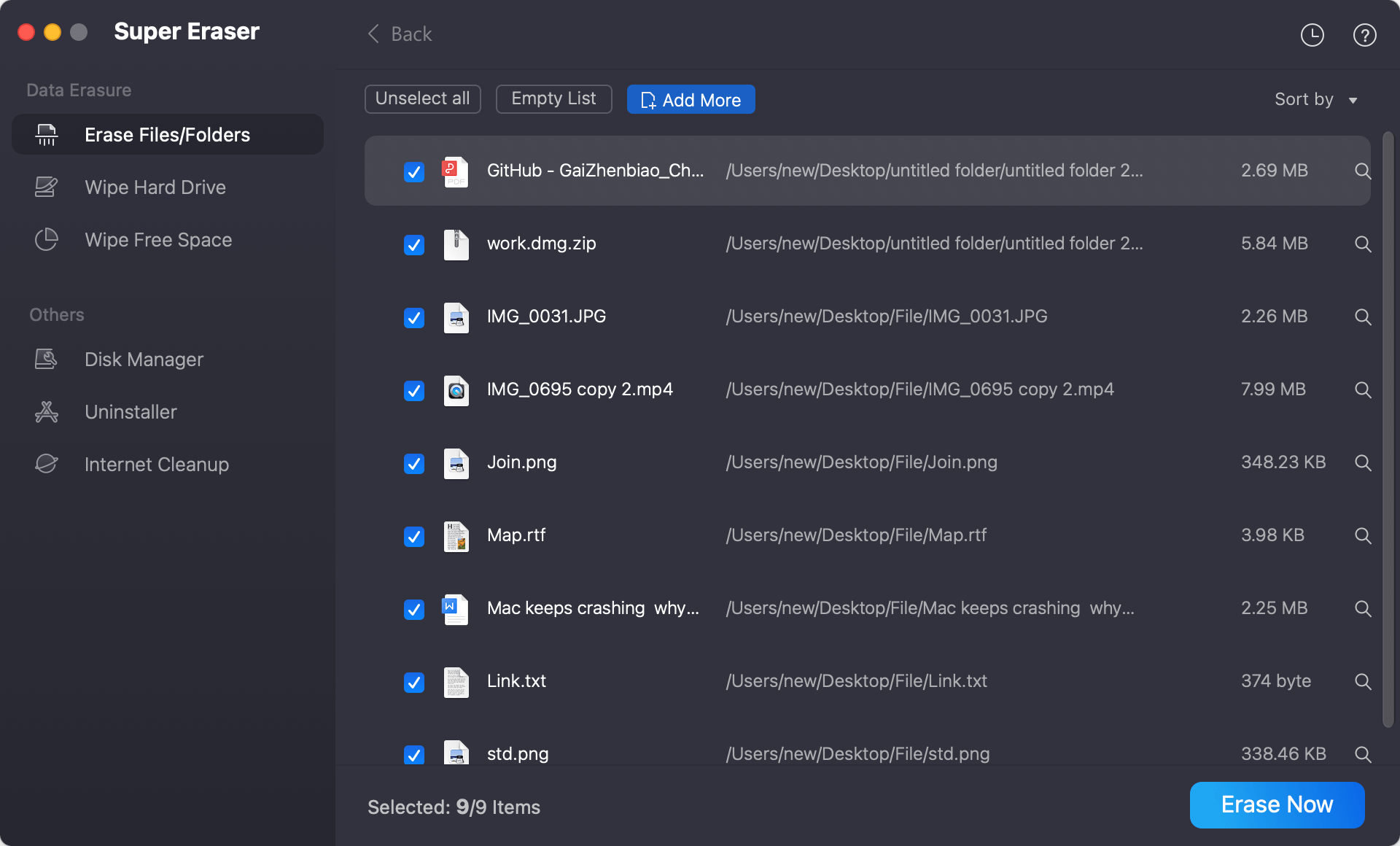
Step 2: Launch the software, select 'Erase Files/Folders' mode. Click 'Add' and select your specific commercial identity directories (e.g., SSH keys, browser profile folders, Slack/Teams caches, and local document archives). Click 'Erase Now' to choose the data wiping algorithm and execute multi-pass destruction.
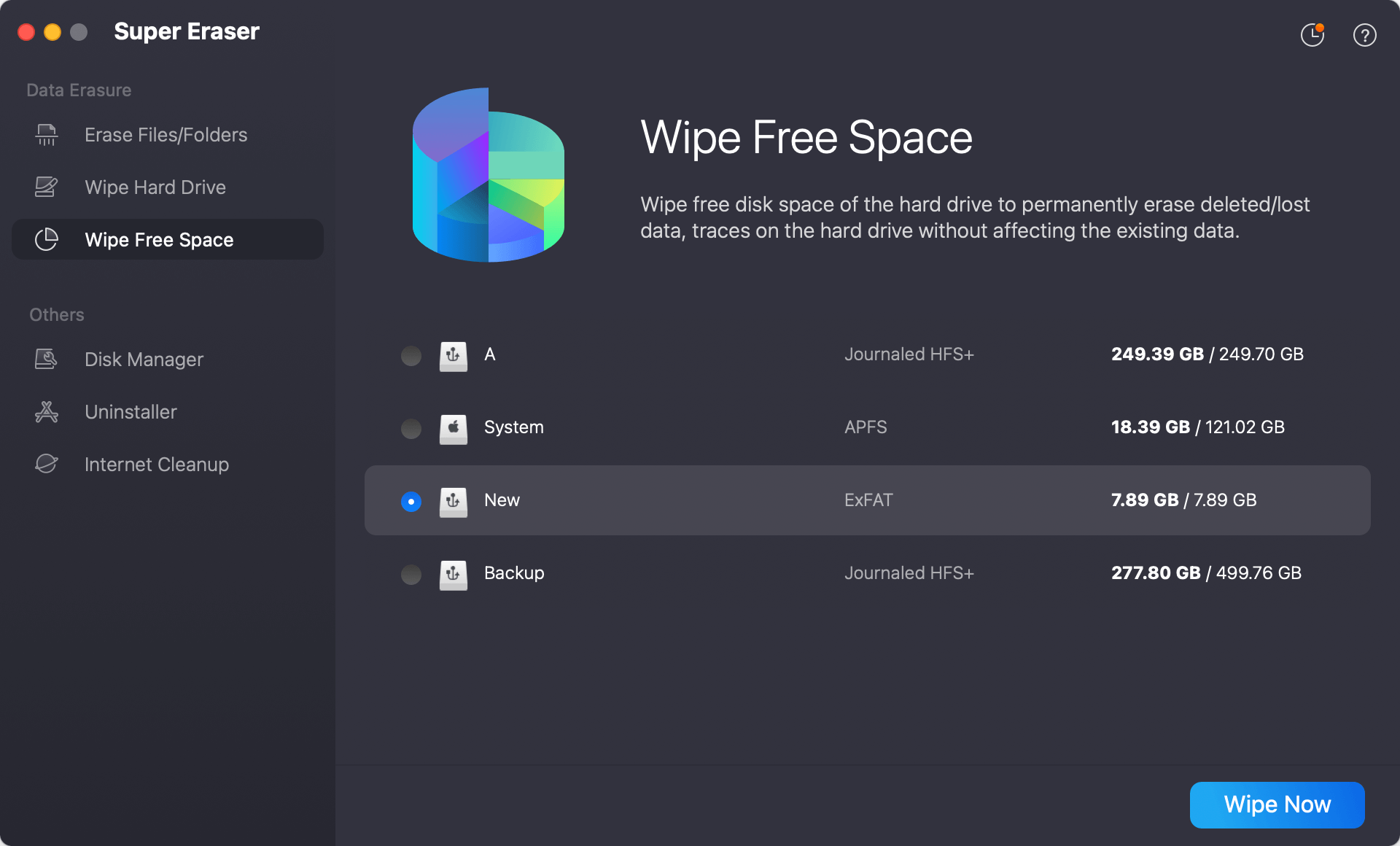
Step 3: Switch to 'Wipe Free Space' mode in DoYourData Super Eraser. Select your primary Macintosh HD / APFS volume and click 'Wipe Now'. This permanently overwrites all unallocated drive space, zeroing out any residual identity fragments.
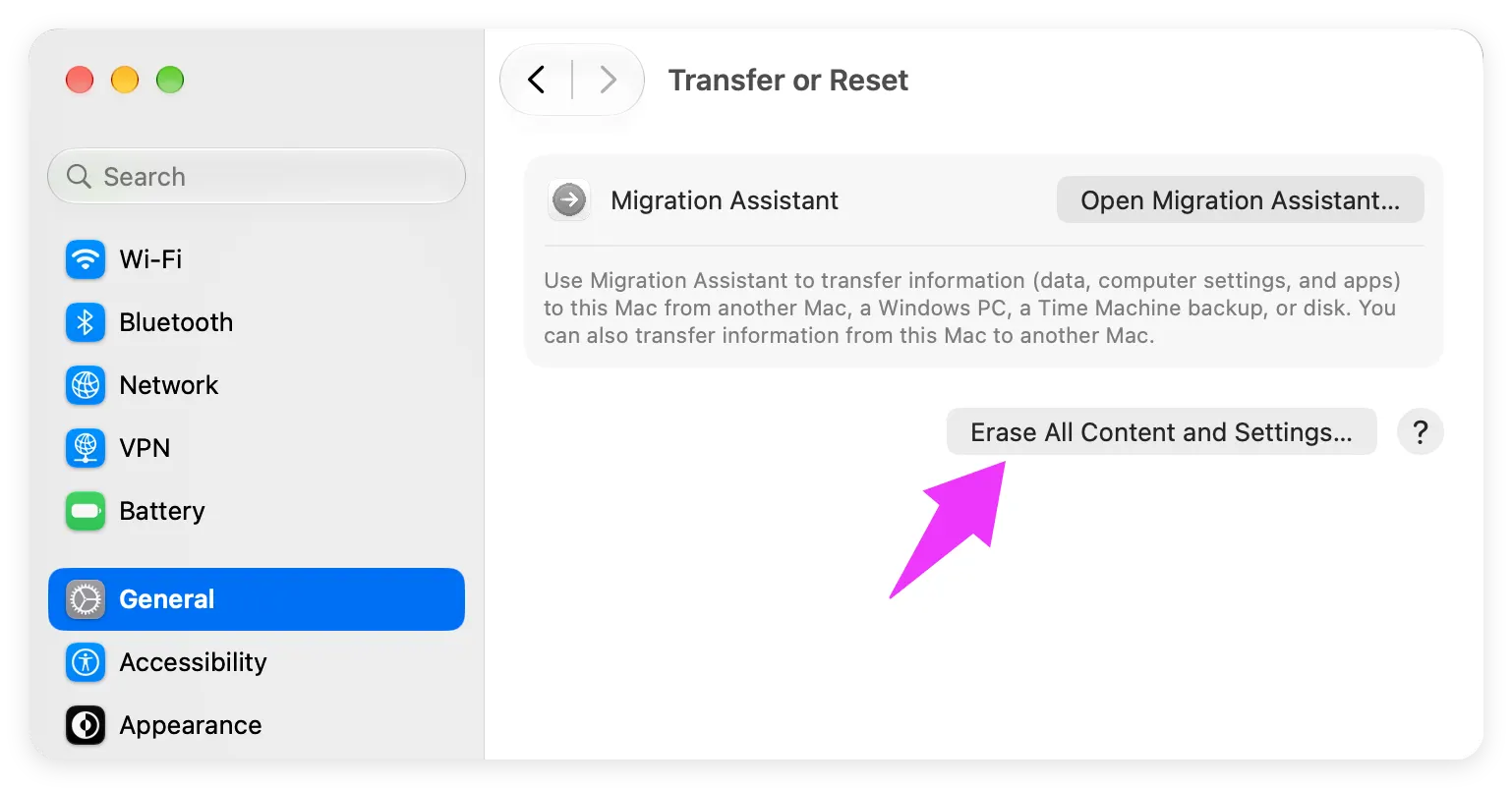
Step 4: Perform Final macOS Reset. Once free space sanitization completes, perform a final macOS factory reset (System Settings > General > Transfer or Reset > Erase All Content and Settings). Your leased MacBook will return to the original factory setup screen with zero chance of recoverable commercial data.
💡 Note: Data sanitized by DoYourData Super Eraser is permanently destroyed. Neither commercial recovery tools nor forensic laboratories can retrieve erased identity folders. Always double-check your backups before wiping.
FAQs about Wiping Commercial Identity Folders
Conclusion:
Returning a corporate leased MacBook marks the end of a hardware lifecycle, but it should never mark the beginning of a security breach. Leaving commercial identity folders, access tokens, and enterprise records behind poses severe legal and financial risks.
By following this guide to permanently wipe commercial identity folders prior to returning corporate leased MacBook hardware using DoYourData Super Eraser for Mac, you can guarantee that all confidential data is completely unrecoverable. Download DoYourData Super Eraser for Mac today and prepare your leased laptop for return with total peace of mind.
DoYourData Super Eraser for Mac
DoYourData Super Eraser for Mac is a 100% safe, powerful and easy-to-use data erasure program. It offers certified data erasure standards including Peter Gutmann, U.S. Army AR380-19, DoD 5220.22-M ECE to permanently erase data from Macs and external devices, making data recovery be impossible.
Written & Updated by Shirly Chen
Shirly Chen has been writing data recovery, data erasure articles for DoYourData over 4 years. She has been working as a professional website content writer & editor for quite a long time. She also writes articles about disk clone, Mac optimization, disk backup, etc.