Certified Data Erasure Software - DoYourData Super Eraser
Are you planning to sell your old laptop, donate a used hard drive, or upgrade your company storage? Before handing over your device, you must ensure your private information is completely gone. DoYourData Super Eraser can help you permanently wipe data to prevent data recovery possibility.
 Updated by Shirly Chen on August 17, 2026
Quick Navigation:
- Why Do You Need to Permanently Eraser Data?
- What Makes Software a Certified Data Erasure Solution?
- DoYourData Super Eraser: All-in-One Data Destruction
- When Should You Use Certified Data Erasure Software?
- FAQs about Certified Data Eraser Software
- Conclusion
Deleting files or formatting your hard drive seems like a quick fix, but it does not actually erase your data. Standard file deletion merely hides the paths to your files. Anyone using basic data recovery software can bring those confidential files back within minutes.
To prevent data leaks and protect your privacy, you need a certified data erasure software - DoYourData Super Eraser. In this complete guide, you will learn how certified data wiping works, why traditional formatting fails, and how DoYourData Super Eraser keeps your personal and business files permanently unrecoverable.
Why Do You Need to Permanently Eraser Data?
When you press 'Delete' or empty your Recycle Bin, your computer does not destroy the file. Instead, it marks the storage space as 'available' for future writing. The actual data remains intact on your drive until new data overwrites it.
Similarly, formatting a hard drive or solid-state drive (SSD) only resets the file system index. The underlying sectors still hold your financial records, family photos, stored passwords, and private business documents.
Logical Deletion vs. Permanent Destruction
Standard deletion removes the map, but leaves the treasure behind. Certified data erasure software completely destroys the treasure by overwriting every binary bit with random code, making recovery physically impossible.
Identity thieves and cybercriminals regularly purchase second-hand electronics to extract un-erased personal data. Using a professional data wiping tool is the only guaranteed defense against unauthorized data recovery.
What Makes Software a Certified Data Erasure Solution?
Not all cleanup tools offer true data sanitization. Certified data erasure software follows strict military, government, and industry standards to guarantee that data cannot be recovered by any forensic laboratory or recovery tool.
These wiping standards use specific algorithms to overwrite your storage space multiple times. Here are the most recognized global erasure standards supported by DoYourData Super Eraser:
- NIST 800-88 Clear & Purge: The gold standard created by the U.S. National Institute of Standards and Technology. It ensures data is thoroughly rendered unreadable on modern HDDs, SSDs, and flash storage.
- DoD 5220.22-M (E, ECE): The U.S. Department of Defense standard that overwrites data with zeros, ones, and pseudo-random characters across multiple passes.
- Peter Gutmann's Algorithm: A high-security 35-pass wiping method designed for maximum security on magnetic disk storage.
DoYourData Super Eraser: All-in-One Data Destruction
DoYourData Super Eraser is a powerful, reliable, and user-friendly data erasure software designed for both Windows and Mac users. Whether you are an everyday home user protecting personal privacy or an IT administrator managing hardware disposal, Super Eraser provides enterprise-grade protection with single-click simplicity.
DoYourData Super Eraser
- Permanently wipe data to prevent data recovery possibility.
- Three data erasure modes for different requirements.
- Certified data erasure algorithms for safe data erasure.
Unlike basic system utilities, DoYourData Super Eraser completely overwrites targeted data with random binary codes. Once the erasure process completes, the data is gone forever—no recovery tool, tech specialist, or forensic software can restore it.
Key Features of DoYourData Super Eraser
- Cross-Platform Compatibility: Runs seamlessly on Windows 11, 10, 8, 7, Windows Server, and macOS (including the latest macOS updates and Apple Silicon Macs).
- Broad Hardware Support: Works with internal HDDs, SSDs, external hard drives, USB flash drives, SD cards, digital camera memory, and RAID arrays.
- Multiple File System Support: Supports FAT 12/16/32, exFAT, NTFS, NTFS 5, ext 2/3/4, APFS, and HFS/HFS+ file systems.
- 100% Safe and Risk-Free: Completely safe for your hardware's health while ensuring targeted data is permanently destroyed.
Three Flexible Erasure Modes for Every Scenario
DoYourData Super Eraser provides three tailored wiping modes to give you full control over how you clean your storage devices.
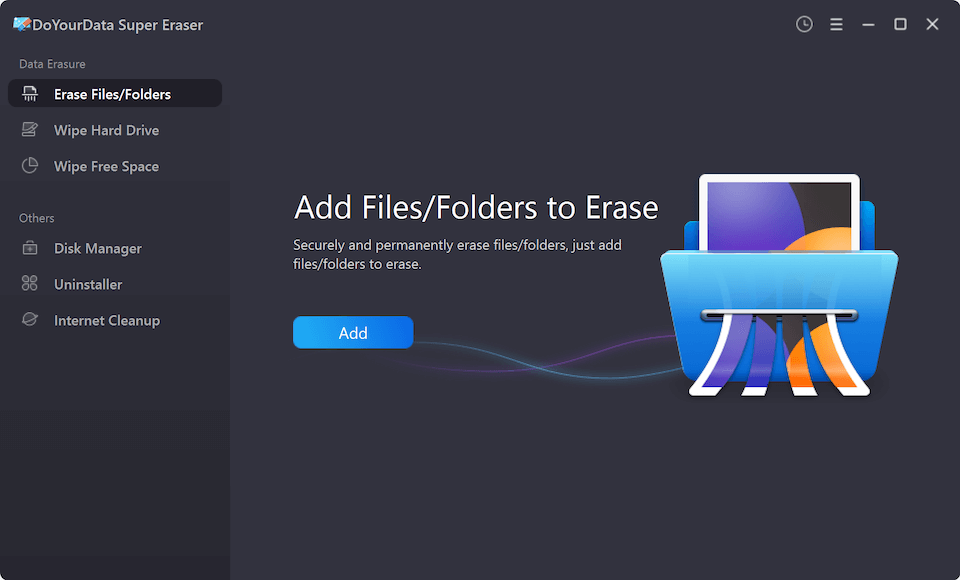
1. Erase Selected Files and Folders
Need to destroy specific sensitive documents without wiping your entire computer? This mode allows you to select individual files or entire folders—such as financial statements, tax records, or legal contracts—and shred them permanently.
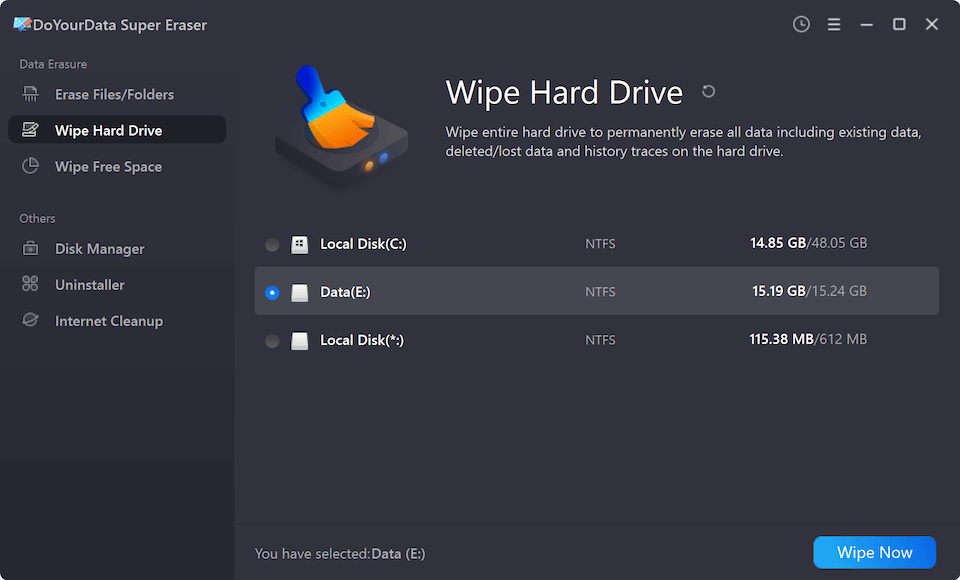
2. Wipe Hard Drive Partition or External Device
Planning to sell, donate, or recycle an old storage drive? This mode completely wipes an entire partition, external hard drive, USB thumb drive, or SD card. It formats and overwrites all existing data in one automated operation.
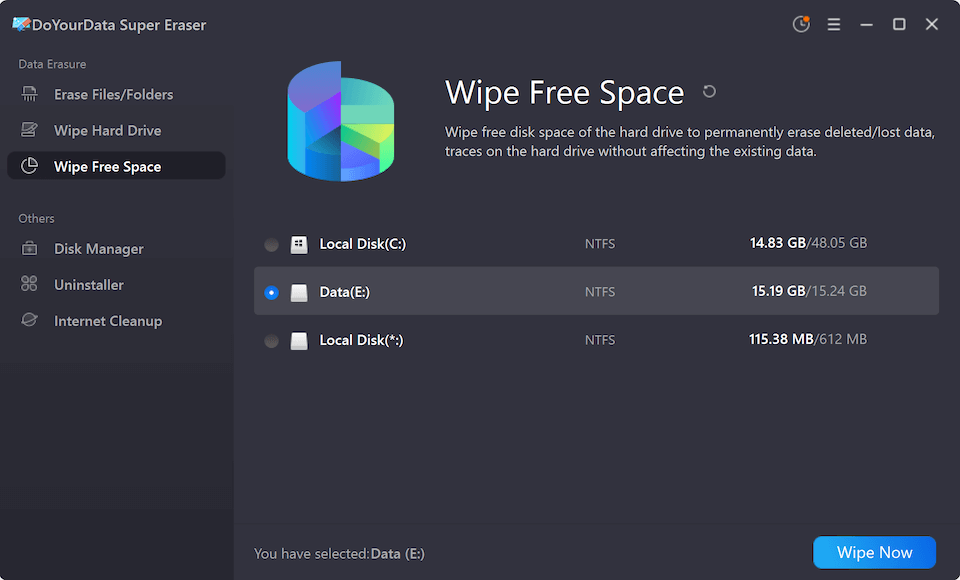
3. Wipe Unused Free Disk Space
When you delete files normally, the traces remain in your drive's free space. This mode scans and overwrites the free space on your hard drive, permanently destroying previously deleted files while keeping your existing, active files completely safe.
DoYourData Super Eraser vs. Standard Deletion Methods
| Feature / Capability | Standard Format / Deletion | DoYourData Super Eraser |
|---|---|---|
| Data Recovery Risk | High (Data easily recovered via free software) | Zero (Data unrecoverable by any tool or forensic lab) |
| Compliance Standards | None (Fails basic security guidelines) | Complies with NIST 800-88 & DoD 5220.22-M |
| Scope of Cleaning | Basic file index removal | Overwrites target files, whole drives, or free space |
How to Permanently Erase Data in 3 Simple Steps
You do not need specialized IT skills to use certified data erasure software - DoYourData Super Eraser. The intuitive user interface makes data destruction quick and effortless:
Step 1: Download and launch DoYourData Super Eraser on your PC or Mac.
Step 2: Choose your desired erasure mode (Erase Files/Folders, Wipe Hard Drive, or Wipe Free Space) and select your target files or drive.
Step 3. Select a data erasure standard to permanently wipe data.
Step 4: Start to process the data wiping.
Once the wiping process completes, the selected data is destroyed beyond any possibility of recovery.
When Should You Use Certified Data Erasure Software?
Data sanitization is essential in many everyday home and business scenarios, including:
- Selling or Donating Electronics: Wipe old laptops, desktop PCs, or external hard drives before handing them over to new owners.
- Returning Lease or Work Equipment: Ensure company data, passwords, and personal information are wiped before returning leased computers to employers.
- Clearing Sensitive Records: Permanently destroy financial statements, tax filings, legal records, or medical files you no longer need.
- Disposing of Old Storage Drives: Sanitize failing or retired hard drives, SSDs, and SD cards before recycling them.
FAQs about Certified Data Eraser Software
Conclusion:
In today's digital landscape, leaving sensitive data on unused devices is a major privacy risk. Simple file deletion and disk formatting do not provide real protection against data theft.
By choosing a certified data erasure software - DoYourData Super Eraser, you gain peace of mind knowing your confidential files are completely and permanently destroyed. Download DoYourData Super Eraser today and secure your privacy before selling, donating, or recycling your devices!

DoYourData Super Eraser
DoYourData Super Eraser, the award-winning data erasure software, offers certified data erasure standards including U.S. Army AR380-19, DoD 5220.22-M ECE to help you securely and permanently erase data from PC, Mac, HDD, SSD, USB drive, memory card or other device, make data be lost forever, unrecoverable!
Written & Updated by Shirly Chen
Shirly Chen has been writing data recovery, data erasure articles for DoYourData over 4 years. She has been working as a professional website content writer & editor for quite a long time. She also writes articles about disk clone, Mac optimization, disk backup, etc.