DoYourData Super Eraser App Download: Permanent Data Erasure
If you plan to sell your computer, donate an old laptop, share a USB drive, or simply protect confidential personal information, standard deletion leaves you vulnerable to data leaks and privacy breaches. This is exactly where a dedicated data erasure solution becomes essential. Download DoYourData Super Eraser to permanently wipe the data to prevent data recovery.
 Updated by Shirly Chen on August 7, 2026
Quick Navigation:
- What Is DoYourData Super Eraser?
- Why Choose DoYourData Super Eraser App Download?
- How to Get DoYourData Super Eraser App Download (Safe & Official)
- How to Use DoYourData Super Eraser: 3 Flexible Erasure Modes
- When Should You Use DoYourData Super Eraser?
- FAQs about DoYourData Super Eraser
- Final Verdict
When you delete a file on your computer and empty the Recycle Bin or Trash, do you think it is gone forever? The surprising truth is that standard deletion does not remove your data. Instead, your operating system simply hides the file path and marks that storage space as available for future use. Until new data overwrites it, your private photos, financial documents, passwords, and work files remain easily recoverable using basic data recovery tools.
With the official DoYourData Super Eraser app download, you can permanently destroy sensitive data from PCs, Macs, hard drives, memory cards, and external storage media. Designed with advanced military-grade data overwriting algorithms, DoYourData Super Eraser ensures that destroyed data can never be recovered by any software or data recovery professional.
What Is DoYourData Super Eraser?
DoYourData Super Eraser is an enterprise-grade yet user-friendly data wiping software built for Windows and macOS. It allows individuals, small businesses, and IT professionals to shred files, wipe entire hard drives, and sanitize free disk space safely without harming hardware.
Unlike basic cleaning utilities that only remove system caches or temporary logs, DoYourData Super Eraser physically overwrites your targeted data with random code, zeros, or multi-pass mathematical patterns. Once wiped, the data is destroyed permanently.
Key Features at a Glance
- Selective File Erasure: Completely destroy targeted files and folders without affecting the rest of your storage system.
- Full Drive & Partition Wiping: Wipe entire hard drive partitions, external hard drives, USB flash drives, or SD memory cards in a single click.
- Free Space Erasure: Clean previously deleted files sitting in hidden disk sectors, ensuring past deletions become 100% unrecoverable.
- Military-Grade Erasure Standards: Supports certified algorithms including DoD 5220.22-M, Peter Gutmann's algorithm, U.S. Army AR380-19, and NIST 800-88.
- Privacy Guard & Clean Utility: Clean internet browsing histories, cookies, caches, and system traces to protect daily privacy.
- Intuitive Interface: Clear, clean dashboard designed for both tech experts and non-technical everyday users.
Why Choose DoYourData Super Eraser App Download?
There are many disk utilities available today, but DoYourData Super Eraser stands out due to its unmatched safety, speed, and cross-platform reliability. Here is why thousands of users choose this app for complete data sanitization:
- 100% Safe and Zero Hardware Damage: Data wiping only writes data to storage sectors; it does not harm your physical hard drive or SSD life span when used correctly. DoYourData Super Eraser automatically protects operating system boot files, preventing accidental system crashes.
- Flexible & Targeted Erasure Modes: You don't always need to wipe your entire computer. Whether you want to destroy one secret spreadsheet or erase an entire external backup drive, the software gives you pinpoint control.
- Full Compatibility Across Platforms: Whether you are running Windows 11, 10, 8, 7 or macOS Golden Gate, Tahoe, Sequoia, and older OS versions, DoYourData Super Eraser runs smoothly across all major operating systems.
- Supports All Storage Devices: From internal NVMe SSDs and traditional HDDs to USB thumb drives, digital cameras, memory cards, and RAID arrays, this app handles them all effortlessly.
💡 Note: Always double-check your file selection before starting the erasure process. Once DoYourData Super Eraser completes a cycle, even specialized forensic laboratories cannot recover your data.
How to Get DoYourData Super Eraser App Download (Safe & Official)
Downloading software from unauthorized third-party websites can expose your system to malware, bundled adware, or outdated software versions. To ensure your computer stays safe, always complete your DoYourData Super Eraser app download directly from the official DoYourData website.
Step-by-Step Download and Installation Instructions
Step 1: Download the software DoYourData Super Eraser. Choose either the Windows version or the Mac version depending on your operating system.
DoYourData Super Eraser
- Most reliable and safe data erasure software.
- Support both Windows and macOS systems.
- Permanently wipe data with certified algorithms.
Step 2: Run the Installer. Open the downloaded setup file (an .exe file for Windows or a .dmg file for Mac) and follow the simple on-screen setup wizard.
System Requirements
- Windows OS: Windows 11, 10, 8, 8.1, 7, Vista, XP and Windows Server editions.
- Mac OS: macOS 27 Golden Gate, macOS 26 Tahoe down to Mac OS X 10.9; supports Intel & Apple Silicon chips.
- Hardware: 500 MHz processor or higher; at least 1 GB RAM; 100 MB free disk space for installation.
- File Systems: FAT16/32, exFAT, ReFS, NTFS, ext2/3/4, HFS/HFS+, APFS.
How to Use DoYourData Super Eraser: 3 Flexible Erasure Modes
DoYourData Super Eraser features three specialized data erasing modes tailored to different privacy needs. Here is a quick guide on how each mode works:
Mode 1: Selective File & Folder Erasure
This mode is perfect when you want to delete specific sensitive documents, photos, videos, or financial folders without touching any other files on your drive.
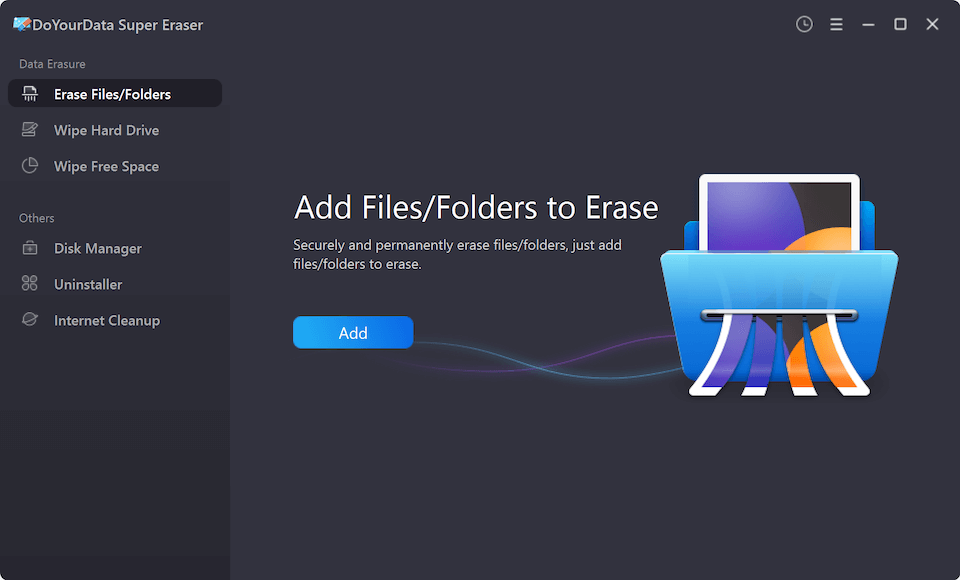
- Select 'Erase Files/Folders' from the left menu.
- Click 'Add' to choose the specific files or folders you want to destroy.
- Click the 'Erase Now' button and confirm your action. The selected items will be shredded beyond recovery within seconds.
Mode 2: Wipe Hard Drive Partition
This mode is ideal when you want to wipe an entire drive, USB flash drive, SD card, or formatted partition clean.
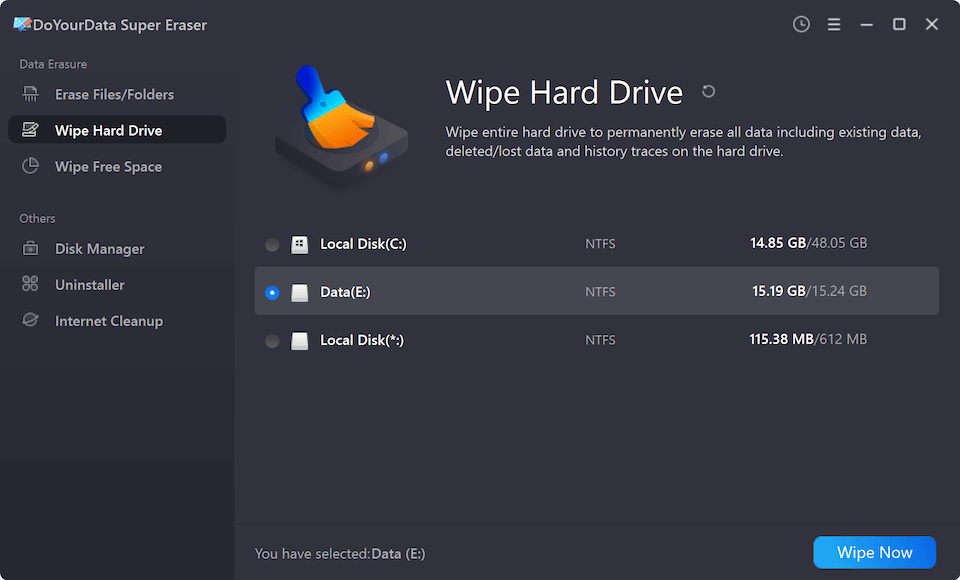
- Select 'Wipe Hard Drive' mode in the application.
- Choose the target drive, partition, or external storage device you wish to wipe.
- Click 'Wipe Now' and confirm. The app will overwrite every sector on that partition, leaving it completely clean.
Mode 3: Wipe Free Space
If you have already deleted files in the past using normal drag-and-drop or emptying the Trash, those files still reside in your drive's free space. This mode wipes only the free space without removing your existing active files.
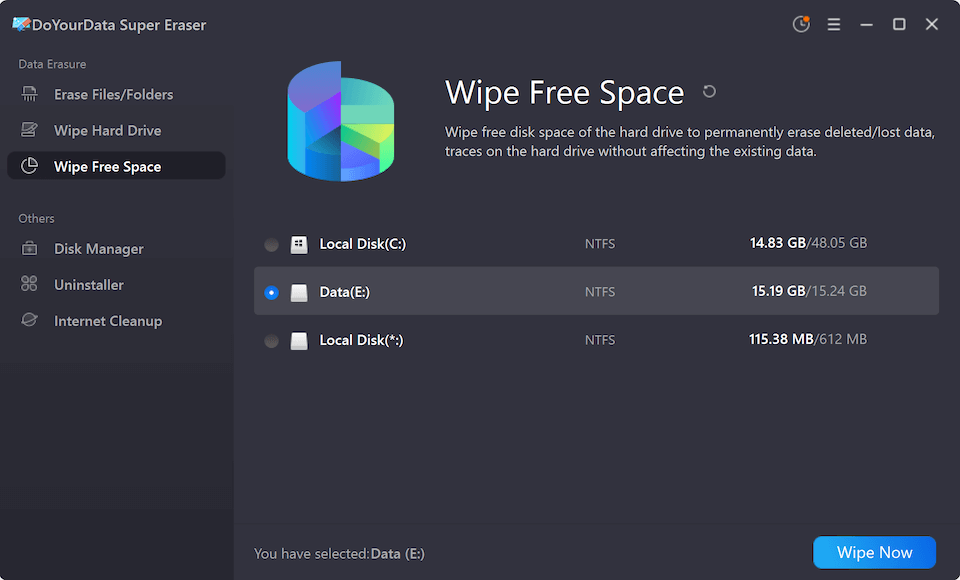
- Choose 'Wipe Free Space' from the menu dashboard.
- Select the hard drive or partition where you previously deleted files.
- Click 'Wipe Now'. The software will scan and permanently wipe all residual data traces from the unused space.
When Should You Use DoYourData Super Eraser?
Data security matters in everyday life and professional workflows. Here are the most common scenarios where getting the DoYourData Super Eraser app download is strongly recommended:
- Selling or Donating Old Devices: When selling, trading in, or giving away your old computer, laptop, or smartphone SD card, wiping your storage ensures the new owner cannot recover your personal documents, photos, browser histories, or bank details.
- Disposing of Sensitive Financial & Personal Records: Shared computers in offices or family homes often store sensitive contracts, payroll files, tax forms, or personal records. Shredding them ensures permanent privacy.
- Cleaning External Drives and Flash Drives: USB flash drives and portable SSDs are easily lost or borrowed. Wiping them completely before reuse prevents unauthorized access to private corporate or personal files.
- Upgrading Hard Drives: Upgrading from an old SSD or HDD to a newer, faster drive? Wipe the old drive before recycling or storing it to eliminate all identity theft risks.
FAQs about DoYourData Super Eraser
Below are direct answers to the most common questions users ask about DoYourData Super Eraser app download and usage:
Final Verdict:
In today's digital world, safeguarding your personal data and digital identity is more important than ever. Simply deleting files or formatting a drive leaves door open for identity thieves and privacy leaks. Taking control of your data erasure guarantees that your confidential information remains strictly confidential.
Whether you are preparing to sell an old computer, clean out temporary work files, or permanently destroy sensitive personal records, DoYourData Super Eraser provides the ultimate military-grade security in an easy-to-use package.
Don't leave your private data at risk. Get your official DoYourData Super Eraser app download today from www.doyourdata.com and enjoy complete peace of mind knowing your deleted data is gone forever!

DoYourData Super Eraser
DoYourData Super Eraser, the award-winning data erasure software, offers certified data erasure standards including U.S. Army AR380-19, DoD 5220.22-M ECE to help you securely and permanently erase data from PC, Mac, HDD, SSD, USB drive, memory card or other device, make data be lost forever, unrecoverable!
Written & Updated by Shirly Chen
Shirly Chen has been writing data recovery, data erasure articles for DoYourData over 4 years. She has been working as a professional website content writer & editor for quite a long time. She also writes articles about disk clone, Mac optimization, disk backup, etc.