How to Wipe Trash Bin on macOS 27 Golden Gate: The Ultimate Secure Guide
If you are running the latest macOS 27 Golden Gate, you might think that clicking 'Empty Trash' means your files are gone forever. Unfortunately, that is not how it works. To permanently wipe the deleted files, you need to use the software DoYourData Super Eraser for Mac.
 Updated by Shirly Chen on July 10, 2026
Quick Navigation:
- Why Standard Deletion Isn't Safe Enough on Mac
- Permanently Wipe Trash with DoYourData Super Eraser for Mac
- Advanced Data Wiping Algorithms at Your Disposal
- What about Alternative Manual Methods?
- Top Benefits of Keeping Your Mac's Trash Fully Wiped
- FAQs about wiping Trash on macOS Golden Gate
- Conclusion
When you empty the Trash bin, your Mac does not actually delete the data. It simply removes the path to that data and marks the space as 'available' for future use. Until new files overwrite that exact space, your old documents, private photos, or sensitive financial sheets are still sitting on your drive, waiting to be found.
For anyone concerned about privacy, data security, or preparing a Mac for resale, knowing how to truly wipe the trash bin on macOS 27 Golden Gate is essential. In this guide, we will break down exactly how file deletion works on the new OS and show you how to securely wipe your deleted files so they can never be recovered by anyone.
Why Standard Deletion Isn't Safe Enough on Mac
Modern operating systems, including macOS 27 Golden Gate, prioritize speed and system efficiency. When you select a file and press Command + Delete, the system moves the file to the Trash folder. When you empty the Trash, macOS removes the file's index entry from the file system. It is like removing a book title from a library's catalog card index—the actual book is still sitting on the shelf.
Because the data remains intact, anyone with a commercial data recovery tool can scan your hard drive or SSD and pull those files back to life in just a couple of clicks. If your Mac falls into the wrong hands, or if you sell it without properly clearing it, your personal details could be completely exposed.
The SSD Challenge on Modern Macs
Wiping data on modern Macs is even trickier due to Solid State Drives (SSDs) and Apple Silicon chips. Older versions of macOS had a native feature called 'Secure Empty Trash.' However, Apple removed this feature because standard overwriting techniques can cause unnecessary wear and tear on SSDs, shortening their lifespan if not managed correctly. This means that under macOS 27 Golden Gate, you cannot rely on built-in buttons to securely shred your files.
Permanently Wipe Trash with DoYourData Super Eraser for Mac
Since macOS 27 Golden Gate does not include a native secure deletion tool for individual files or the trash bin, the safest and most efficient way to protect your data is by using a professional-grade data erasure application. This is where DoYourData Super Eraser for Mac comes into play.
DoYourData Super Eraser for Mac
- Permanently wipe Trash data on macOS 27.
- Support 3 data erasure modes for different requirements.
- Securely wipe data and ensure the data is unrecoverable.
DoYourData Super Eraser for Mac is a certified data wiping tool designed to permanently erase files from HDDs, SSDs, USB drives, and memory cards. By using advanced, government-approved overwriting algorithms, it ensures your data is completely unrecoverable.
Whether you want to clean up confidential work documents, financial statements, or personal photos, this software provides a safe, simple, and certified way to overwrite the data. Once processed, the deleted files are gone forever and cannot be recovered by any data recovery software or specialist service.
Step-by-Step: How to Wipe Trash Bin on macOS 27 Golden Gate
To completely remove any trace of your deleted files after you have emptied the Trash, you can use the 'Wipe Free Space' or 'Wipe Trash' features in DoYourData Super Eraser. Let's look at the simple steps to achieve total data security:
Step 1: Empty Your Trash Bin Normally
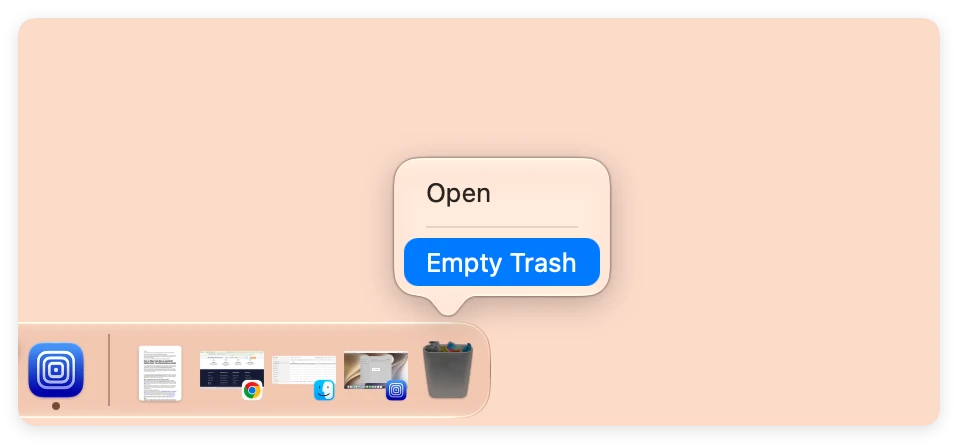
Click on the Trash icon located in your macOS Dock. Click the 'Empty' button in the top-right corner (or press Command + Shift + Delete). Confirm that you want to empty the items. This clears the basic file pointers.
Step 2: Choose the Wiping Mode and Drive
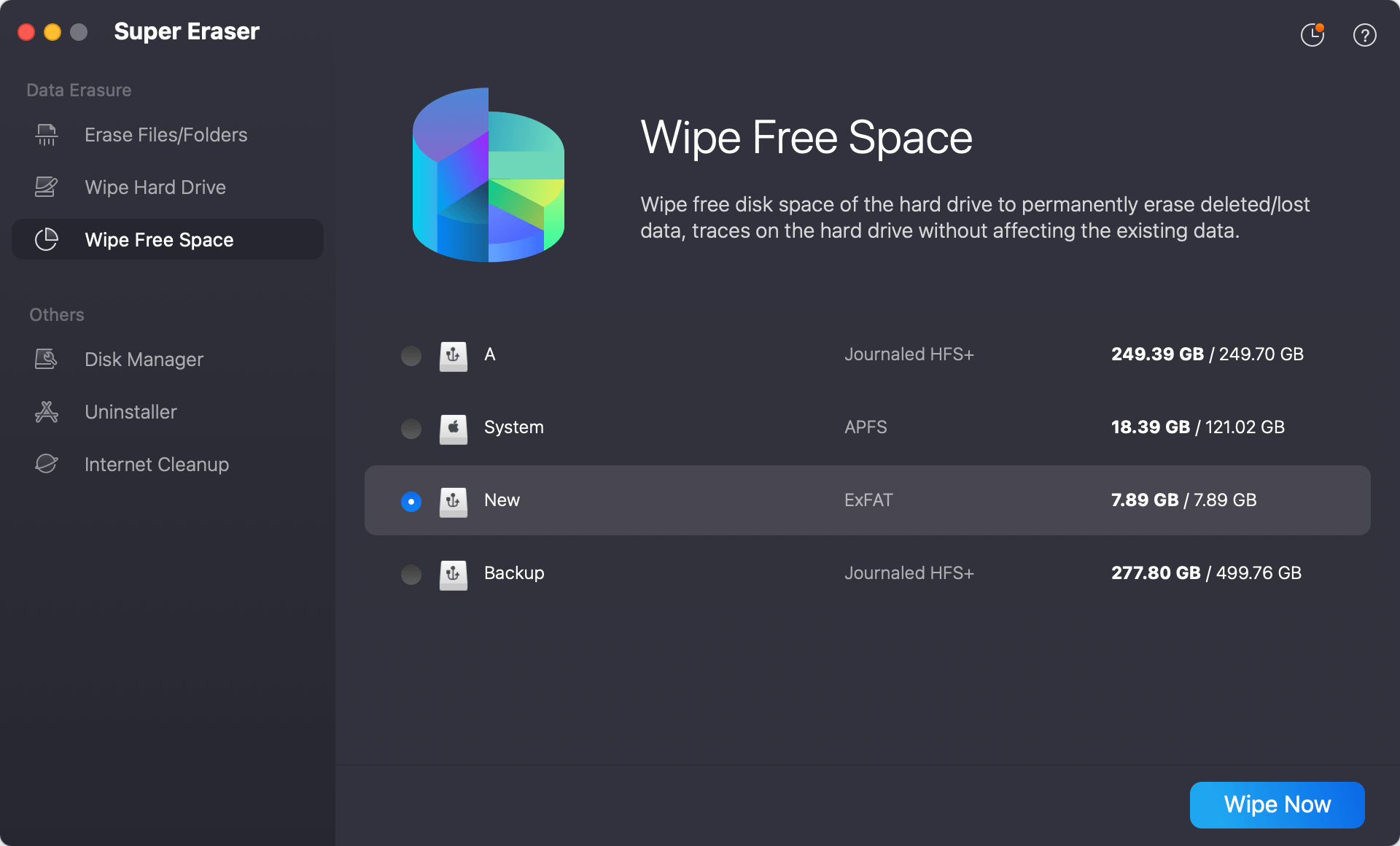
Install the application on your Mac running macOS 27 Golden Gate and launch it from your Applications folder or Apps. The software offers multiple wiping options on the left-hand sidebar.
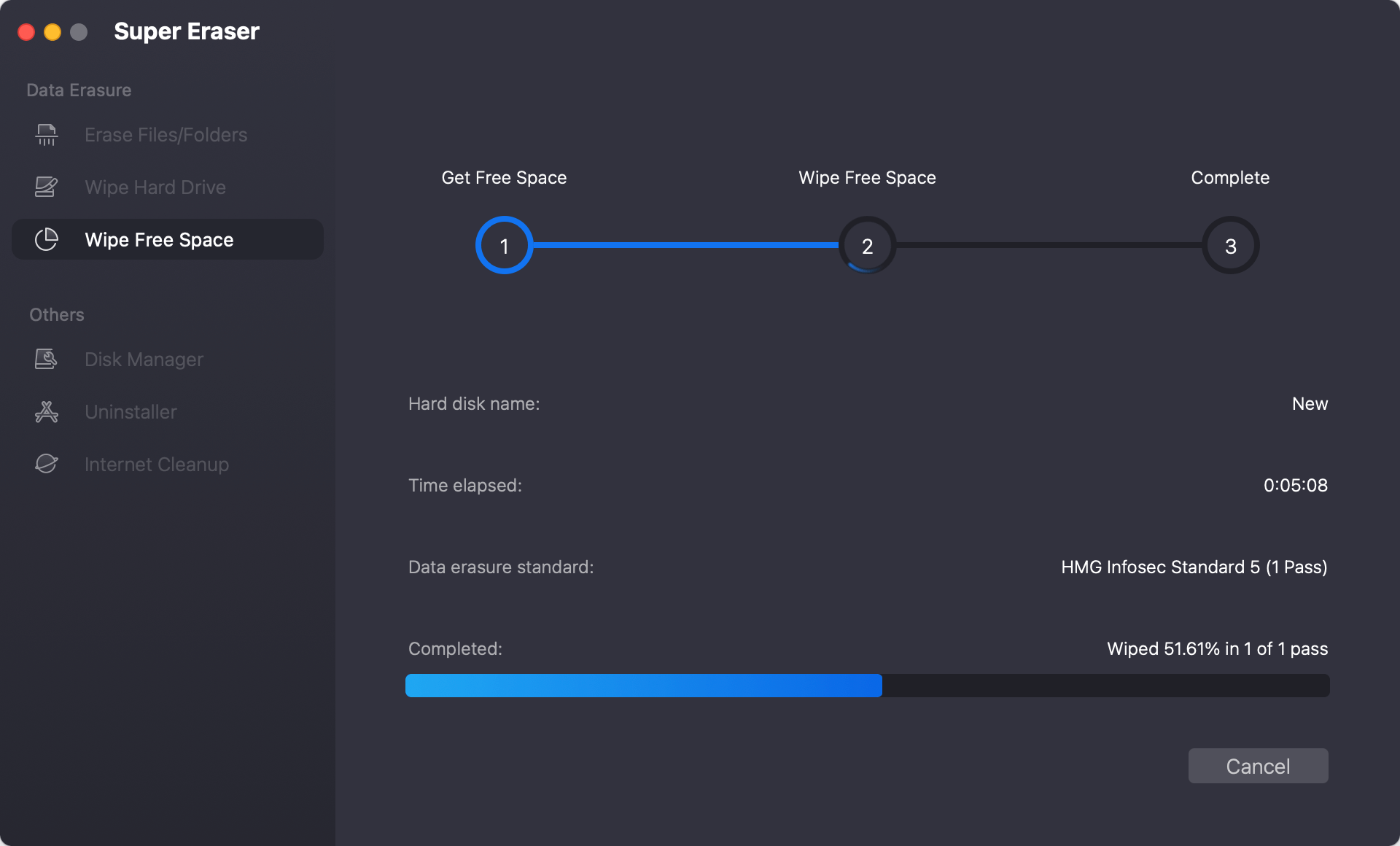
To target files that have already been emptied from the Trash, select the 'Wipe Free Space' mode. This will safely scan the empty areas of your drive where the deleted file remains reside, without touching your current, active files. Select your main system drive (usually Macintosh HD).
Step 3: Select the Data Erasure Algorithm
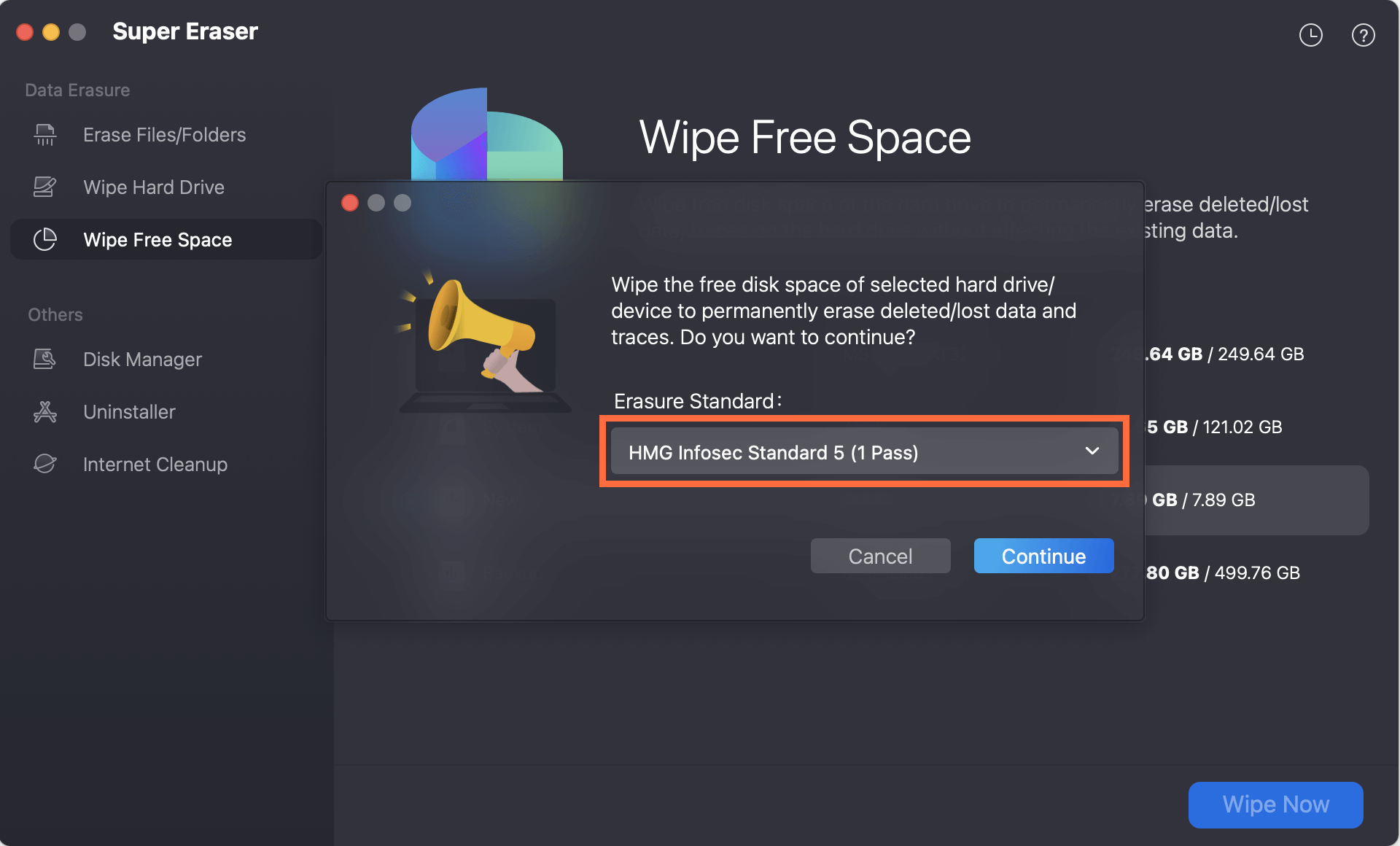
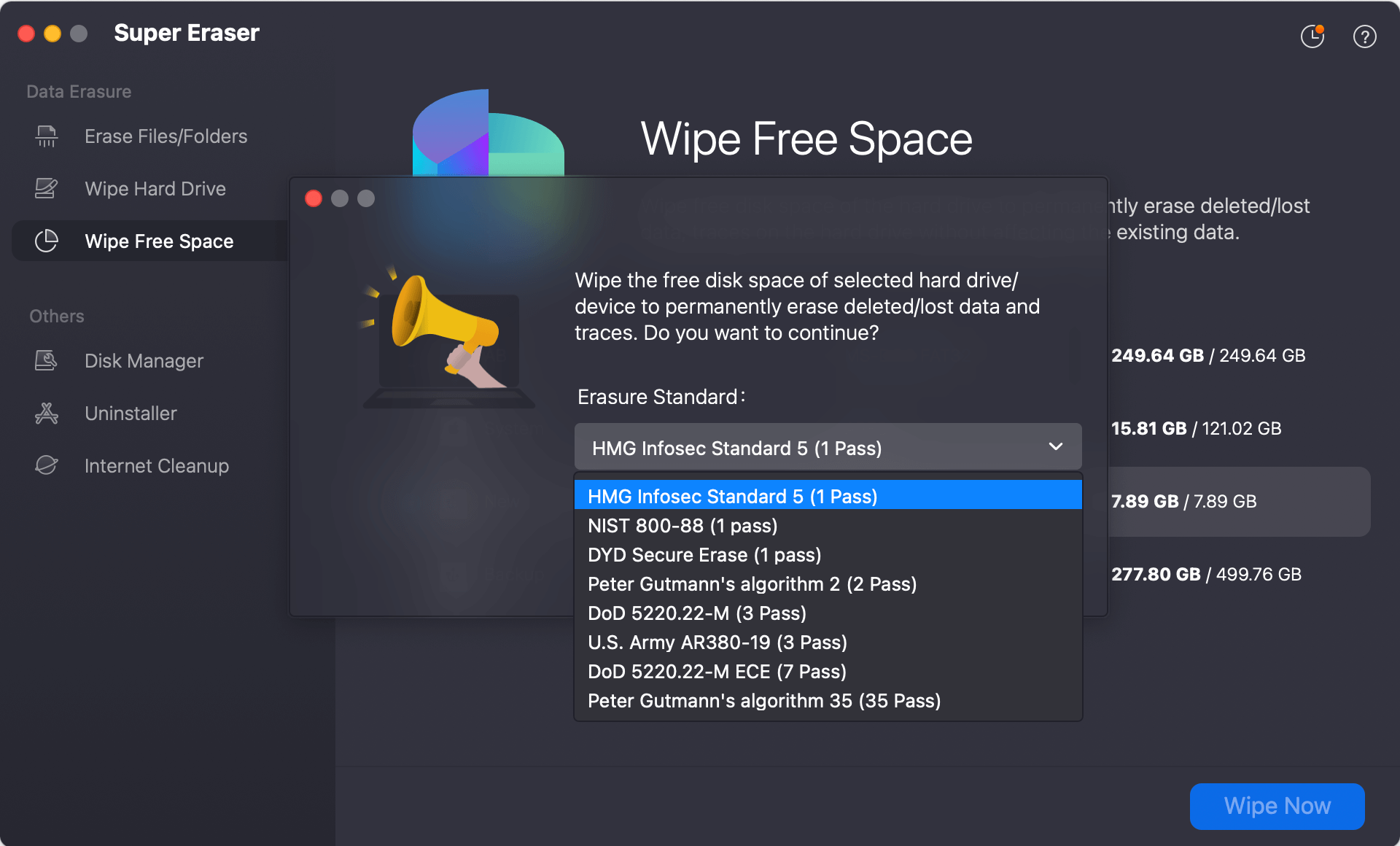
Click the 'Wipe Now' button at the bottom of the screen. Then you can select any algorithm from the Data Eraser Standard drop-down list. Click the 'Continue' button to proceed.
Step 4: Start Wiping the Deleted Files on Mac
The software will execute military-grade shredding standards to overwrite the free space, ensuring that all previously emptied Trash items are permanently erased.
Advanced Data Wiping Algorithms at Your Disposal
DoYourData Super Eraser for Mac doesn't just write random zeroes over your files once. It includes several world-class data erasure standards that you can choose based on your security compliance needs:
- HMG Infosec Standard: Good for quick and secure day-to-day file shredding.
- DoD 5220.22-M: A highly reliable 3-pass standard used by global organizations.
- U.S. Army AR380-19: An ultra-secure 7-pass algorithm designed for highly confidential intelligence files.
- Peter Gutmann's Algorithm: The ultimate 35-pass secure method for absolute certainty.
For most users, the standard DoD 5220.22-M method provides the perfect balance between speed and heavy-duty protection, ensuring absolute piece of mind.
What about Alternative Manual Methods?
Some advanced users wonder if they can use the macOS Terminal to wipe their trash bin. In older versions of macOS, you could use command-line utilities like 'srm' (secure remove) to shred files. However, Apple has progressively restricted deep file system access to safeguard the operating system's integrity.
Furthermore, using the Terminal for secure deletion requires typing complex commands. A single typo or a misplaced space in a Terminal string can accidentally delete your entire user directory or corrupt core system files. Worse yet, native command-line utilities are often unoptimized for the wear-leveling mechanisms of modern Apple Silicon SSDs. This means they either fail to erase the actual data block or cause unnecessary damage to your storage drive.
Using a dedicated graphical tool like DoYourData Super Eraser for Mac removes the risk of human error, guarantees compliance with modern SSD architectures, and protects your hardware from degradation.
Top Benefits of Keeping Your Mac's Trash Fully Wiped
Consistently wiping your trash bin on macOS 27 Golden Gate provides massive benefits that extend beyond simple privacy protection:
- Safe Device Resale: When you sell, trade in, or gift your MacBook or iMac, ensuring that past data cannot be recovered protects you from identity theft.
- Enhanced Workspace Privacy: If you share your computer with family members or colleagues, wiping deleted files guarantees that private logs, personal photos, or financial records stay strictly confidential.
- Optimized Storage Health: Over time, residual file fragments can clutter your storage drive's indexing performance. Properly wiping and refreshing free space helps maintain peak storage efficiency.
- Regulatory Compliance: Many modern privacy regulations require businesses and freelancers to permanently destroy client or patient records once they are no longer needed. Professional software ensures you stay compliant.
FAQs about wiping Trash on macOS Golden Gate
Conclusion:
Your digital privacy is too important to leave to chance. While macOS 27 Golden Gate offers incredible performance and state-of-the-art features, it leaves standard file deletion unsecure to preserve SSD performance. Relying solely on the standard 'Empty Trash' command leaves a back door open for anyone to retrieve your personal information.
By integrating DoYourData Super Eraser for Mac into your maintenance routine, you can securely wipe your trash bin, clean out residual data fragments, and ensure your private information remains strictly private. Download DoYourData Super Eraser for Mac today and experience true peace of mind.
DoYourData Super Eraser for Mac
DoYourData Super Eraser for Mac is a 100% safe, powerful and easy-to-use data erasure program. It offers certified data erasure standards including Peter Gutmann, U.S. Army AR380-19, DoD 5220.22-M ECE to permanently erase data from Macs and external devices, making data recovery be impossible.
Written & Updated by Shirly Chen
Shirly Chen has been writing data recovery, data erasure articles for DoYourData over 4 years. She has been working as a professional website content writer & editor for quite a long time. She also writes articles about disk clone, Mac optimization, disk backup, etc.